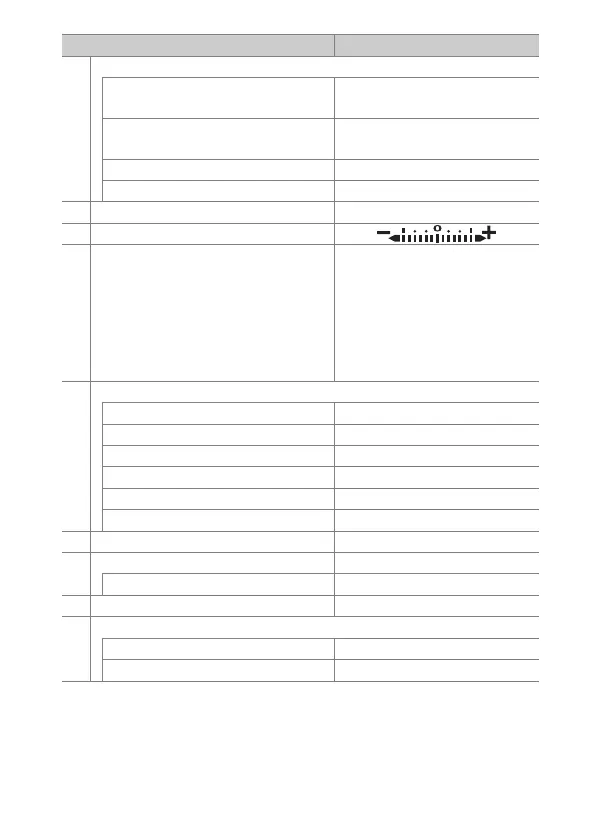
149Menu Guide > Defaults
f5 Customize command dials
Reverse rotation
Exposure compensation: U
Shutter speed/aperture: U
Change main/sub
Exposure setting: Off
Autofocus setting: Off
Menus and playback Off
Sub-dial frame advance 10 frames
f6 Release button to use dial No
f7 Reverse indicators
g1 Customize i menu Set Picture Control; White balance;
Frame size and rate/Image quality;
Microphone sensitivity;
Choose image area; Metering;
Wi-Fi connection; Active D-Lighting;
Electronic VR; Vibration reduction;
AF-area mode; Focus mode
g2 Custom control assignment
Fn1 button White balance
Fn2 button Focus mode/AF-area mode
AF-ON button AF-ON
Sub-selector center AE/AF lock
Shutter-release button Take photos
Lens control ring Focus (M/A)
g3 OK button Select center focus point
g4 AF speed 0
When to apply Always
g5 AF tracking sensitivity 4
g6 Highlight display
Display pattern Off
Highlight display threshold 248
Option Default



 To Next Page