260 Menu Guide > A Custom Settings
In situations where the slightest camera movement can blur
pictures, shutter release can be delayed by from about 0.2 to
3 seconds after the shutter-release button is pressed.
Select Enable to enable the electronic front-curtain shutter,
eliminating blur caused by the motion of the mechanical
shutter.
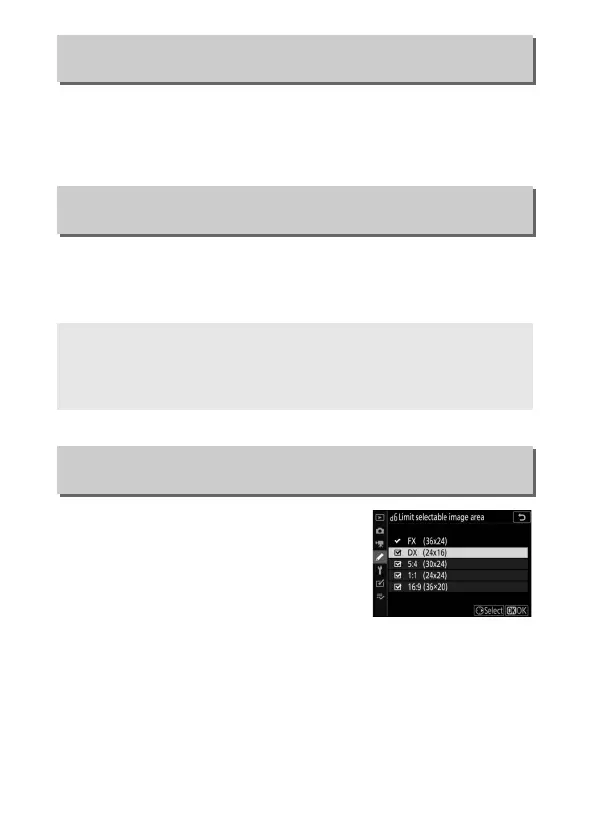
Choose the options available when
image-area selection is assigned to the i
menu or to the command dials and a
camera control. Highlight the desired
options and press 2 to select or
deselect. Press J to save changes when
settings are complete.
d4: Exposure Delay Mode
G button ➜ A (Custom Settings menu)
d5: Electronic Front-Curtain Shutter
G button ➜ A (Custom Settings menu)
D The Electronic Front-Curtain Shutter
The fastest shutter speed and maximum ISO sensitivity available with
the electronic front-curtain shutter are
1
/
2000 s and ISO 25600 (Z 7) or
51200 (Z 6), respectively.
d6: Limit Selectable Image Area
G button ➜ A (Custom Settings menu)



 To Next Page