UDO LP400 User Guide
_____________________________________________________________________________________________________
LP400 User Guide (11/07)
13
b. “Label Setup” Box (cont.)
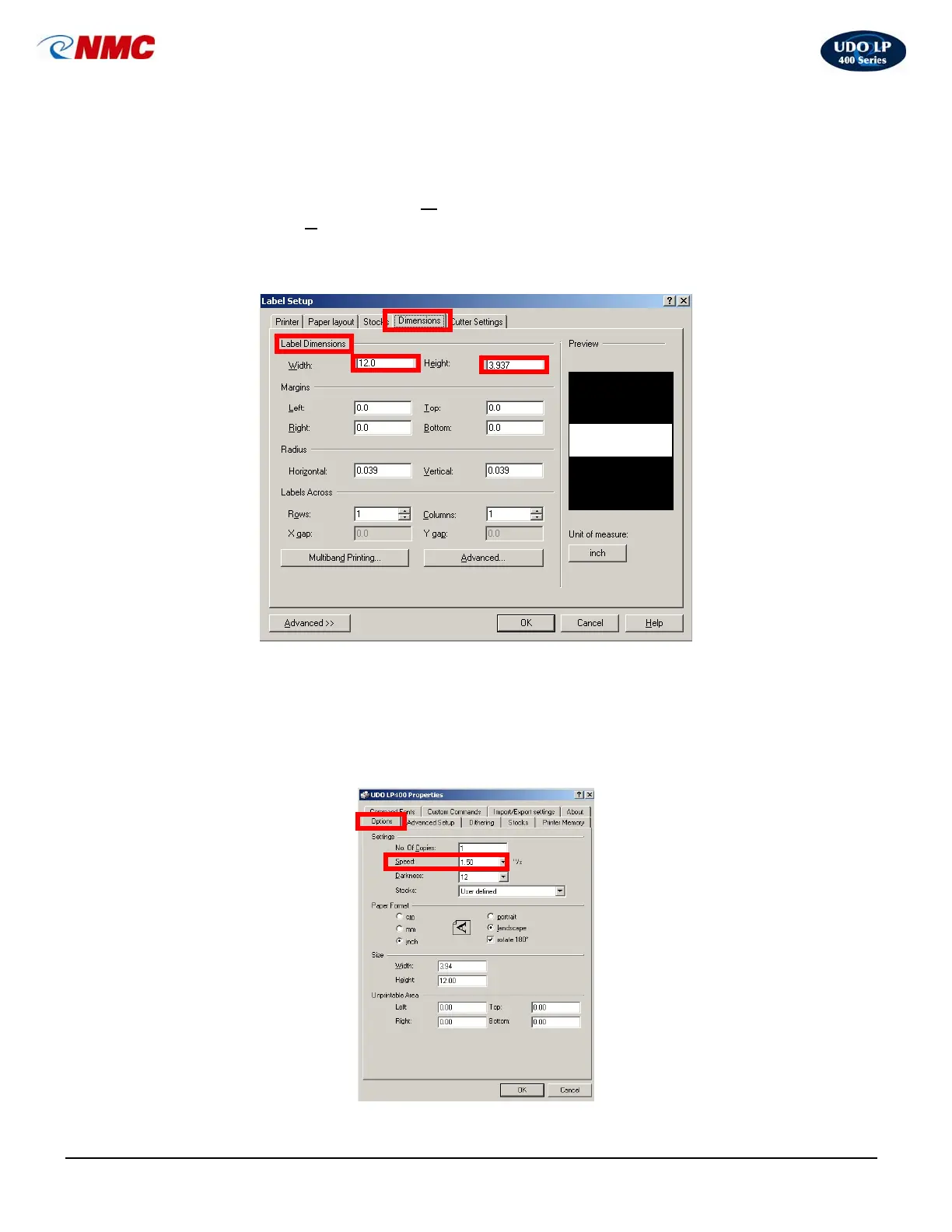
The default settings are set to print on a continuous vinyl label whose
dimensions are H: 3.937” X W: 12” (Fig. 3). The height and width may be
adjusted, as desired. The W
idth can be increased to a maximum of 43”.
Adjust the H
eight setting accordingly if you are not using a 4” vinyl roll.
(Note: The cutter will be activated after the last printed item on your label.)
Click ‘OK’ when you have finished setting desired dimensions.
2. LP400 Printer Properties
a. Settings. To adjust other default settings Click on the ‘Printer’ tab
(Fig. 2), Click on ‘Properties’, Click on the ‘Options’ tab (Fig. 4). For
example, the Darkness setting may need to be adjusted depending on
the image desired to be printed or the color of print ribbon and vinyl
used (Fig. 4).
Fig. 3
Fig. 4



 To Next Page