User Interfaces
User Interfaces
50 51
߰ On the Graphical User Interface, more edits on banks are possible
(see chapter 4.15 Graphical UI Functionality for further details).
4.6.4 Importing/Exporting Banks
The C15 provides two ways of transferring (importing, exporting) single banks in order to
manage big preset collections. When importing a bank, the bank will not be selected and
no preset will be loaded.
Import and Export on USB stick
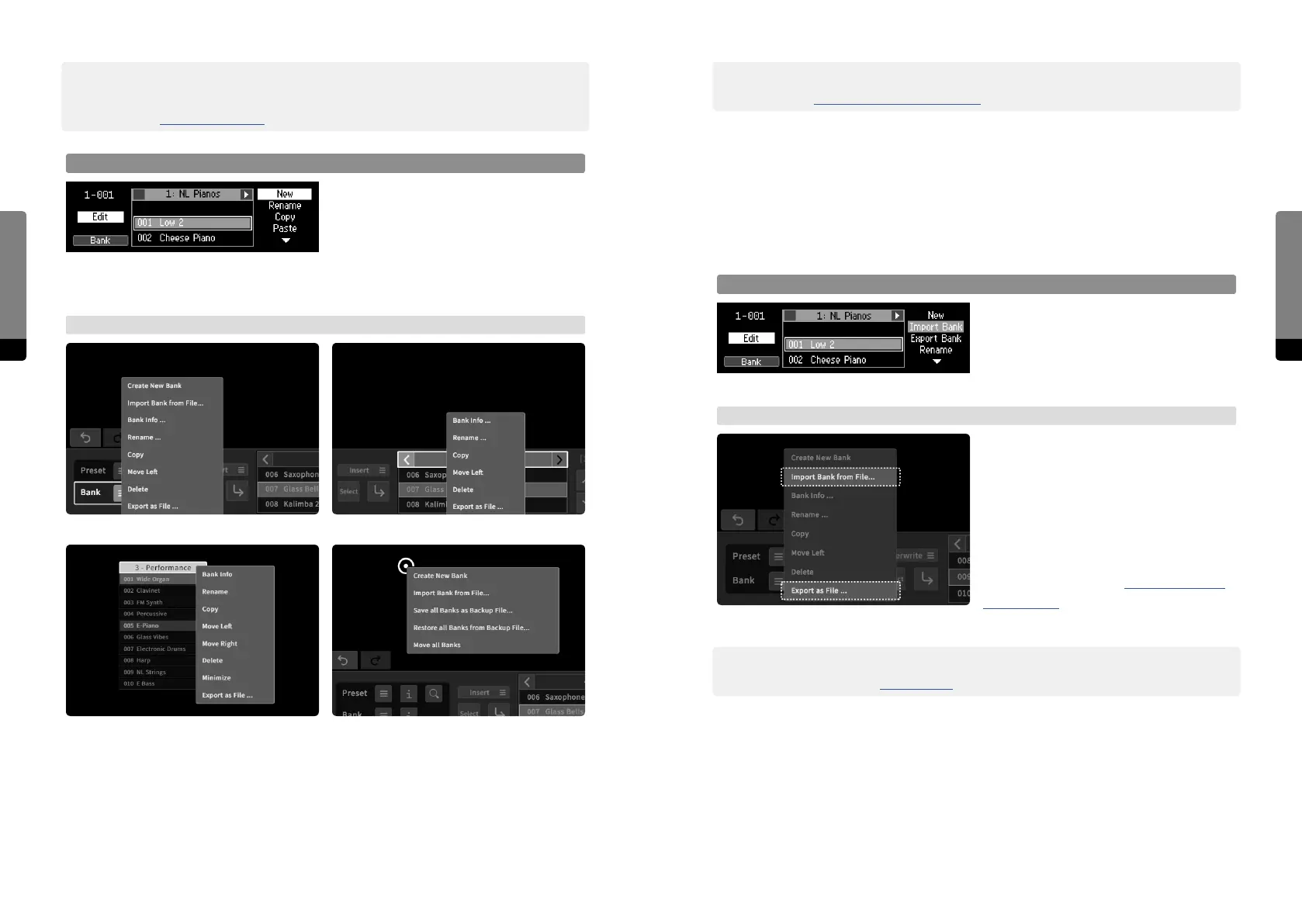
When a USB stick is connected, the
selected bank can be exported to it by
using the Export option. Any bank present
on the USB stick can be selected and
imported by using the Import option.
→ Graphical UI
The bank menu provides an option to save
the current bank as a file, which will be
downloaded on the external device. The
menu also includes an option to import a
particular bank from a file present on the
external device, which can be selected
and uploaded. Other Bank context menus
(as explained in chapter 4.15 Graphical UI
Functionality) will also oer import and
export options.
߰ The process of transferring multiple banks can be further simplified by the C15 backup
capabilities (see chapter 4.13 Backups for more details).
߰ The Graphical User Interface provides another way of moving a bank via the Bank Info
window, where the bank number (position in the bank list) can be adjusted directly
(see chapter 4.7 Contextual Info for more details).
Bank Edit Mode
When the Bank screen is in focus, pressing
the Edit button invokes a menu, repre-
sented in the rightmost stack. Cycle the
stack by pressing So Button 4 in order to
select a menu entry and press the Enter button in order to focus on an aspect. Press the
Edit button again to return to the Preset screen.
→ Graphical UI
The Graphical User Interface provides two menus for editing banks. There is a global
menu (invoked by a right-click / long touch gesture on the background) and a local menu
for banks (provided by a bank menu icon in the Preset tab or by a right-click / long touch
gesture on any bank header).
Bank Menu 3: floating bank header
Bank Menu 1: Preset tab > Bank button Bank Menu 2: Preset tab > bank header
Bank Menu 4: main area background


 To Next Page