User Interfaces
User Interfaces
76 77
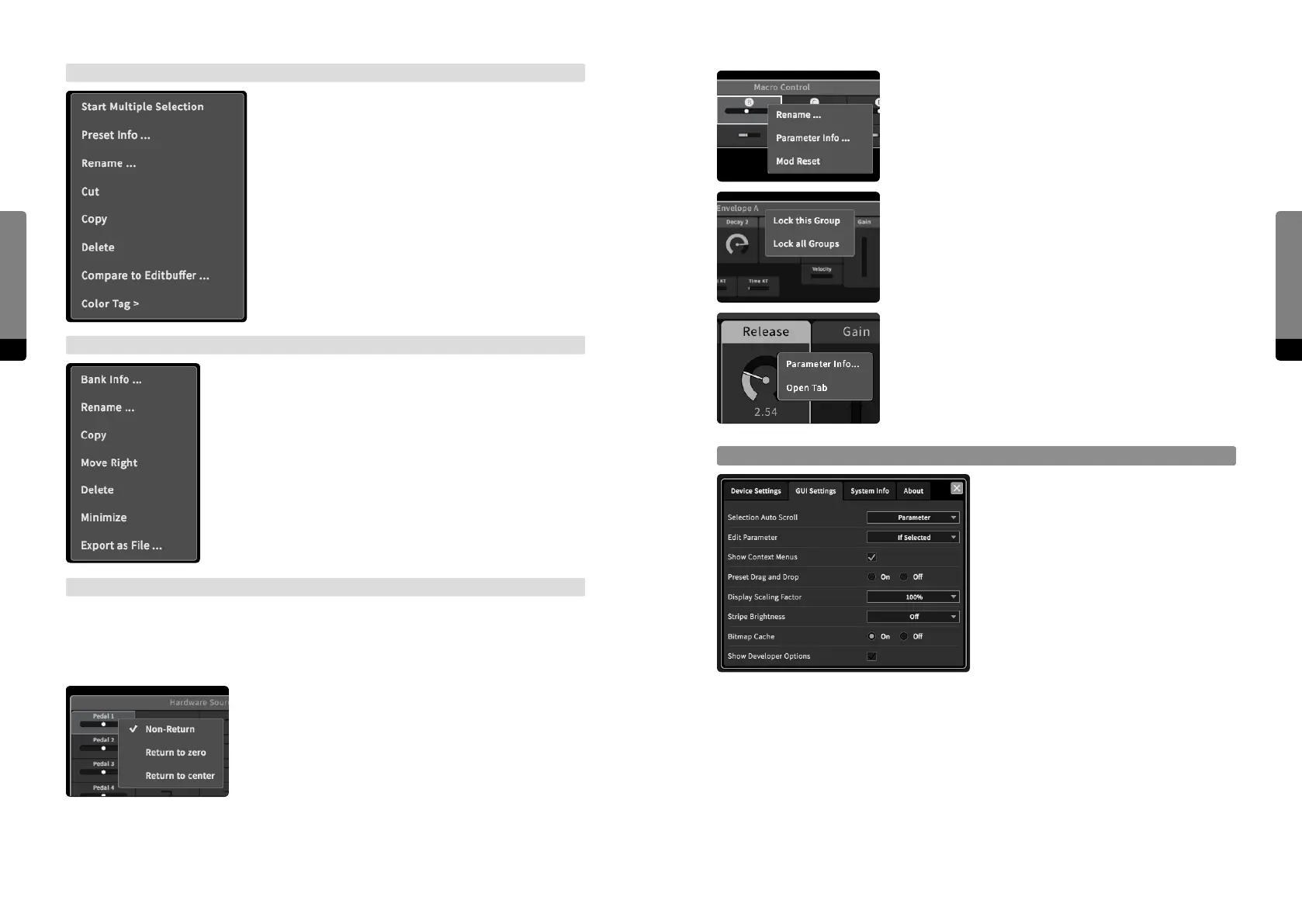
Macro Controls provide options for renaming, viewing
the Parameter Info window (showing their user-definable
info text) and resetting (clearing all mappings to target
parameters).
Each group header additionally provides local (aecting
the specific group) and global (aecting all groups) locking
options.
The Parameter context menu provides an option to get the
parameter info (by showing the Parameter Info window)
or view the parameter in the Parameter tab (if not already
visible).
GUI Settings
There are some options concerning only
the Graphical User Interface. They are
provided in the Setup menu, which can
be called via the topright Main menu icon.
These settings are not available on the
Hardware Interface.
Selection Auto Scroll
Determine if selected items should be automatically scrolled to. Available options are
none, parameters, presets and both (presets and parameters).
Edit Parameter
Determine if parameters can be directly adjusted in the main area. Available options are
always, if (the parameter is) selected and never. In the Parameter tab, edits are always
possible.
Preset Context Menu
There are a two ways to invoke the Preset context menu.
In the Preset tab, a menu icon is provided for presets.
In addition, a right click (or long touch gesture) on a
preset (in the Preset tab or in the main area) can also be
used. The menu provides preset-specific functionalities
such as handling multiple preset selection, an option
to show the Preset Info window, a rename option, cut/
copy/paste/delete options for selected presets, the
compare option and a fast way to change the color tag
of selected presets.
Bank Context Menu
The Bank context menu can be invoked by the Bank menu icon
in the Preset tab, or by a right click (or long touch gesture) on
any bank header (in the Preset tab or in the main area). Depend-
ing on where the Bank context menu was invoked, dierent
functionalities will be provided. In general, the following options
are provided: create a new bank, import/export a bank (from/to
the external device), an option to show the Bank Info window,
a rename option, copy/paste/delete options, move le/right
options and the minimize/maximize option.
Parameter Context Menus
Finally, all parameters and all parameter group headers also provide a context menu in
order to adjust parameter-specific behaviors. Similar to the other context menus, they can
be invoked by right-clicking on an element, or by using a long touch gesture.
In the Hardware Sources and Amounts group, the return
behavior of pedals and Ribbons can be set.


 To Next Page