MCTRL4K LED Display Controller
User Manual 7 Menu Operations
www.novastar.tech 20
Do not use any of the two methods on MCTRL4K to configure the screen again
after the screen is configured the in NovaLCT.
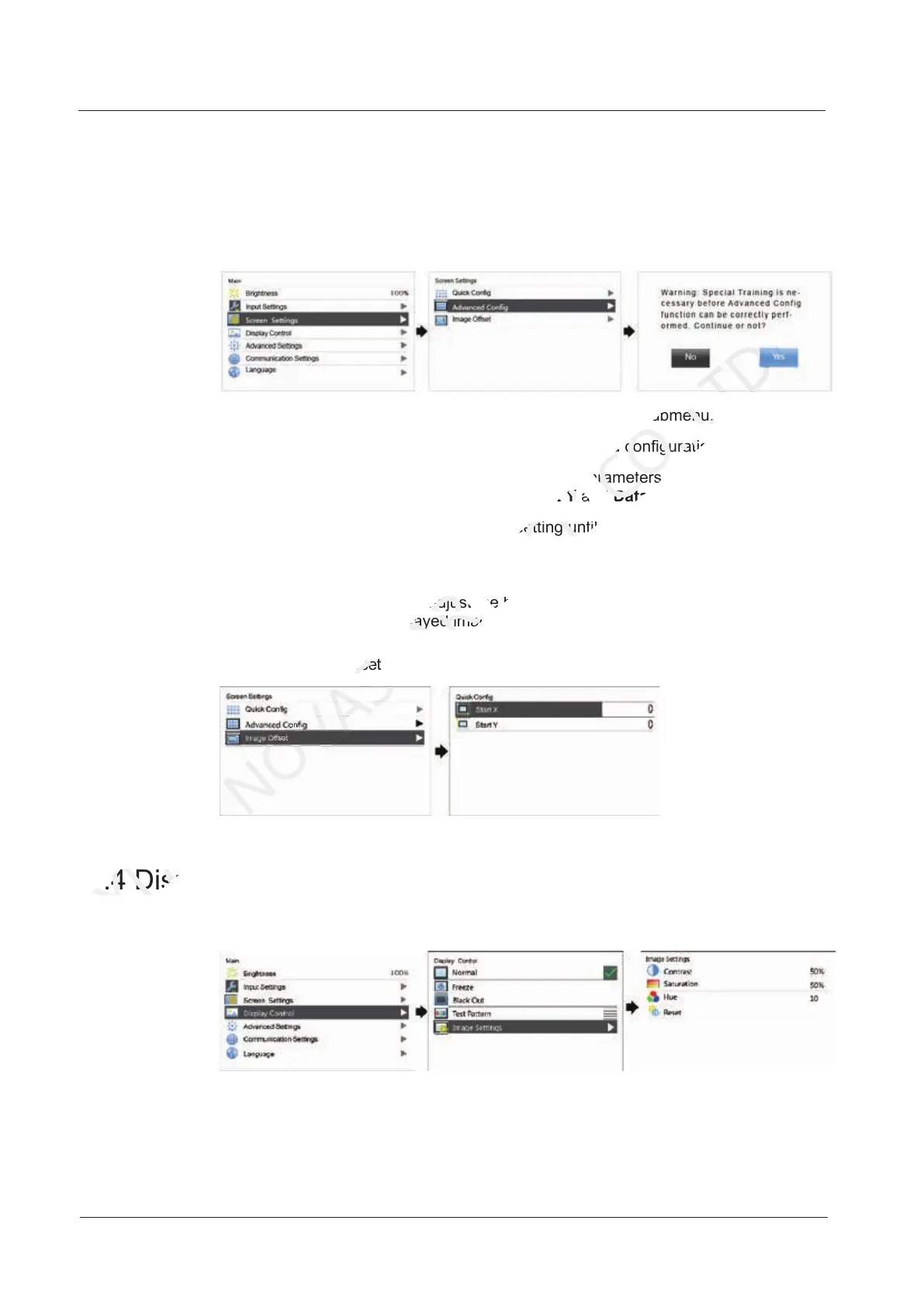
7.3.1 Advanced Configuration
Figure 7-7 Advanced configuration
Step 1 Choose Advanced Config and press the knob to enter its submenu.
Step 2 On the warning screen, click Yes to enter the advanced configuration screen.
Step 3 Select Enable, select an Ethernet port and set its parameters, including Cabinet
Row Qty, Cabinet Column Qty, Start X, Start Y and Data Flow. At last, click Apply.
Step 4 Select the next Ethernet port to continue setting until all the ports are set.
7.3.2 Image Offset
After configuring the screen, adjust the horizontal and vertical offsets (Start X and
Start Y) of the overall displayed image to ensure it is displayed in the target position.
Figure 7-8 Image offset
7.4 Display Control
Figure 7-9 Display control
Normal: The LED screen displays the current input source normally.
Black Out: The LED screen goes black and does not display input source still
being played in the background.
7.4 Display Control
XI'AN
7.4 Display Control
After configuring the screen, adjust the horizontal and vertical offsets (
NOVASTAR
After configuring the screen, adjust the horizontal and vertical offsets (
) of the overall displayed image to ensure it is displayed in the target position.
NOVASTAR
) of the overall displayed image to ensure it is displayed in the target position.
Figure 7-8 Image offset
NOVASTAR
Figure 7-8 Image offset
, select an Ethernet port and set its parameters
TECH
, select an Ethernet port and set its parameters
Step 4 Select the next Ethernet port to continue setting until all the ports are set.
TECH
Step 4 Select the next Ethernet port to continue setting until all the ports are set.
After configuring the screen, adjust the horizontal and vertical offsets (
TECH
After configuring the screen, adjust the horizontal and vertical offsets (
and press the knob to enter its submenu.
CO.,LTD.
and press the knob to enter its submenu.
to enter the advanced configuration screen.
CO.,LTD.
to enter the advanced configuration screen.
, select an Ethernet port and set its parameters
CO.,LTD.
, select an Ethernet port and set its parameters
Data Flow
CO.,LTD.
Data Flow



 To Next Page