MCTRL4K LED Display Controller
User Manual 7 Menu Operations
www.novastar.tech 15
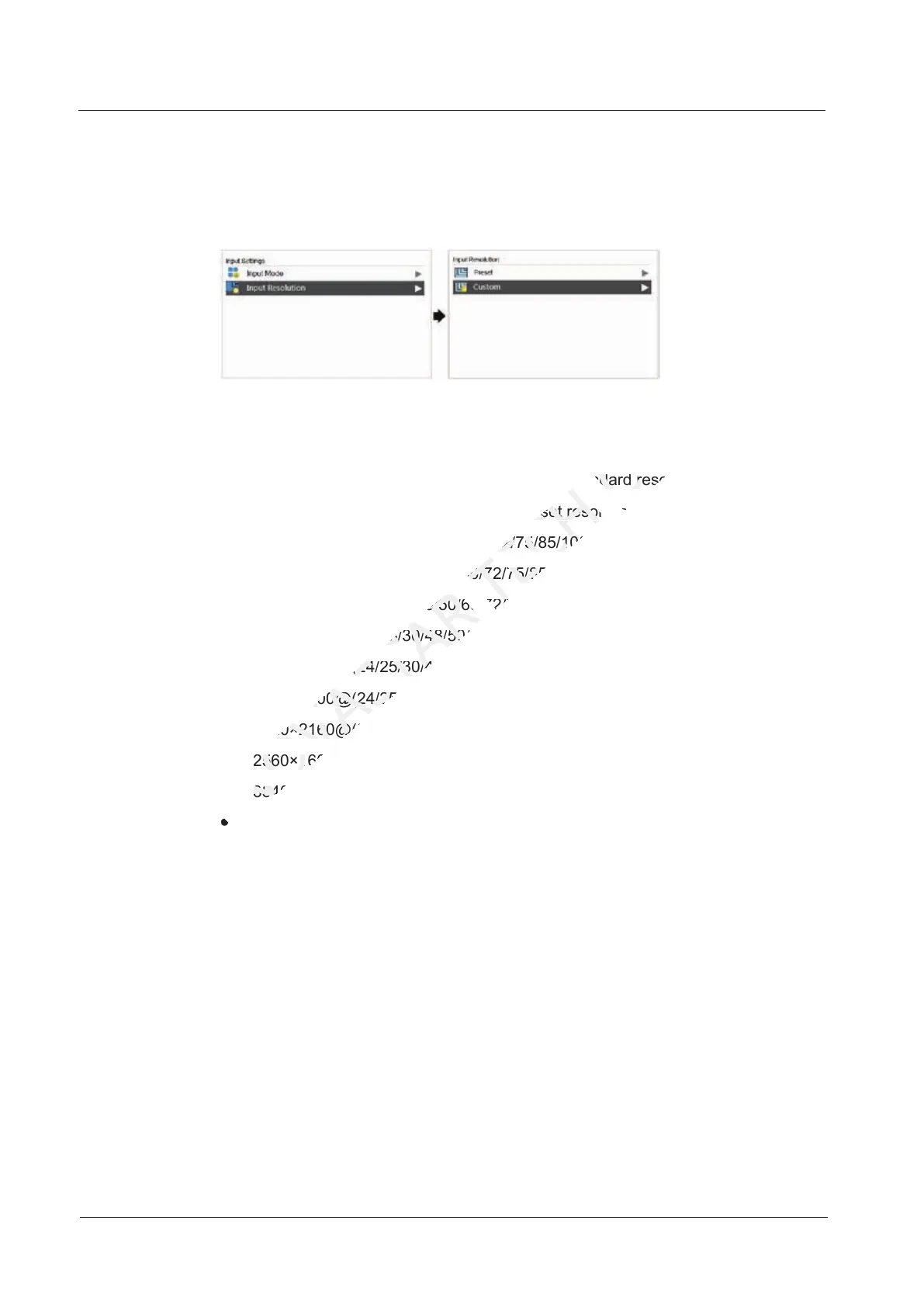
7.1.2 Step 2 Setting Input Resolution
The input resolution can be set to a preset resolution or can be customized.
Figure 7-2 Input resolution settings
The input resolution can be set through the following methods.
Method 1: Preset
Select an appropriate resolution from the preset standard resolutions.
When the input source is DVI, supported preset resolutions include:
1280×1024@(24/25/30/48/50/60/72/75/85/100/120)Hz
1366×768@(24/25/30/48/50/60/72/75/85/100/120)Hz
1440×900@(24/25/30/48/50/60/72/75/85/100/120)Hz
1600×1200@(24/25/30/48/50/60/72/75/85/100/120)Hz
1920×1080@(24/25/30/48/50/60/72/75/85/100/120)Hz
1920×1200@(24/25/30/48/50/60/72/75/85/100)Hz
1920×2160@(24/25/30/48/50/60)Hz
2560×1600@(24/25/30/48/50/60)Hz
3840×1080@(24/25/30/48/50/60)Hz
3840×2160@(24/25/30)Hz
When the input source is HDMI, supported preset resolutions include:
1280×1024@(24/25/30/48/50/60/72/75/85/100/120)Hz
1440×900@(24/25/30/48/50/60/72/75/85/100/120)Hz
1600×1200@(24/25/30/48/50/60/72/75/85/100/120)Hz
1920×1080@(24/25/30/48/50/60/72/75/85/100/120)Hz
1920×1200@(24/25/30/48/50/60/72/75/85/100/120)Hz
1920×2160@(24/25/30/48/50/60/72/75/85/100/120)Hz
2048×1536@(24/25/30/48/50/60/72/75/85/100/120)Hz
2560×1600@(24/25/30/48/50/60/72/75/85/100/120)Hz
3840×1080@(24/25/30/48/50/60/72/75/85/100/120)Hz
3840×2160@(24/25/30/48/50/60)Hz
1440×900@(24/25/30/48/50/60/72/75/85/100/120)
NOVASTAR
1440×900@(24/25/30/48/50/60/72/75/85/100/120)
1600×1200@(24/25/30/48/50/60/72/75/85/100/120)
NOVASTAR
1600×1200@(24/25/30/48/50/60/72/75/85/100/120)
1920×1080@(24/25/30/48/50/60/72/75/85/100/120)
NOVASTAR
1920×1080@(24/25/30/48/50/60/72/75/85/100/120)
1920×1200@(24/25/30/48/50/60/72/75/85/100)
NOVASTAR
1920×1200@(24/25/30/48/50/60/72/75/85/100)
1920×2160@(24/25/30/48/50/60)
NOVASTAR
1920×2160@(24/25/30/48/50/60)
2560×1600@(24/25/30/48/50/60)
NOVASTAR
2560×1600@(24/25/30/48/50/60)
3840×1080@(24/25/30/48/50/60)
NOVASTAR
3840×1080@(24/25/30/48/50/60)
Select an appropriate resolution from the preset standard resolutions.
TECH
Select an appropriate resolution from the preset standard resolutions.
When the input source is DVI, supported preset resolutions include:
TECH
When the input source is DVI, supported preset resolutions include:
×1024@(24/25/30/48/50/60/72/75/85/100/120)Hz
TECH
×1024@(24/25/30/48/50/60/72/75/85/100/120)Hz
1366×768@(24/25/30/48/50/60/72/75/85/100/120)
TECH
1366×768@(24/25/30/48/50/60/72/75/85/100/120)
1440×900@(24/25/30/48/50/60/72/75/85/100/120)
TECH
1440×900@(24/25/30/48/50/60/72/75/85/100/120)
The input resolution can be set through the following methods.
CO.,LTD.
The input resolution can be set through the following methods.
Select an appropriate resolution from the preset standard resolutions.
CO.,LTD.
Select an appropriate resolution from the preset standard resolutions.
When the input source is DVI, supported preset resolutions include:
CO.,LTD.
When the input source is DVI, supported preset resolutions include:



 To Next Page