MCTRL4K LED Display Controller
User Manual 7 Menu Operations
www.novastar.tech 32
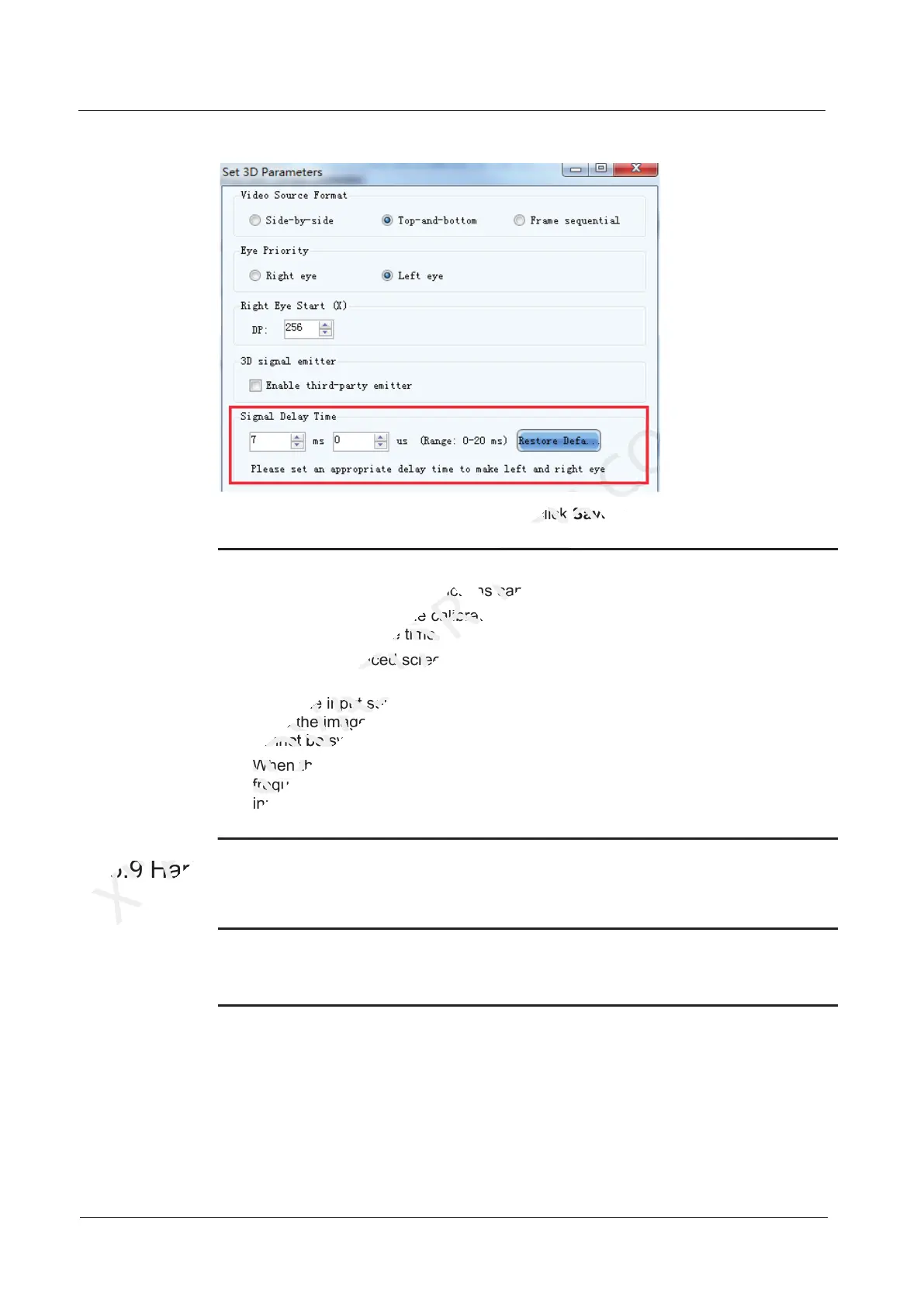
Figure 7-25 Setting 3D parameters - HDMI/DP
3. On the screen configuration page, click Save to save current configuration
parameters to the controller.
Note:
The 3D and low latency functions cannot be enabled at the same time.
The 3D function and the calibration function of support software cannot be
enabled at the same time.
When the advanced screen configuration is enabled, 3D function is not
supported.
When the input source is DVI, DVI1 loads the images for left eye, and DVI2
loads the images for right eye. When the 3D function is in use, the input mode
cannot be switched to multi-card mode.
When the video source format is set to side-by-side or top-and-bottom, the frame
frequency of Ethernet output will be doubled (for example, if the frequency of
input source is 60 Hz, the frequency of Ethernet output will be 120 Hz), and the
loading capacity of Ethernet port will be reduced by half.
7.5.9 Hardware Version
View the hardware version of current device.
Note:
To upgrade the hardware version, send the upgrade file to the MCTRL4K via
NovaLCT.
7.6 Communication Settings
Set the communication mode and network parameters.
7.5.9 Hardware Version
XI'AN
7.5.9 Hardware Version
The 3D and low latency functions cannot be enabled at the same time.
NOVASTAR
The 3D and low latency functions cannot be enabled at the same time.
The 3D function and the calibration function of support software cannot be
NOVASTAR
The 3D function and the calibration function of support software cannot be
enabled at the same time.
NOVASTAR
enabled at the same time.
When the advanced screen configuration is enabled, 3D function is not
NOVASTAR
When the advanced screen configuration is enabled, 3D function is not
When the input source is DVI, DVI1 loads the images for left eye, and DVI2
NOVASTAR
When the input source is DVI, DVI1 loads the images for left eye, and DVI2
loads the images for right eye. When the 3D function is in use, the input mode
NOVASTAR
loads the images for right eye. When the 3D function is in use, the input mode
cannot be switched to multi-card mode.
NOVASTAR
cannot be switched to multi-card mode.
When the video source format is set to side-
NOVASTAR
When the video source format is set to side-
frequency of Ethernet output will be doubled (for example, if the frequency of
NOVASTAR
frequency of Ethernet output will be doubled (for example, if the frequency of
input source is 60 Hz, the frequency of Ethernet output will be 120 Hz), and the
NOVASTAR
input source is 60 Hz, the frequency of Ethernet output will be 120 Hz), and the
On the screen configuration page, click
TECH
On the screen configuration page, click
The 3D and low latency functions cannot be enabled at the same time.
TECH
The 3D and low latency functions cannot be enabled at the same time.
to save current configuration
CO.,LTD.
to save current configuration



 To Next Page