MCTRL4K LED Display Controller
User Manual 7 Menu Operations
www.novastar.tech 21
Freeze: The LED screen always displays the frame when frozen. The input
source is still being played in the background.
Test Pattern: Test patterns are used to check the display effect and pixel
operating status. There are 8 test patterns, including pure colors and line
patterns.
Image Settings: The settings are used to adjust the contrast, saturation and hue
of the output image in order to improve the display effect.
Parameter Description
Contrast Range: 0%–100%; step: 1%
Saturation Range: 0%–100%; step: 1%
Hue Range: -180–+180; step: 1
Notice:
When the calibration function is enabled, image settings are unavailable.
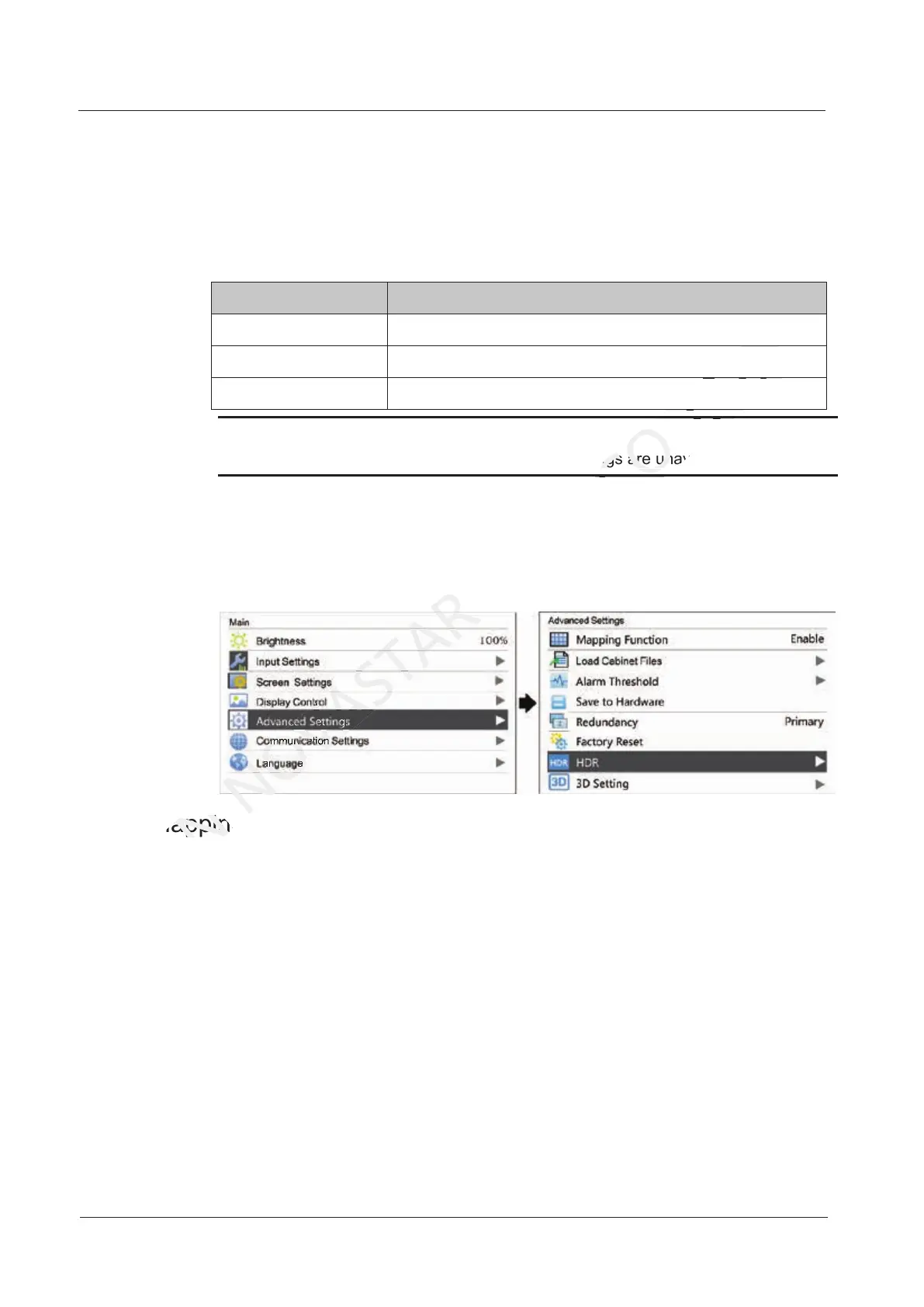
7.5 Advanced Settings
Figure 7-10 Advanced Settings
7.5.1 Mapping Function
When mapping function is enabled, each of the cabinets will display its cabinet No.
and the No. of the Ethernet port that loads the cabinet.
Note: Receiving cards used by the system must support mapping function.
7.5.1 Mapping Function
XI'AN
7.5.1 Mapping Function
7.5.1 Mapping Function
NOVASTAR
7.5.1 Mapping Function
When the calibration function is enabled, image settings are unavailable.
CO.,LTD.
When the calibration function is enabled, image settings are unavailable.



 To Next Page