MCTRL4K LED Display Controller
User Manual 7 Menu Operations
www.novastar.tech 27
Application
Note:
The HDR function supports only the HDMI input connector.
The HDR function supports only the 10-bit input source.
The HDR function and the calibration function of support software cannot be
enabled at the same time.
In NovaLCT, the HDR and ClearView functions cannot be enabled at the same
time.
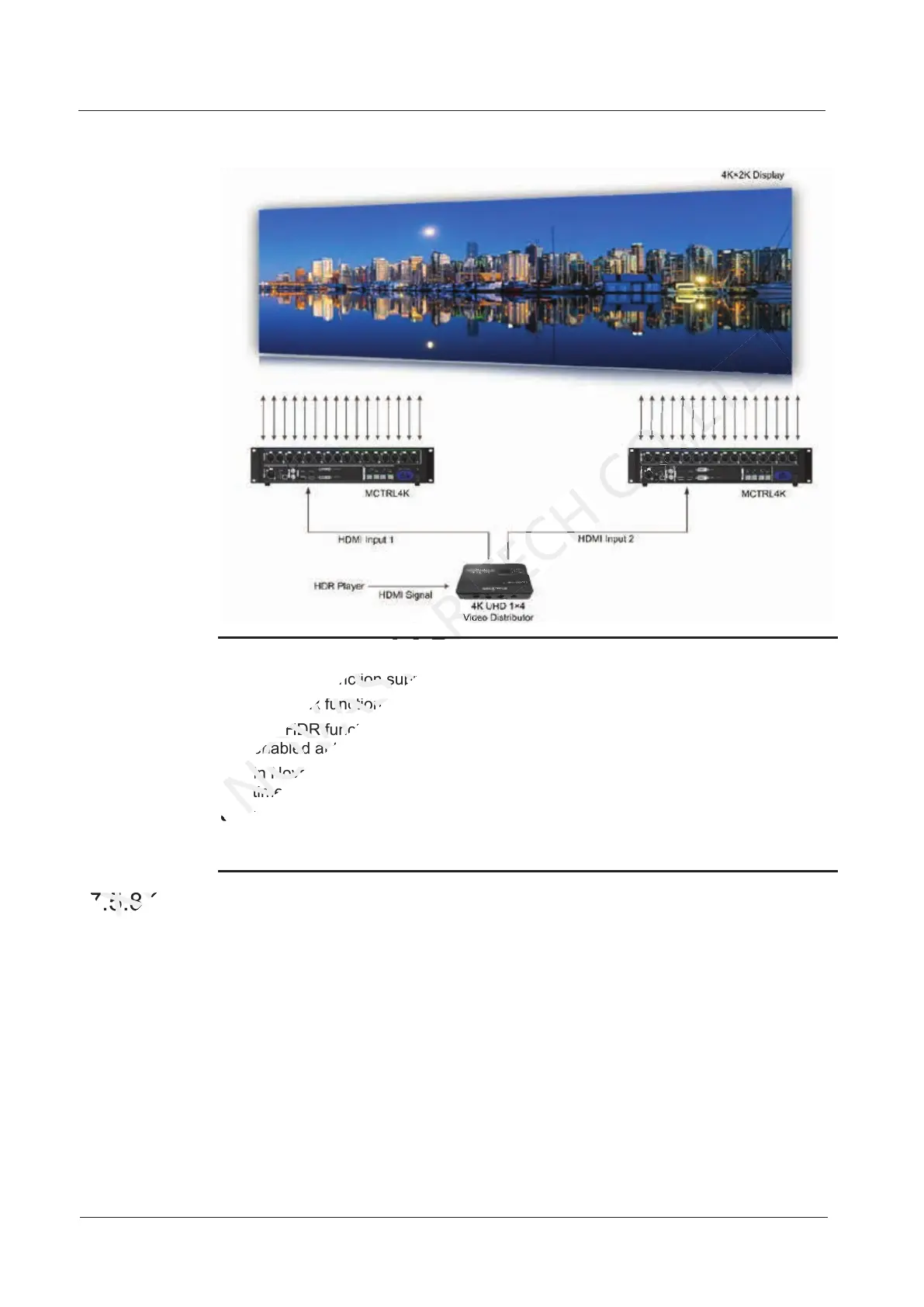
Using the HDR function will reduce the loading capacity of the MCTRL4K by half
because the HDR video source is 10-bit. Please refer to the diagram above and
work out a connection solution in advance.
7.5.8 3D Settings
This function works with the 3D emitter EMT200 and 3D glasses to allow users to
experience 3D effects on LED screen. For detailed usage, see 3D Emitter EMT200
Quick Start Guide.
Applications
Application 1: EMT200 connected behind the last receiving card
7.5.8 3D Settings
XI'AN
7.5.8 3D Settings
The HDR function supports only the HDMI input connector.
NOVASTAR
The HDR function supports only the HDMI input connector.
The HDR function supports only the 10-bit input source.
NOVASTAR
The HDR function supports only the 10-bit input source.
The HDR function and the calibration function of support software cannot be
NOVASTAR
The HDR function and the calibration function of support software cannot be
enabled at the same time.
NOVASTAR
enabled at the same time.
In NovaLCT, the HDR and ClearView functions cannot be enabled at the same
NOVASTAR
In NovaLCT, the HDR and ClearView functions cannot be enabled at the same
Using the HDR function will reduce the loading capacity of the MCTRL4K by half
NOVASTAR
Using the HDR function will reduce the loading capacity of the MCTRL4K by half



 To Next Page