MCTRL4K LED Display Controller
User Manual 6 Home Screen
www.novastar.tech 12
6 Home Screen
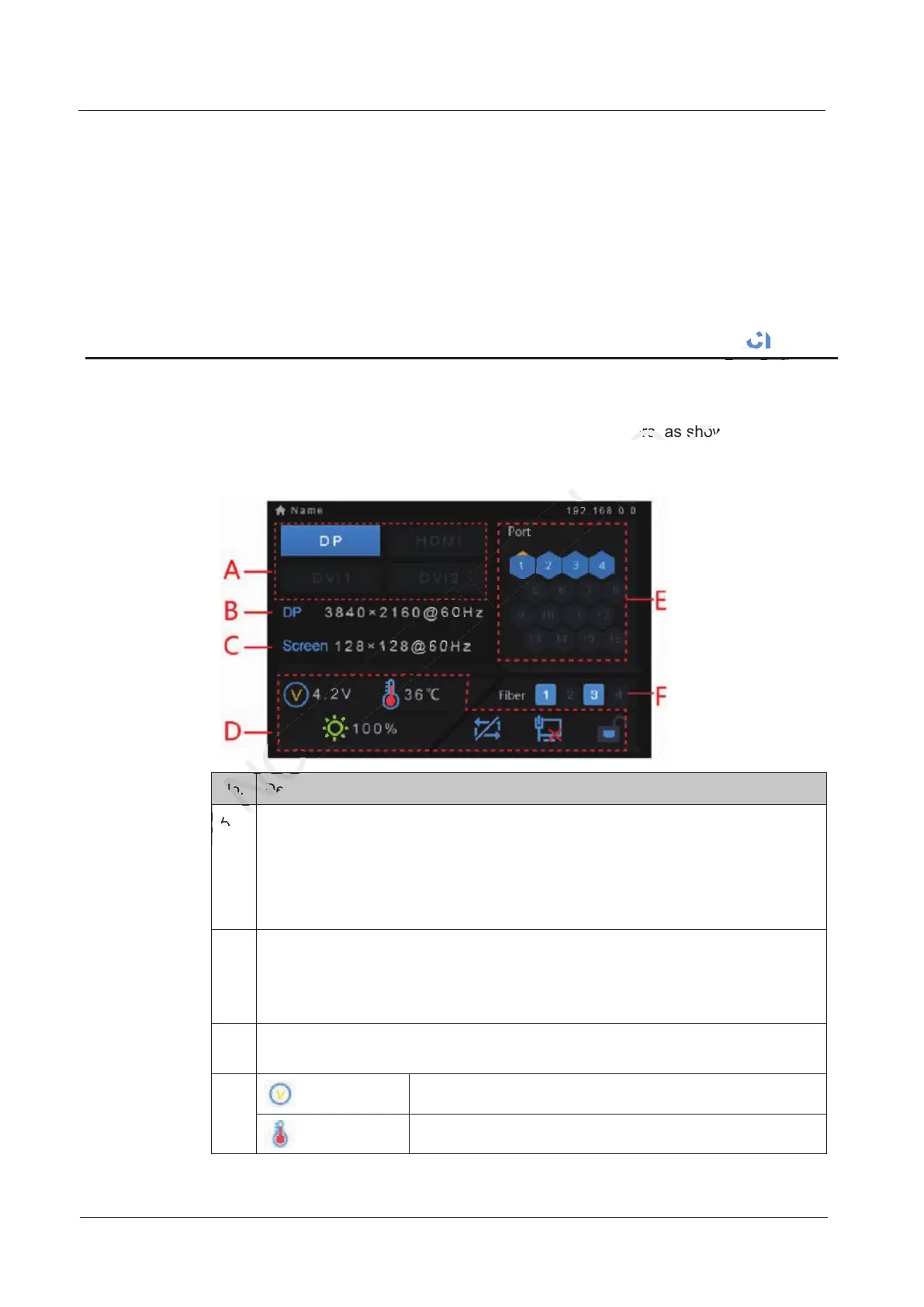
After the MCTRL4K is powered on, its home screen appears, as shown in Figure 6-1.
Figure 6-1 Home screen
No. Description
A Access status of signal sources:
On: Signal available
Off: Signal unavailable
The interval between unplugging and plugging the DP source must be greater
than 5 seconds. Otherwise, the DP source cannot be detected.
B Display the current input source information, including source type, resolution
and frame frequency.
In multi-card mode, both DVI1 and DVI2 have input sources. The information
about the two DVI sources will be displayed alternately.
C Display the resolution and frame frequency of the currently configured LED
display.
D Supply voltage of motherboard
Temperature inside the controller
Description
NOVASTAR
Description
Home Screen
CO.,LTD.
Home Screen
home screen appears, as shown in
CO.,LTD.
home screen appears, as shown in



 To Next Page