Chapter 2 Installation of OEM7 Family Receiver Cards
OEM7 Installation and Operation User Manual v1 34
l
Transmitted Data (TX)
l
Received Data (RX)
l
Request To Send (RTS) [ports with flow control]
l
Clear To Send (CTS) [ports with flow control]
Port settings (bit rate and parity, for example) are software configurable. See Communications
with the Receiver on page41. Also see OEM719 Technical Specifications on page110, OEM729
Technical Specifications on page130 and OEM7700 Technical Specifications on page150 for fur-
ther information on data communications specifications and pin assignments.
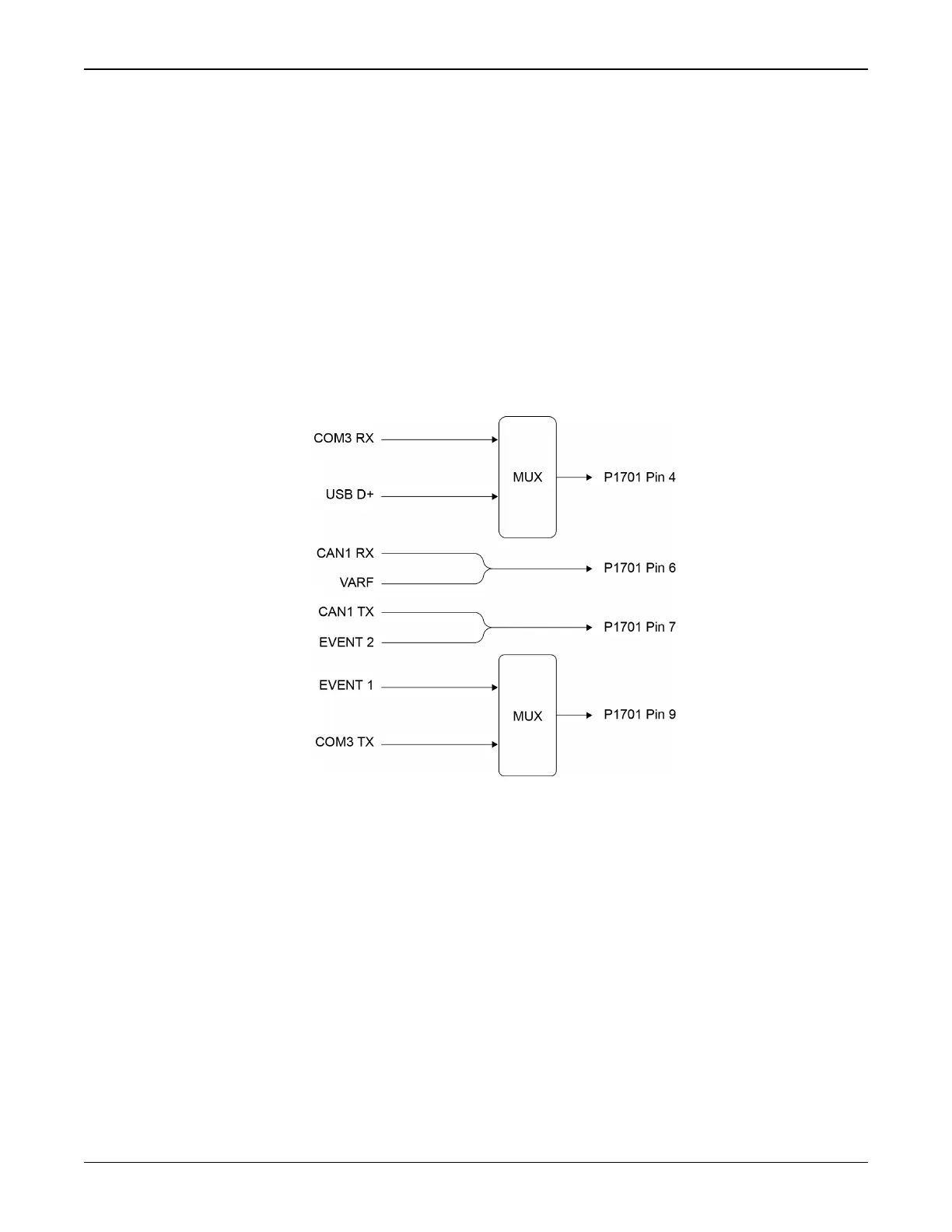
OEM719Multiplexed Port
On the OEM719, COM3 is multiplexed with USB and EVENT1. USB and EVENT1 are enabled by
default.
Figure 12: COM3 and USB Multiplexed on OEM719
To enable COM3, issue the following commands:
1.
INTERFACEMODE USB1 NONE NONE
2.
INTERFACEMODE USB2 NONE NONE
3.
INTERFACEMODE USB3 NONE NONE
4.
MARKCONTROL MARK1 DISABLE
5.
INTERFACEMODE COM3 NOVATEL NOVATEL
6.
SAVECONFIG (optional)
To enable USB, issue the following commands:
1.
INTERFACEMODE COM3 NONE NONE
2.
INTERFACEMODE USB1 NOVATEL NOVATEL



 To Next Page