Chapter 6 CAN Bus
OEM7 Installation and Operation User Manual v1 87
the PGN and its priority)
l
CCOMCONFIG command: configures the parameters used by the NovAtel command inter-
face to interact with the CAN Bus
For information about these commands, see the OEM7 Commands and Logs Reference
Manual (OM-20000169).
Details for the PGN messages can be found in the NMEA2000 specification which can be
purchased directly from the National Marine Electronics Association (www.nmea.org/).
6.1 Default Configuration
After a FRESET, the receiver has the following CAN configuration:
l
All CAN physical port are disabled
l
No J1939 addresses are configured
l
CCOM ports are configured for NMEA2000 messages only
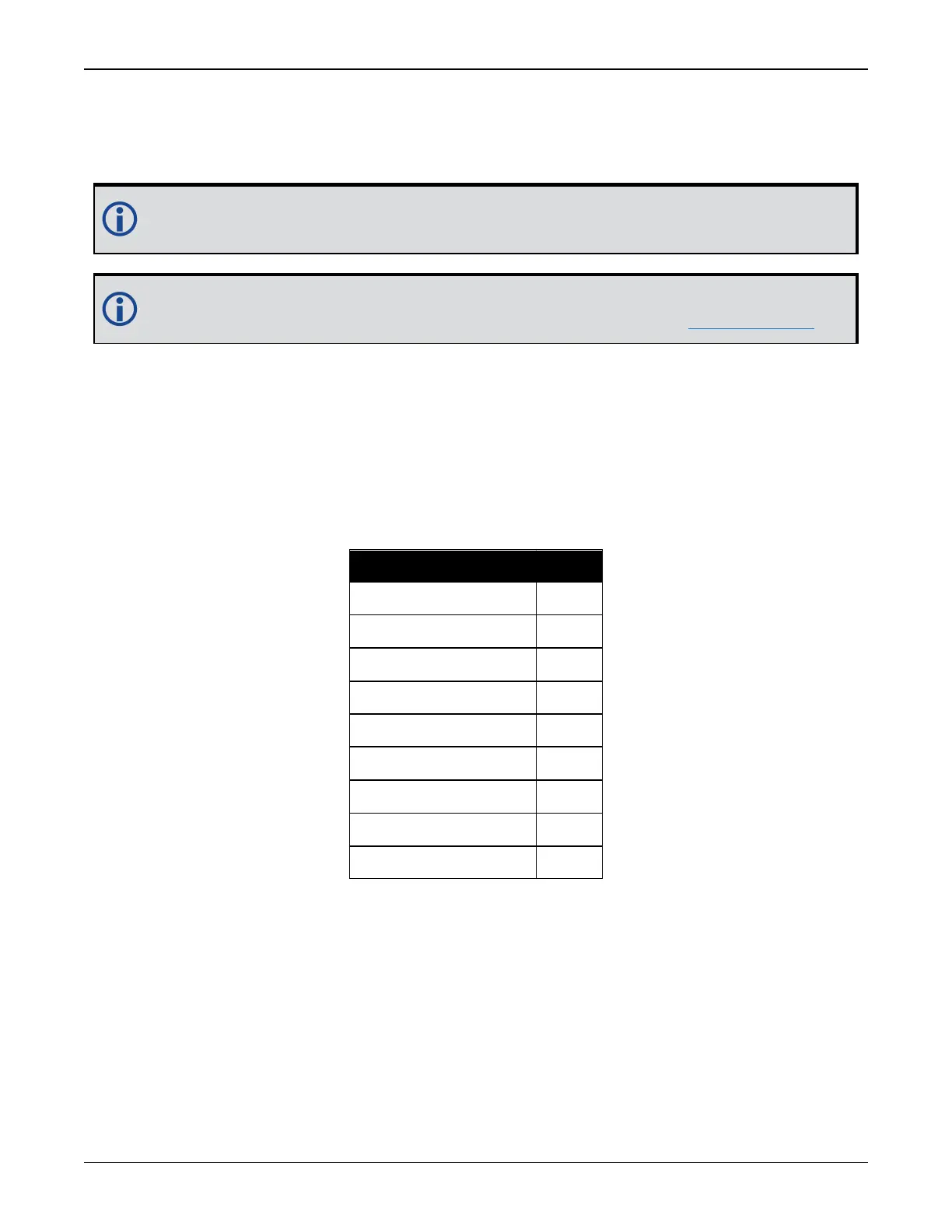
Parameter Value
Address 0xFE
Industry Group 2
Device Class 0
Device Class Instance 0
Function 23
Function Instance 0
ECU Instance 0
Manufacturer Code 0
Identity Number 0
Table 8: Default NAME
6.2 Configuring the CAN Bus
To enable an OEM7 receiver to communicate over the CAN bus, configure CAN and place the
receiver on bus, triggering a J1939 Address Claim Procedure.
1.
Use the J1939CONFIG command to specify J1939 NAME and desired address.
2.
Use the CANCONFIG command to place the receiver on bus.
3.
Optionally, use the J1939STATUS log to monitor CAN status on the receiver.



 To Next Page