Chapter 4 Built-In Status Tests
OEM7 Installation and Operation User Manual v1 75
4.4.6 Set and Clear Mask for all Status Code Arrays
The other two mask words in the status code arrays operate on the associated status word in the
same way. These mask words are used to configure the bits in the status word that result in a
RXSTATUSEVENT log broadcast. The set mask is used to turn logging on temporarily while the
bit changes from the 0 to 1 state. The clear mask is used to turn logging on temporarily while
the bit changes from a 1 to a 0 state. Note the error word does not have any associated mask
words. Any bit set in the error word results in a RXSTATUSEVENT log broadcast (unless
unlogged).
Refer also to the RXSTATUS log in the OEM7 Commands and Logs Reference Manual (OM-
20000169) for a more detailed description.
4.5 Status LED
The diagnostic LED provided on the OEM7 family cards blinks green on and off approximately
once per second to indicate normal operation.
Error bits and status bits that have been priority masked as errors cause the LED to flash a code
in a binary sequence. The binary sequence is a six flash (0.5 second on and 0.25 second off per
flash) sequence followed by a one second delay. The sequence repeats indefinitely. If there are
more than one error or status present, the lowest number appears as the flash code output. The
codes are ordered to have the highest priority condition output first.
The first flash in the six flash sequence indicates if the code that follows is an error bit or a
status bit. Error bits flash red and status bits flash yellow. The next five flashes are the binary
number of the code (most significant bit first). A red flash indicates a one and a yellow flash
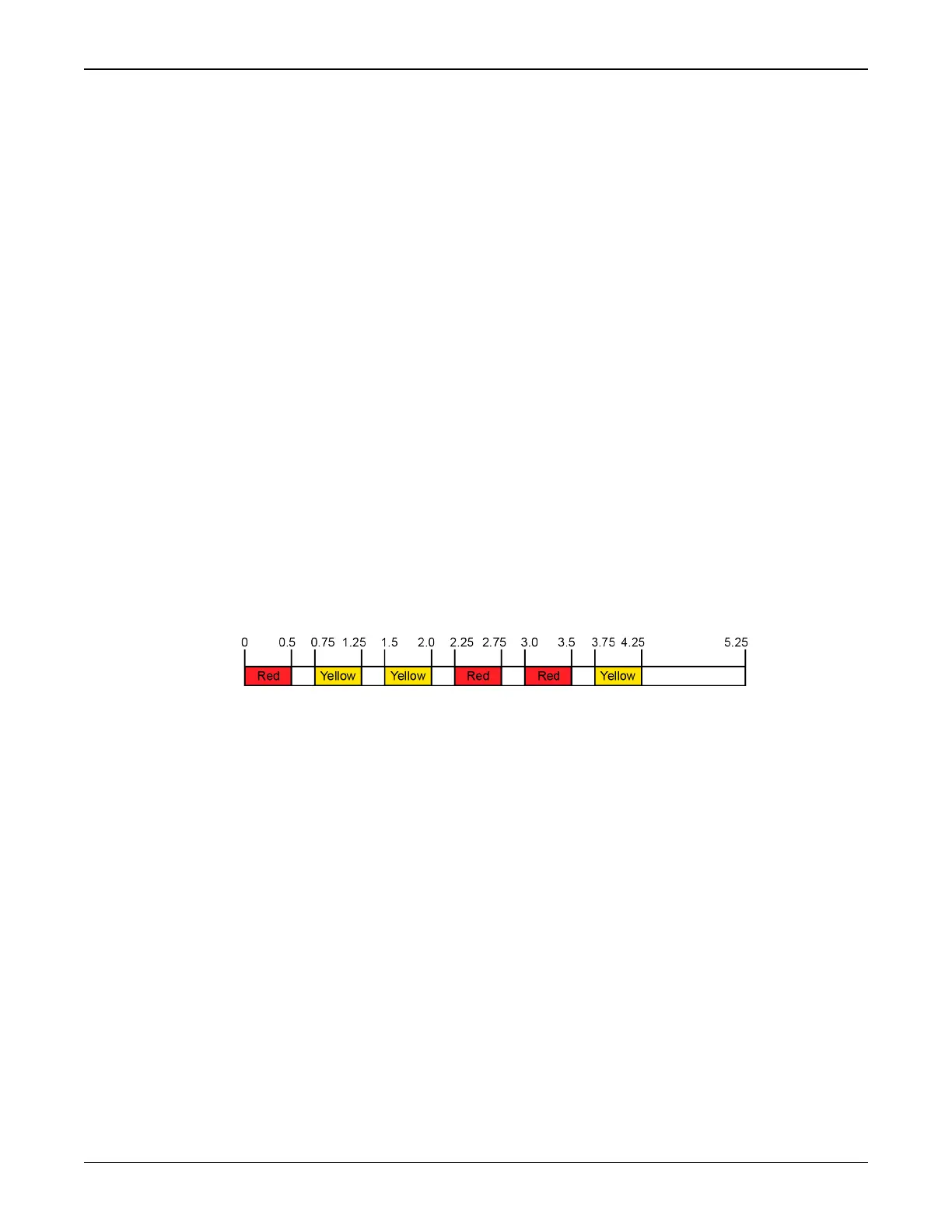
indicates a zero. For example, for an error bit six, the binary number is 00110 so the output
sequence is:
followed by a one second delay. The sequence repeats indefinitely until the receiver is reset.
In the example shown in Figure 31: Status LED Flash Sequence Example on the next page, the
first flash in the sequence is red, meaning a bit is set in the receiver error word. The next five
flashes give a binary value of 00111. Converting this value to decimal results in a value of
seven. Therefore, bit seven of the receiver error word is set, indicating a problem with the sup-
ply voltage of the receiver’s power circuitry.



 To Next Page