Chapter 5 Ethernet Configuration
OEM7 Installation and Operation User Manual v1 82
Make a note of the IP address returned with this log. This value is used later in
this procedure.
5.
Assign the TCP/IP port number by entering:
ICOMCONFIG ICOM1 TCP :2000
6.
Confirm the port number assigned to ICOM1 by entering:
LOG ICOMCONFIG ONCE
5.4 Base/Rover Configuration through Ethernet Connectivity
You can use an Ethernet connection to provide communication between a base and rover
receiver.
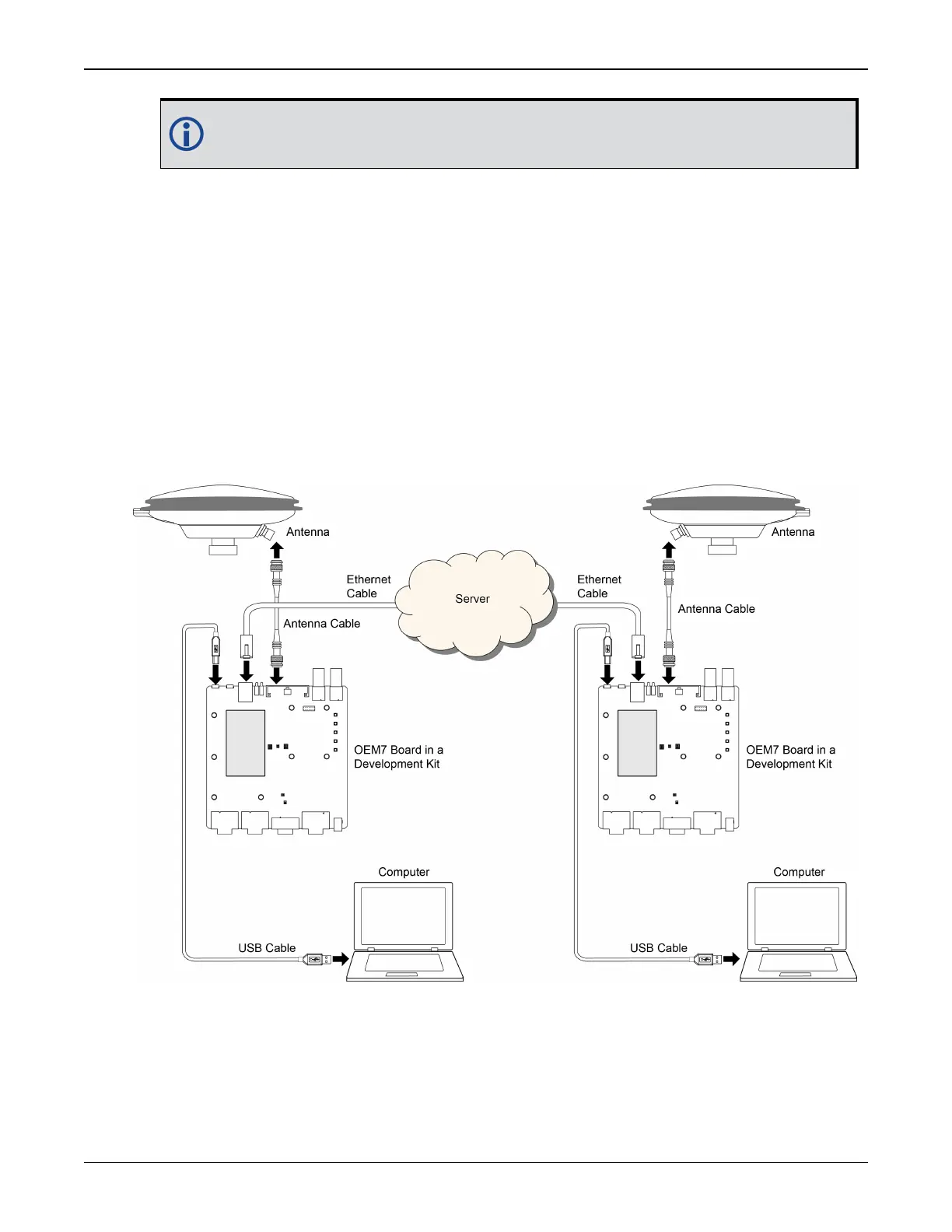
Figure 34: Base/Rover Ethernet Setup—OEM7 Receiver Card below shows the connections when
a base and rover OEM7 receiver are connected using Ethernet.
Figure 34: Base/Rover Ethernet Setup—OEM7 Receiver Card
1.
Connect your computer to both OEM7 receivers using null modem serial cables or USB
cables.
2.
Establish a connection to the receiver using either NovAtel Connect or another terminal pro-
gram such as Windows HyperTerminal. This connection is used to send the commands in this



 To Next Page