If users enable the lens while lens is not installed correctly or not even installed, a
warning message will pop up as a notification if users are trying to operate lens on
liveview page.
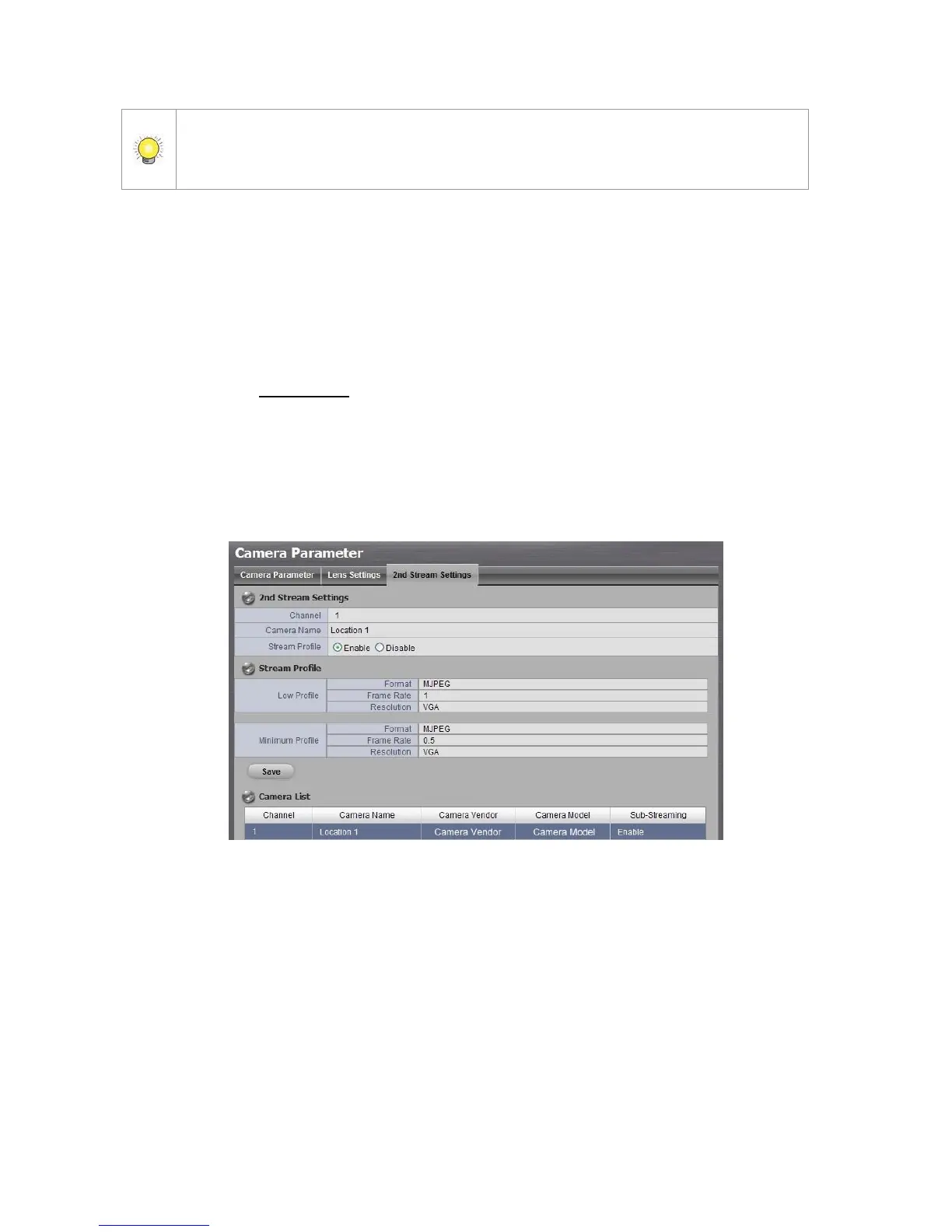
2.1.6 Set up 2nd Stream
Stream profile is designed for mobile client and lower fps live stream display.
Without stream profile integration, users cannot watch live video on mobile
client nor select lower fps stream on liveview. Further, for performance
consideration, we fix the resolution and framerate for each brand/series. You
can refer to appendix for supporting list.
1. Open Internet Explorer and log in to the unit.
2. Click IP Camera / Camera Parameters.
3. Click the 2nd Stream Settings tab.
Stream Profile: The default status is Disable. If you want mobile client
user to access to this camera, you can select Enable, and click Save
button in the middle of the page.
Low Profile: The stream profile, under 300kbps, is designed for mobile
client single-view.
Minimum Profile: The stream profile, under 100 kbps, is designed for
mobile client multi-view.
2.1.7 View Camera Status



 To Next Page