OJMAR 40
2.4 INSTALLING WINDOWS DRIVERS FOR THE DESKTOP
READER
The controllers supplied are compatible with the following operating systems:
Windows XP (32 and 64 bit).
Windows Vista (32 and 64 bit).
Windows 7 (32 and 64 bit).
NOTE: All screens shown below correspond to Windows 7. If you have another
Operating System, these may be slightly different.
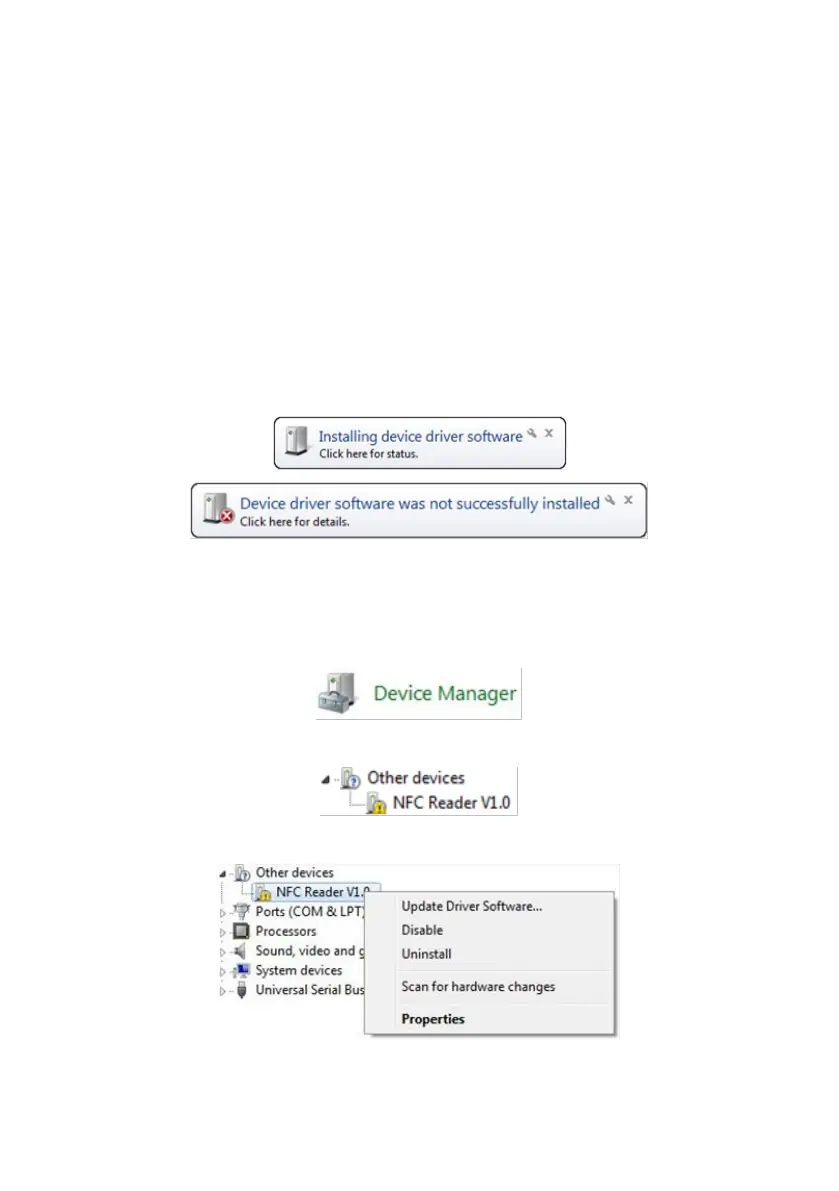
1. Connect the programmer to the USB port on your PC.
2. Windows will detect the programmer and will display the following messages:
3. Windows cannot automatically install the Windows controller. It must be
installed manually.
4. To do so, access the Windows “Device manager”. This option is located in the
“Control Panel”.
5. Locate the following error on the list:
6. Right-click on the conflicting device and select “Update driver software”:
7. Select “Browse my computer for driver software”.



 To Next Page