OJMAR 86
Opening and closing: The locker may be neither opened nor closed as of
the expiry date/time.
NOTE: Dedicated keys are not subject to Time Zones.
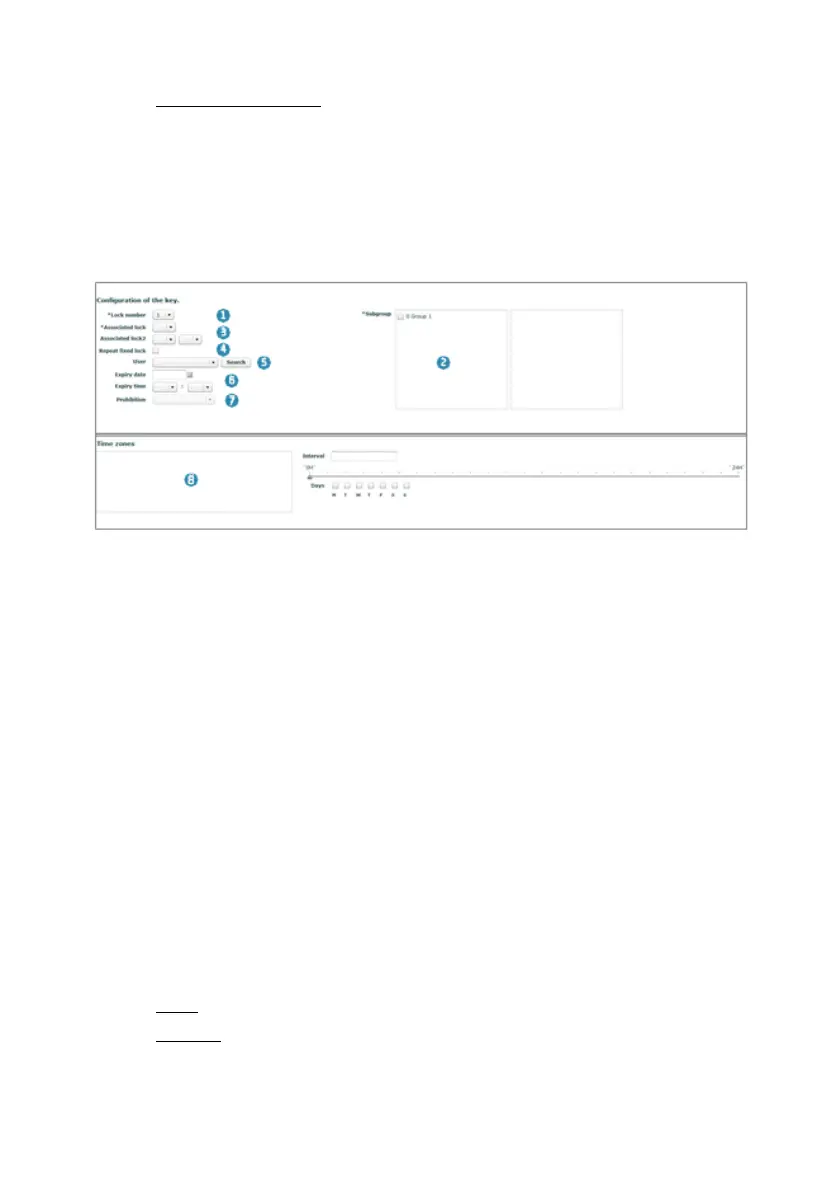
4.12.3 Write Multifunction Keys
NOTE: There must be at least one Free and Dedicated key in order to be able to
create a key of this type.
NOTE: All of the fields marked with an * must be filled in.
1. Number of locks: Number of free locks that a key can open (maximum 3).
2. Subgroup: Subgroup (more than one can be selected) to which the key belongs
(See Section 4.5).
3. Associated lock: Displays a list of dedicated locks that can be assigned.
Additionally, the key can be linked to 2 more dedicated locks from the
"Associated lock 2" field.
4. Repeat dedicated lock: Allows for a duplicate dedicated key to be created. In
this case, a list will be displayed with the lock numbers and an * above the lock
number with a duplicate dedicated key.
5. User: A previously created user can be selected for greater control and
information on the key (See Section 4.9).
6. Expiry Date/Time: Assign an expiry date and time to the key.
7. Prohibition: Where an expiry date and time have been defined (6), the following
restrictions can be added to the key:
None: No restriction will be applied as of the expiry date/time.
Opening: The locker may be closed but not opened as of the expiry
date/time.



 To Next Page