Appendix-6 OPERATION GUIDE
Menu List
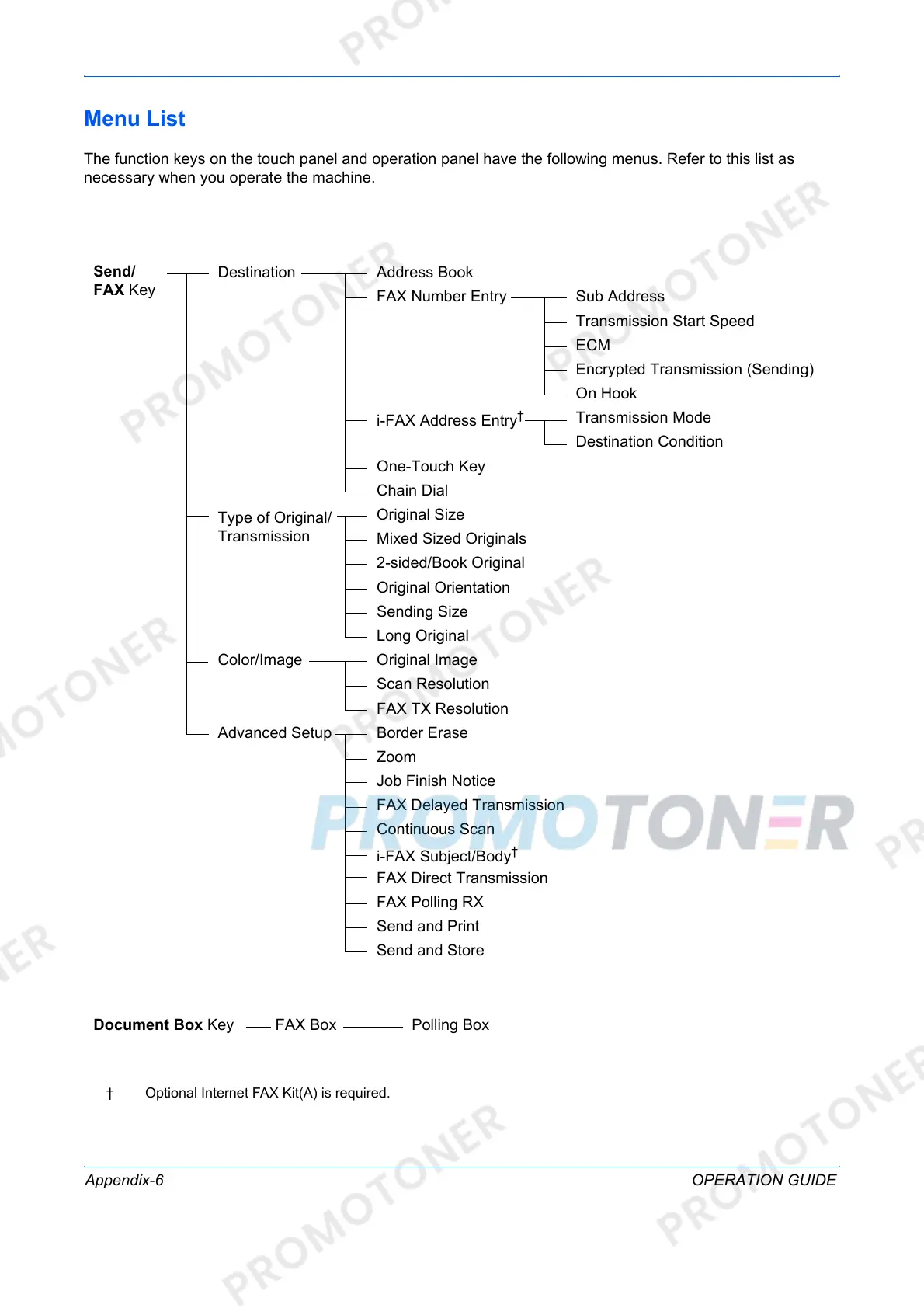
The function keys on the touch panel and operation panel have the following menus. Refer to this list as
necessary when you operate the machine.
† Optional Internet FAX Kit(A) is required.
Send/
FAX Key
Destination Address Book
FAX Number Entry Sub Address
Transmission Start Speed
ECM
Encrypted Transmission (Sending)
On Hook
i-FAX Address Entry
†
Transmission Mode
Destination Condition
One-Touch Key
Chain Dial
Type of Original/
Transmission
Original Size
Mixed Sized Originals
2-sided/Book Original
Original Orientation
Sending Size
Long Original
Color/Image Original Image
Scan Resolution
FAX TX Resolution
Advanced Setup Border Erase
Zoom
Job Finish Notice
FAX Delayed Transmission
Continuous Scan
i-FAX Subject/Body
†
FAX Direct Transmission
FAX Polling RX
Send and Print
Send and Store
Document Box Key FAX Box Polling Box



 To Next Page