FAX Operation (Basic)
3-4 OPERATION GUIDE
Automatic Send
General transmission using the numeric keys is explained.
NOTE: To send an Internet FAX (i-FAX), refer to i-FAX Transmission on page 8-7.
Switching to the Send Screen
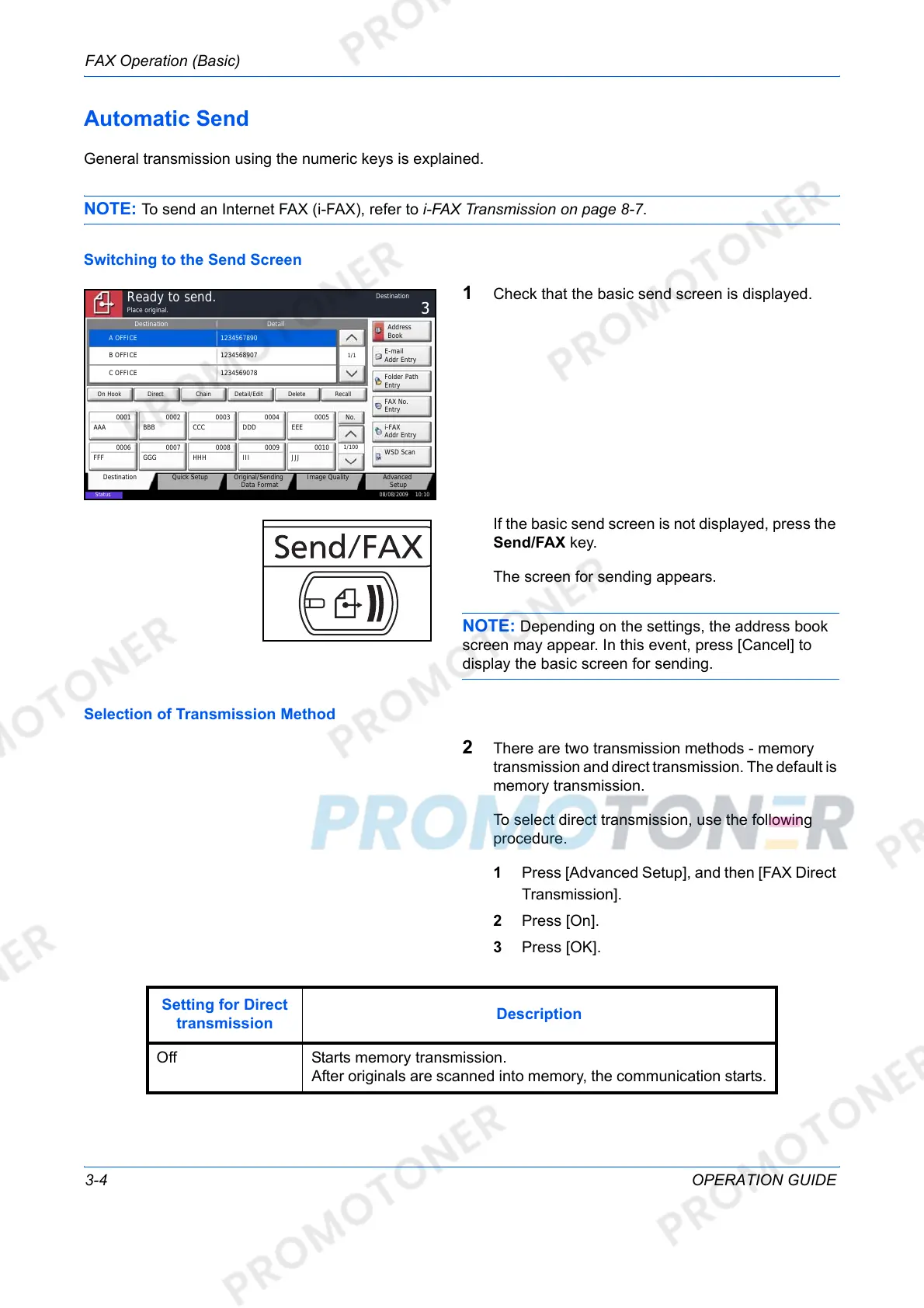
1 Check that the basic send screen is displayed.
If the basic send screen is not displayed, press the
Send/FAX key.
The screen for sending appears.
NOTE: Depending on the settings, the address book
screen may appear. In this event, press [Cancel] to
display the basic screen for sending.
Selection of Transmission Method
2 There are two transmission methods - memory
transmission and direct transmission. The default is
memory transmission.
To select direct transmission, use the following
procedure.
1 Press [Advanced Setup], and then [FAX Direct
Transmission].
2 Press [On].
3 Press [OK].
Status
08/08/2009 10:10
Original/Sending
Data Format
Quick SetupDestination Image Quality Advanced
Setup
Destination Detail
A OFFICE
1234567890
Address
Book
Folder Path
Entry
E-mail
Addr Entry
No.
1/100
AAA BBB CCC DDD EEE
FFF GGG HHH III JJJ
00040003 00050001 0002
0006 0007 0008 0009 0010
1/1
i-FAX
Addr Entry
FAX No.
Entry
WSD Scan
Place original.
Ready to send.
Destination
B OFFICE
1234568907
C OFFICE
1234569078
Direct Delete RecallOn Hook Chain Detail/Edit
Setting for Direct
transmission
Description
Off Starts memory transmission.
After originals are scanned into memory, the communication starts.













 To Next Page