Internet Faxing (i-FAX) (Option)
8-12 OPERATION GUIDE
i-FAX Reception
At set intervals, this machine connects to the mail server and automatically downloads and prints any Internet
faxes found on the server. No particular user intervention is needed when the machine receives an i-FAX.
You can change the following reception settings:
• i-FAX address registration
• Incoming E-mail check interval setting
• Cover page (E-mail information) printing
For details, refer to i-FAX POP3 Settings on page 8-6.
Manual i-FAX Reception
Use this procedure to check for faxes immediately.
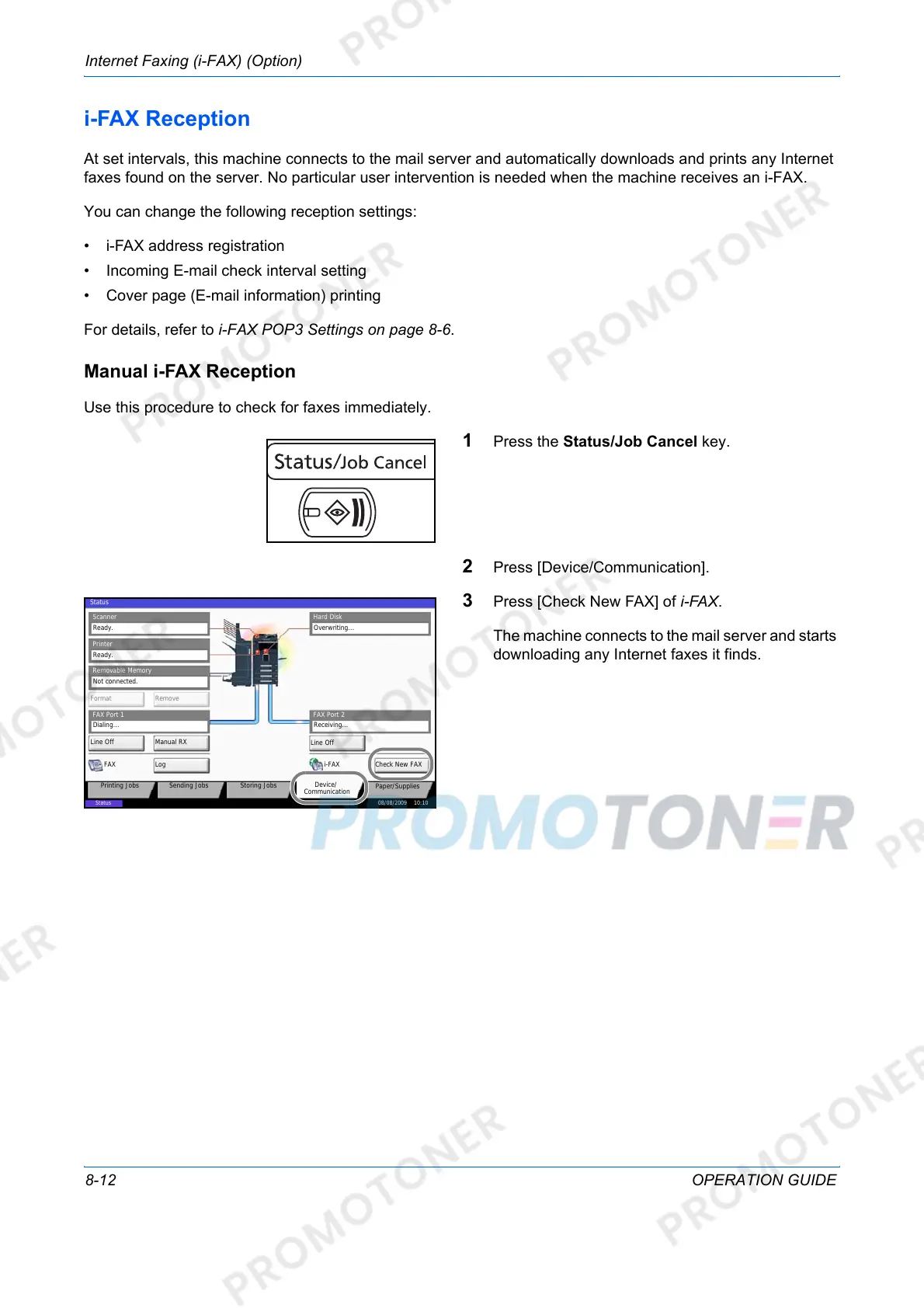
1 Press the Status/Job Cancel key.
2 Press [Device/Communication].
3 Press [Check New FAX] of i-FAX.
The machine connects to the mail server and starts
downloading any Internet faxes it finds.
Overwriting...
Scanner
Ready.
Printer
Not connected.
Removable Memory
Hard Disk
䝯䝰䝸䜹䞊䝗
Format Remove
Line Off Manual RX
FAX Port 1
LogFAX
Check New FAX
i-FAX
FAX Port 2
Line Off
08/08/2009 10:10
Status
Printing Jobs Sending Jobs Storing Jobs
Device/
Communication
Paper/Supplies
Status
Dialing... Receiving...
Ready.



 To Next Page