Internet Faxing (i-FAX) (Option)
OPERATION GUIDE 8-11
8
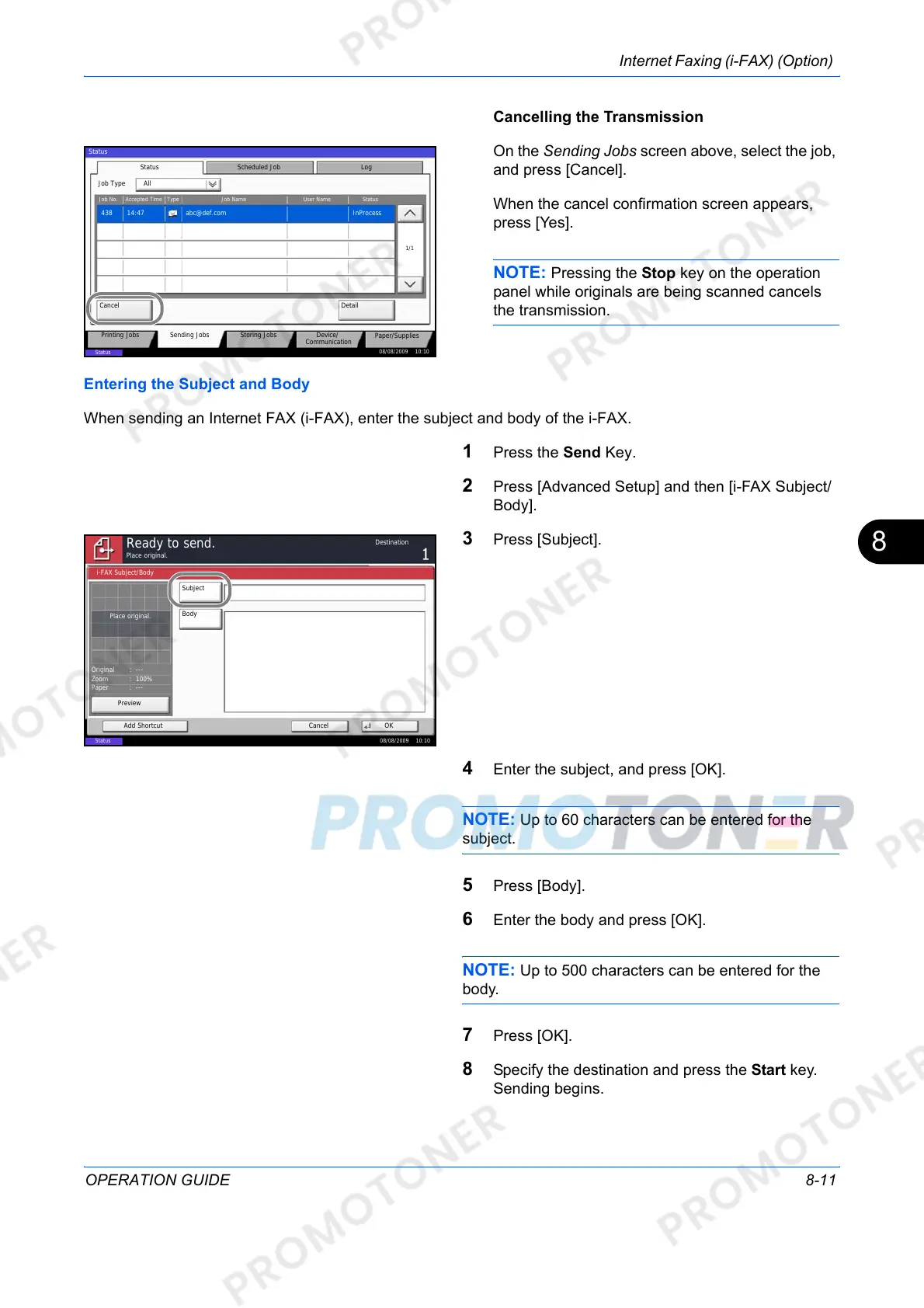
Cancelling the Transmission
On the Sending Jobs screen above, select the job,
and press [Cancel].
When the cancel confirmation screen appears,
press [Yes].
NOTE: Pressing the Stop key on the operation
panel while originals are being scanned cancels
the transmission.
Entering the Subject and Body
When sending an Internet FAX (i-FAX), enter the subject and body of the i-FAX.
1 Press the Send Key.
2 Press [Advanced Setup] and then [i-FAX Subject/
Body].
3 Press [Subject].
4 Enter the subject, and press [OK].
NOTE: Up to 60 characters can be entered for the
subject.
5 Press [Body].
6 Enter the body and press [OK].
NOTE: Up to 500 characters can be entered for the
body.
7 Press [OK].
8 Specify the destination and press the Start key.
Sending begins.
Log
abc@def.com438 14:47
1/1
08/08/2009 10:10
Status
Printing Jobs Sending Jobs Storing Jobs
Device/
Communication
Paper/Supplies
Detail
InProcess
Status
User NameJob NameType
Accepted Time
Job No.
Cancel
Job Type All
Status
Status
Scheduled Job
Subject
Body
i-FAX Subject/Body
Cancel OKAdd Shortcut
Status
08/08/2009 10:10
Preview
Original
Zoom
Paper
100%
---
:
:
:
---
Place original.
Place original.
Ready to send.
Destination



 To Next Page