FAX Operation (Basic)
OPERATION GUIDE 3-5
3
NOTE: In direct transmission, you can designate only
one destination for one transmission.
IMPORTANT: You cannot use direct transmission
when the optional Printed Document Guard Kit is
installed.
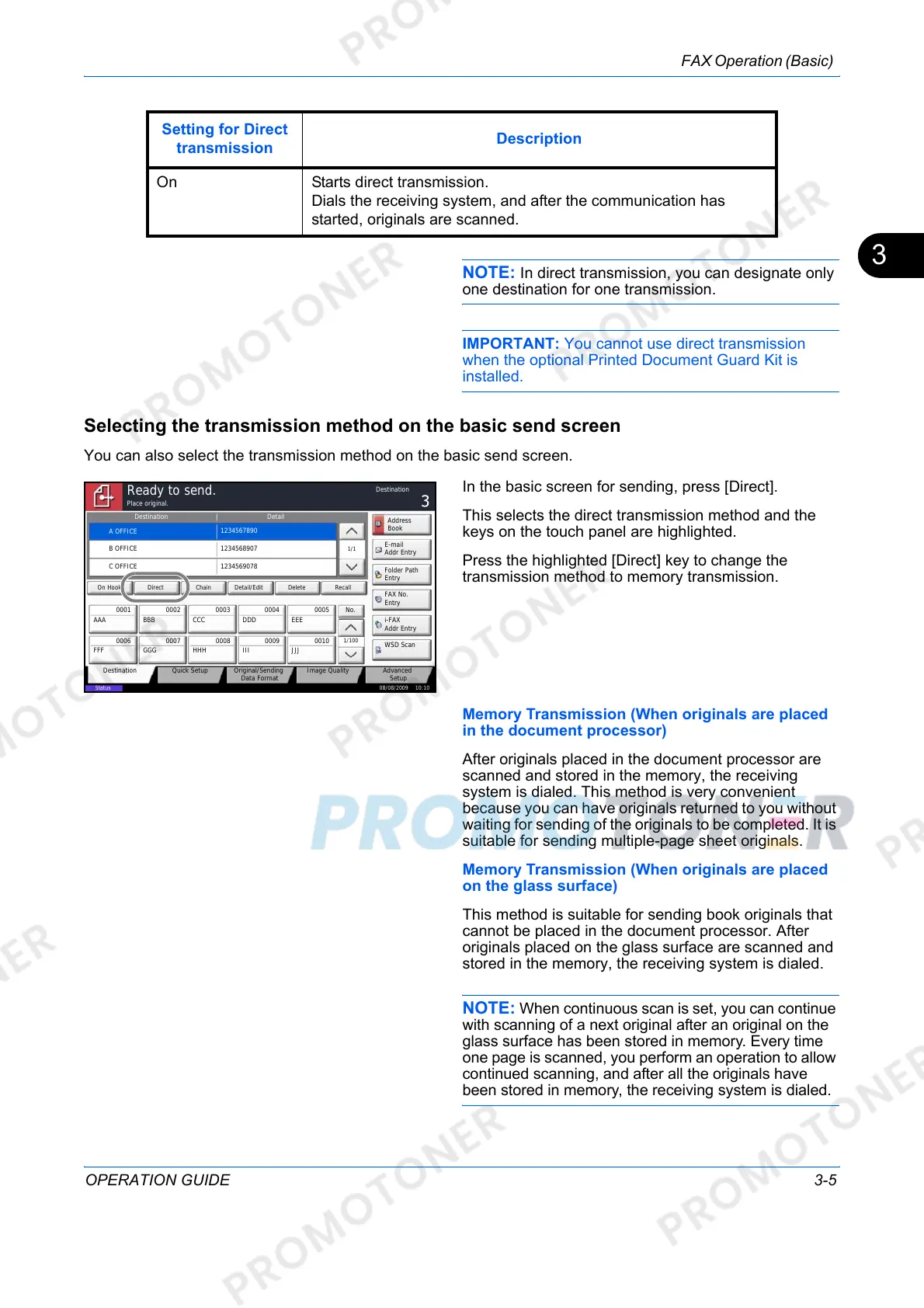
Selecting the transmission method on the basic send screen
You can also select the transmission method on the basic send screen.
In the basic screen for sending, press [Direct].
This selects the direct transmission method and the
keys on the touch panel are highlighted.
Press the highlighted [Direct] key to change the
transmission method to memory transmission.
Memory Transmission (When originals are placed
in the document processor)
After originals placed in the document processor are
scanned and stored in the memory, the receiving
system is dialed. This method is very convenient
because you can have originals returned to you without
waiting for sending of the originals to be completed. It is
suitable for sending multiple-page sheet originals.
Memory Transmission (When originals are placed
on the glass surface)
This method is suitable for sending book originals that
cannot be placed in the document processor. After
originals placed on the glass surface are scanned and
stored in the memory, the receiving system is dialed.
NOTE: When continuous scan is set, you can continue
with scanning of a next original after an original on the
glass surface has been stored in memory. Every time
one page is scanned, you perform an operation to allow
continued scanning, and after all the originals have
been stored in memory, the receiving system is dialed.
On Starts direct transmission.
Dials the receiving system, and after the communication has
started, originals are scanned.
Setting for Direct
transmission
Description
Status
08/08/2009 10:10
Original/Sending
Data Format
Quick SetupDestination Image Quality Advanced
Setup
Destination Detail
A OFFICE
1234567890
Address
Book
Folder Path
Entry
E-mail
Addr Entry
No.
1/100
AAA BBB CCC DDD EEE
FFF GGG HHH III JJJ
00040003 00050001 0002
0006 0007 0008 0009 0010
1/1
i-FAX
Addr Entry
FAX No.
Entry
WSD Scan
Place original.
Ready to send.
Destination
B OFFICE
1234568907
C OFFICE
1234569078
Direct Delete RecallOn Hook Chain Detail/Edit













 To Next Page