8. Jam display Field Service Ver. 2.0 Jan. 2008
38
SD-505
Troubleshooting
8.3 Solution
8.3.1 Initial check items
• When a paper misfeed occurs, first perform the following initial check items.
8.3.2 Solution when paper curl occurs
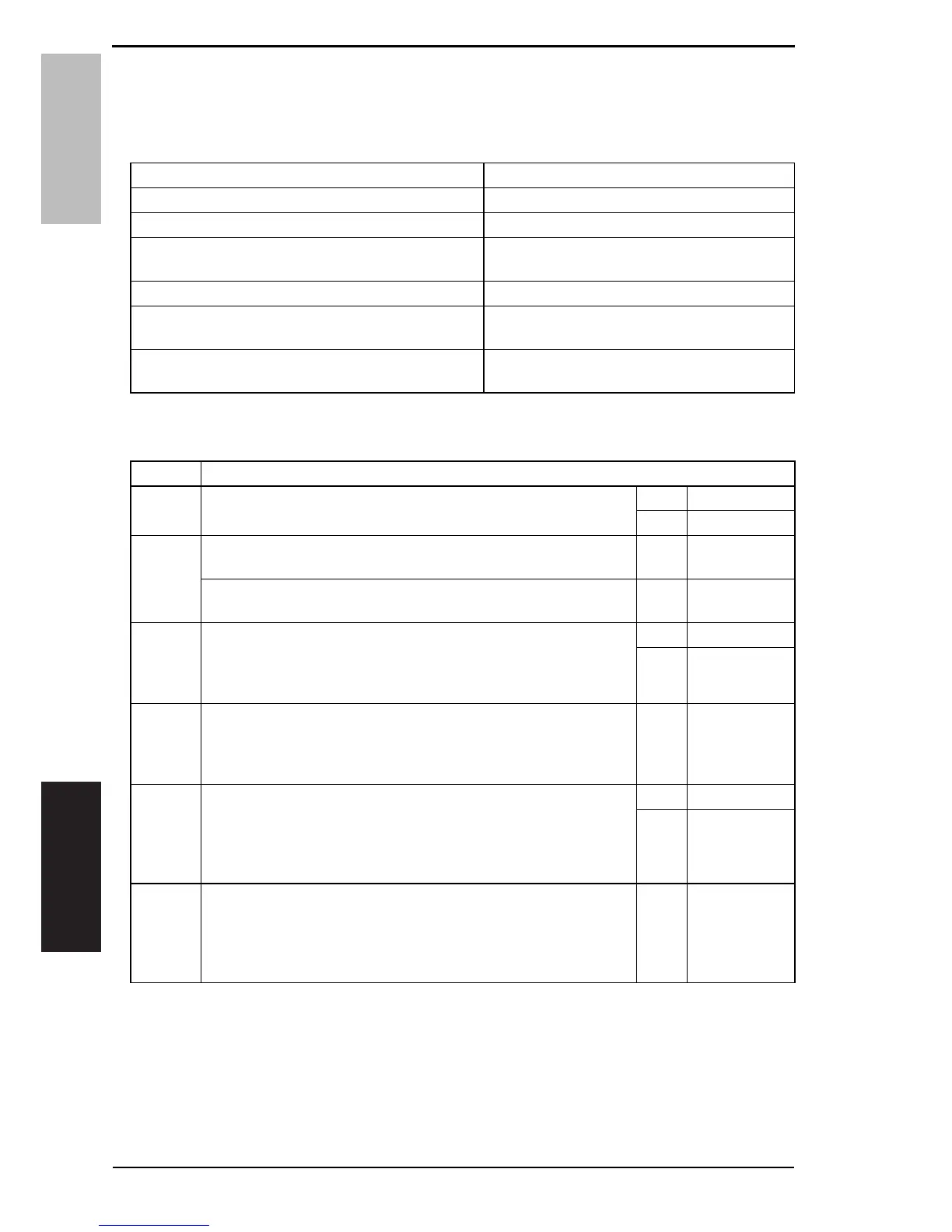
Check Item Action
Does the paper meet product specifications? Change the paper.
Is paper curled, wavy, or damp? See “Solution when paper curl occurs” on P.38.
Is a foreign object present along the paper path, or is
the paper path deformed or worn?
Clean or change the paper path.
Are the rolls/rollers dirty, deformed, or worn? Clean or change the defective roll/roller.
Are the edge guide and trailing edge stop at the cor-
rect position to accommodate the paper?
Set as necessary.
Are the actuators found operational when checked for
correct operation?
Correct or change the defective actuator.
Step Check items/actions
1 Turn over the stacked paper in the paper tray.
OK —
NG Go to step 2.
2
Does paper curl occur just after a warm-up has been completed or
the sleep mode has been turned OFF?
YES Go to step 3.
Does paper curl occur under normal conditions (under conditions
other than those mentioned above)?
YES Go to step 5.
3
1. Call the Service Mode to the screen.
2. Select [System 1] → [Change Warm Up Time].
3. Change the setting to [Mode3].
See P.394 of the main body service manual.
OK —
NG Go to step 4.
4
1. Call the Service Mode to the screen.
2. Select [System 1] → [Change Warm Up Time].
3. Change the setting to [Mode4].
See P.394 of the main body service manual.
——
5
1. Call the Service Mode to the screen.
2. Select [Machine] → [Fusing Temperature].
3. Select a paper type.
4. Change the temperature of Heater Roller to [-10 °C].
See P.346 of the main body service manual.
OK —
NG Go to step 6
6
1. Call the Ser
vice Mode to the screen.
2. Select [Machine] → [Fusing Temperature].
3. Select a paper type.
4. Change the temperature of Heater Roller to [-20 °C].
See P.346 of the main body service manual.
——
Service Manual Y108482-2













 To Next Page