Field Service Ver. 2.0 Jan. 2008 3. Other
11
SD-505Maintenance
3.3.6 Stapler unit
1. Remove the saddle unit.
See P.7
2. Remove the paper output tray.
See P.5
3. Remove the front cover.
See P.5
4. Remove the rear cover.
See P.6
5. Remove the upper cover.
See P.6
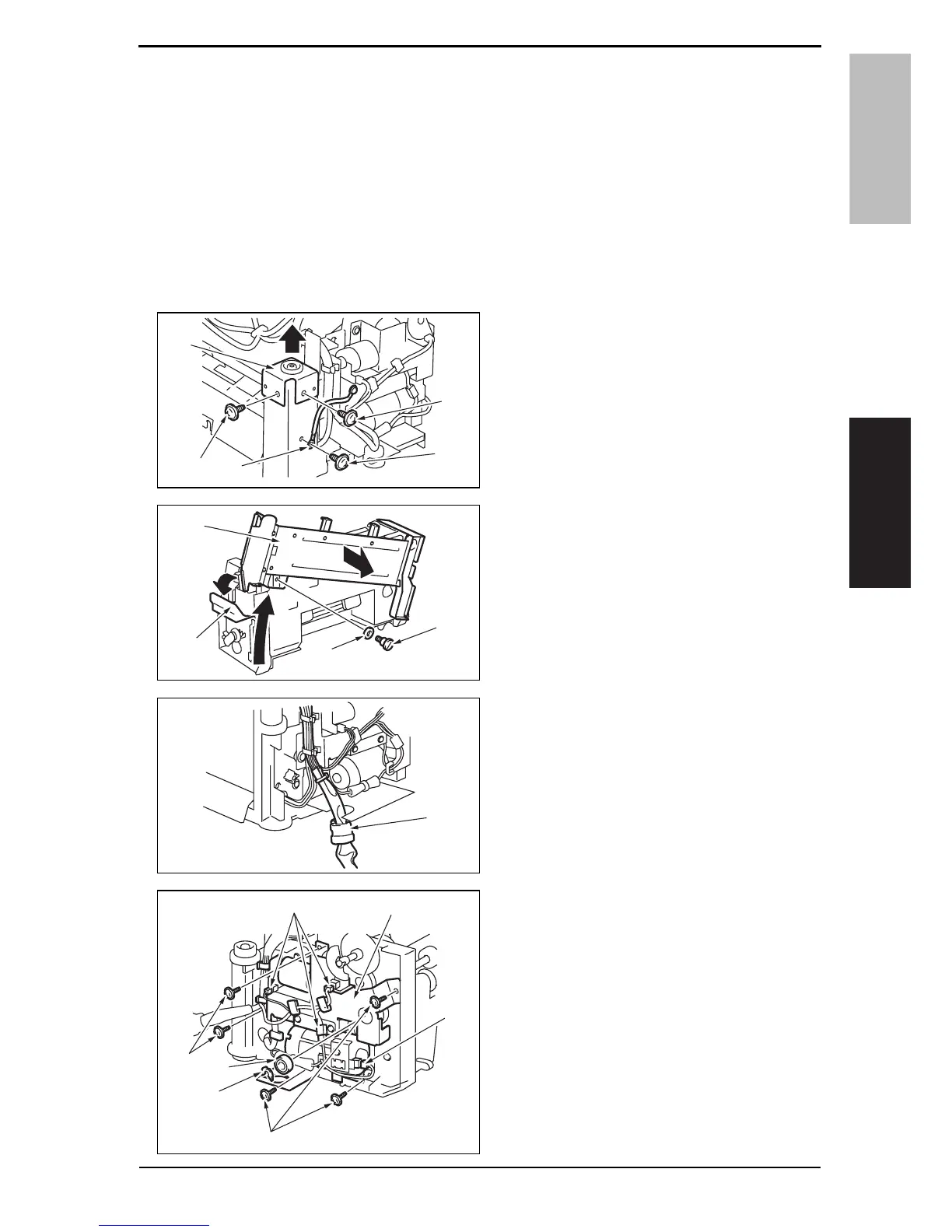
6. Remove the screw [1], and remove
the ground wire [2].
7. Remove two screws [3], and remove
the holder [4].
8. Release the lock release lever [1],
and slide the saddle unit mounting
plate [2].
9. Remove the shoulder screw [3] and
the washer [4], and remove the sad-
dle unit mounting plate [2].
10. Remove the harness clamp [1] from
the metal bracket.
11. Remove the harness from the
wire
saddle.
12. Disconnect four connectors [1].
13. Remove the C-ring [2], and remove
the bearing [3].
14. Remove five screws [4], and remove
the drive unit [5].
4511F2C513DA
[1]
[2]
[3]
[3]
[4]
4511F2C515DA
[3]
[4]
[1]
[2]
4511F2C516DA
[1]
4511F2C517DA
[5]
[1]
[1]
[2]
[3]
[4]
[4]
Y108482-2 Service Manual













 To Next Page