6. Finisher operations Field Service Ver. 2.0 Jan. 2008
32
SD-505
Adjustment / Setting
6.4 Center Staple Position Adjustment
NOTE
Make this adjustment after any of the following procedures has been performed.
• When staple unit has been replaced.
• When center staple position is misaligned.
• When center staple angle adjustment has been made.
1. Load a five-page A4 document in the
document feed tray.
2. Select the center staple mode and
make a copy. (A3 Size)
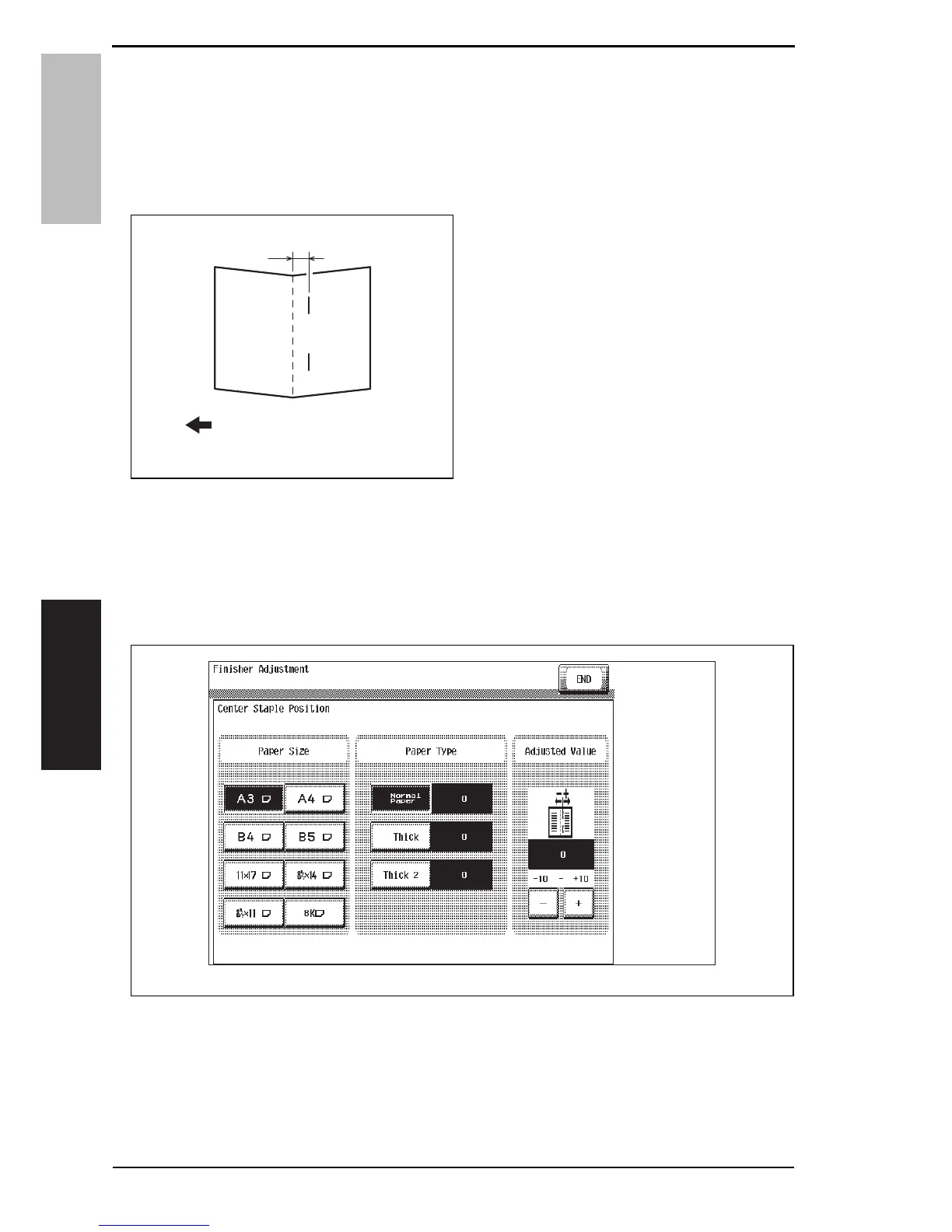
3. Check the staple position for devia-
tion from the crease (Measure width
A).
Specification: 0 ± 1.5 mm
4. When the width A does not fall within
the specified value, conduct the fol-
lowing adjustment.
5. Display the Service Mode screen.
See P.338 of the main body service manual.
6. Touch [Finisher].
7. Touch [CB-FN adjustment].
8. Touch [Fold & Staple Pos.Adjustment].
9. Touch [Center Staple Position].
10. Touch [A3] and then touch [Normal Paper].
4511F3C510DA
A
Exit direction
4511F3E540DA
Service Manual Y108482-2













 To Next Page