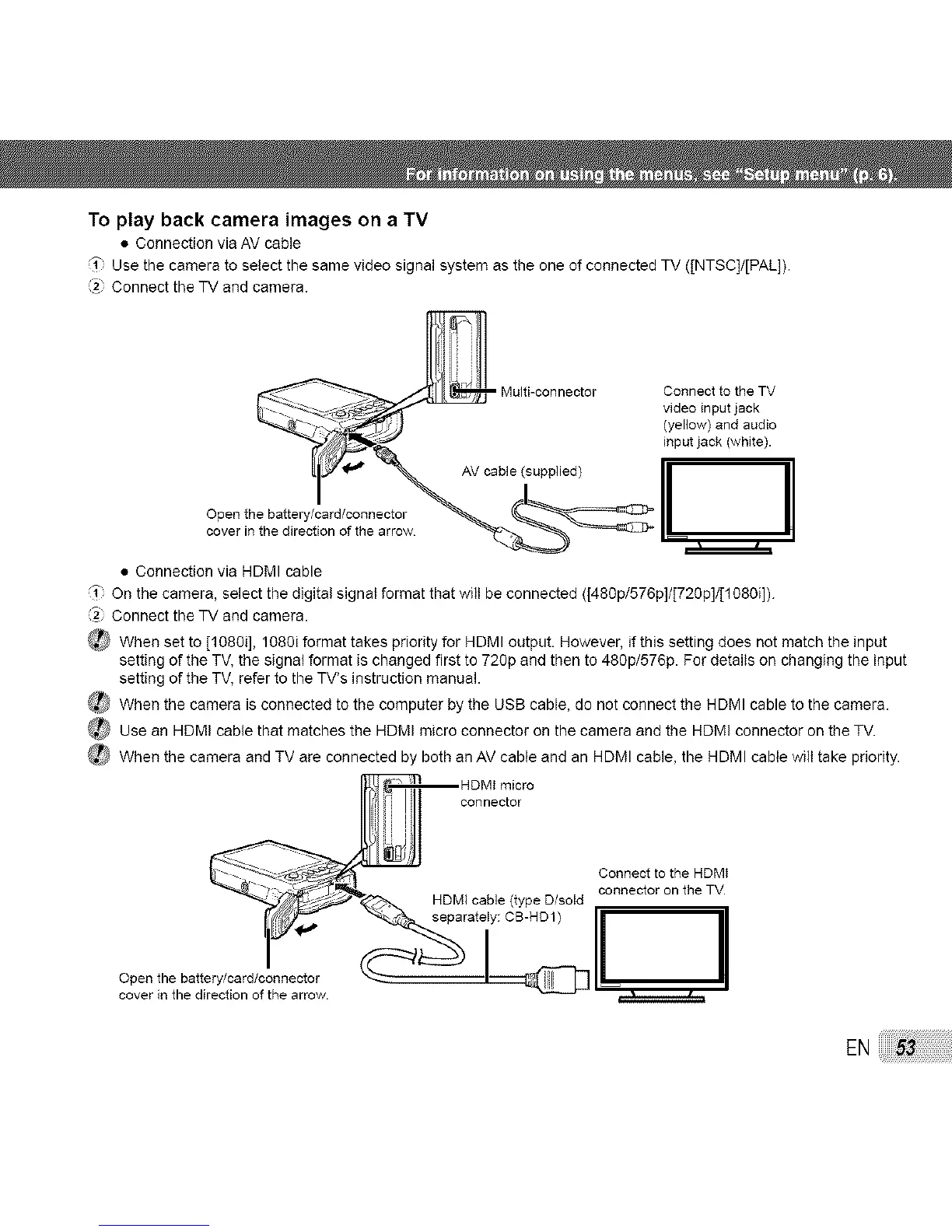
To play back camera images on a TV
• Connection via AV cable
_1" Use the camera to select the same video signal system as the one of connected TV ([NTSC]/[PAL]).
Connect the TV and camera.
video input jack
(yellow) and audio
input jack (white).
Open the battery/card/connector
• Connection via HDMI cable
f" On the camera, select the digital signal format that will be connected ([480p/576p]/[720p]/[1080i]).
(_) Connect the TV and camera.
(_ When set to [1080i], 1080i format takes priority for HDMI output. However, if this setting does not match the input
setting of the TV, the signal format is changed first to 72gp and then to 480p/576p. For details on changing the input
setting of the TV, refer to the TV's instruction manual.
_ When the camera is connected to the computer by the USB cable, do not connect the HDMI cable to the camera.
_Use an HDMI cable that matches the HDMI micro connector on the camera and the HDMI connector on the TV.
_ When the camera and TV are connected by both an AV cable and an HDMI cable, the HDMI cable will take priority.
cHoDMnlectmio_r°
C°nnnec_totr°thfl HDM'
EN:53



 To Next Page