Error message
_#_ When one of the messages below is displayed on the
monitor, check the corrective action.
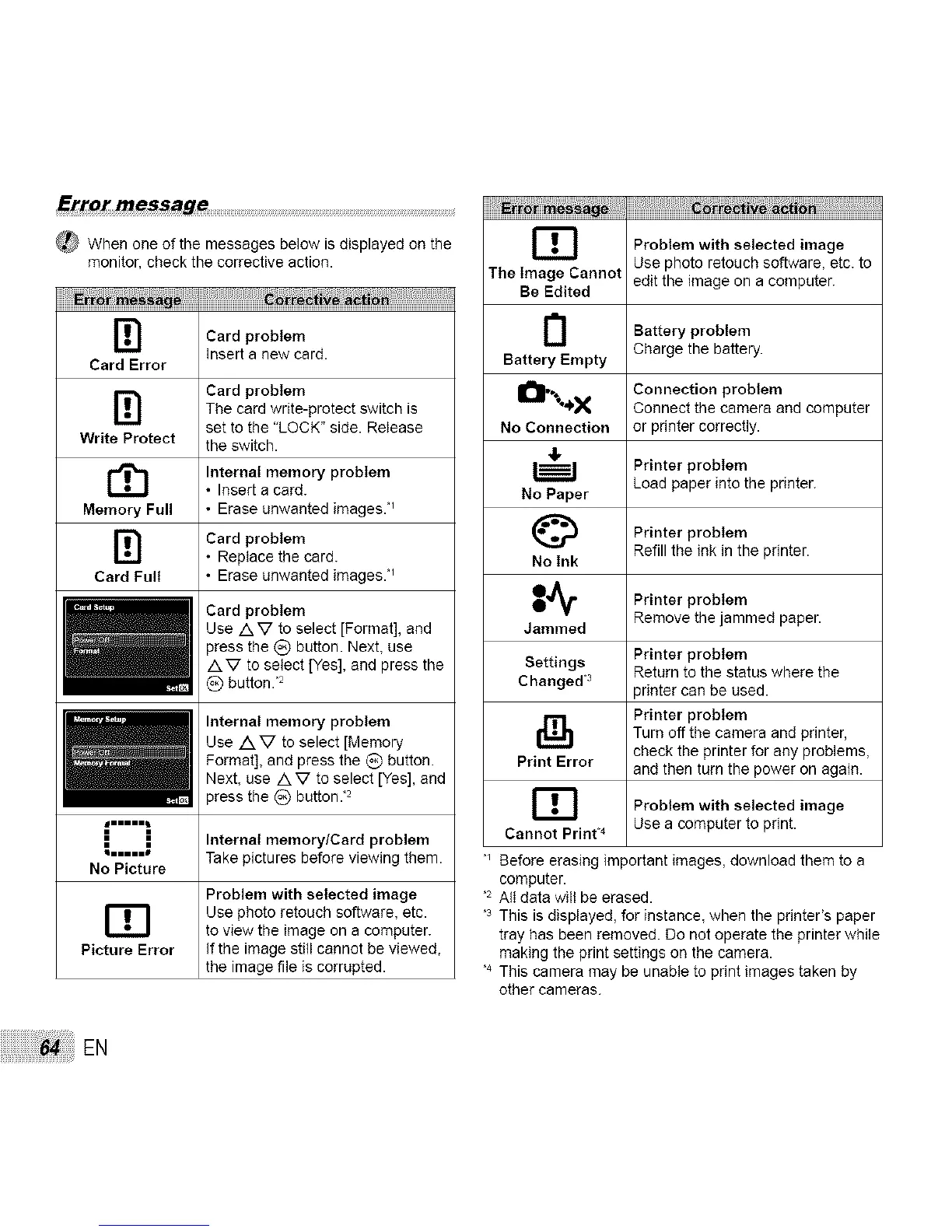
[!]
Card Error
[i]
Write Protect
Memory Full
rn
Card Full
mm
i i
HH.
No Picture Take pictures before viewing them.
Problem with selected image
_T_ Use photo retouch software, etc.
to view the image on a computer.
Picture Error If the image still cannot be viewed,
the image file is corrupted.
EB
The Image Cannot
, Be Edited
Card problem
Insert a new card.
Card problem
The card write-protect switch is
set to the "LOCK" side. Release
the switch.
Internal menlory problem
• Insert a card.
• Erase unwanted images. '_
Card problem
• Replace the card.
• Erase unwanted images. '_
Card problem
Use AV to select [Format], and
press the (_) button. Next, use
A V to select [Yes], and press the Settings
_) button. "2 Changed "3
Internal memory problem
Use AV to select [Memory
Format], end press the _) button. Print Error
Next, use A V to select [Yes], and
press the (_) button :2 _T_
Internal menlory/Card problem Cannot Print 4
Problem with selected image
Use photo retouch software, etc. to
edit the image on a computer.
Battery problem
Charge the battery.
Battery Empty
O ..+.._x Connection problem
Connect the camera and computer
No Connection or printer correctly.
,I.
Printer problem
Load paper into the printer.
No Paper
Printer problem
Refill the ink in the printer.
No Ink
I_ Printer probtem
Remove the jammed paper.
Jammed
Printer problem
Return to the status where the
_rinter can be used.
Printer problem
Turn off the camera and printer,
check the printer for any problems,
and then turn the power on again.
Problem with selected image
Use a computer to print.
Before erasing important images, download them to a
computer.
,2 All data will be erased.
,3 This is displayed, for instance, when the printer's paper
tray has been removed. Do not operate the printer while
making the print settings on the camera.
,4 This camera may be unable to print images taken by
other cameras.
EN



 To Next Page