i_paring the Camera
Inserting the battery
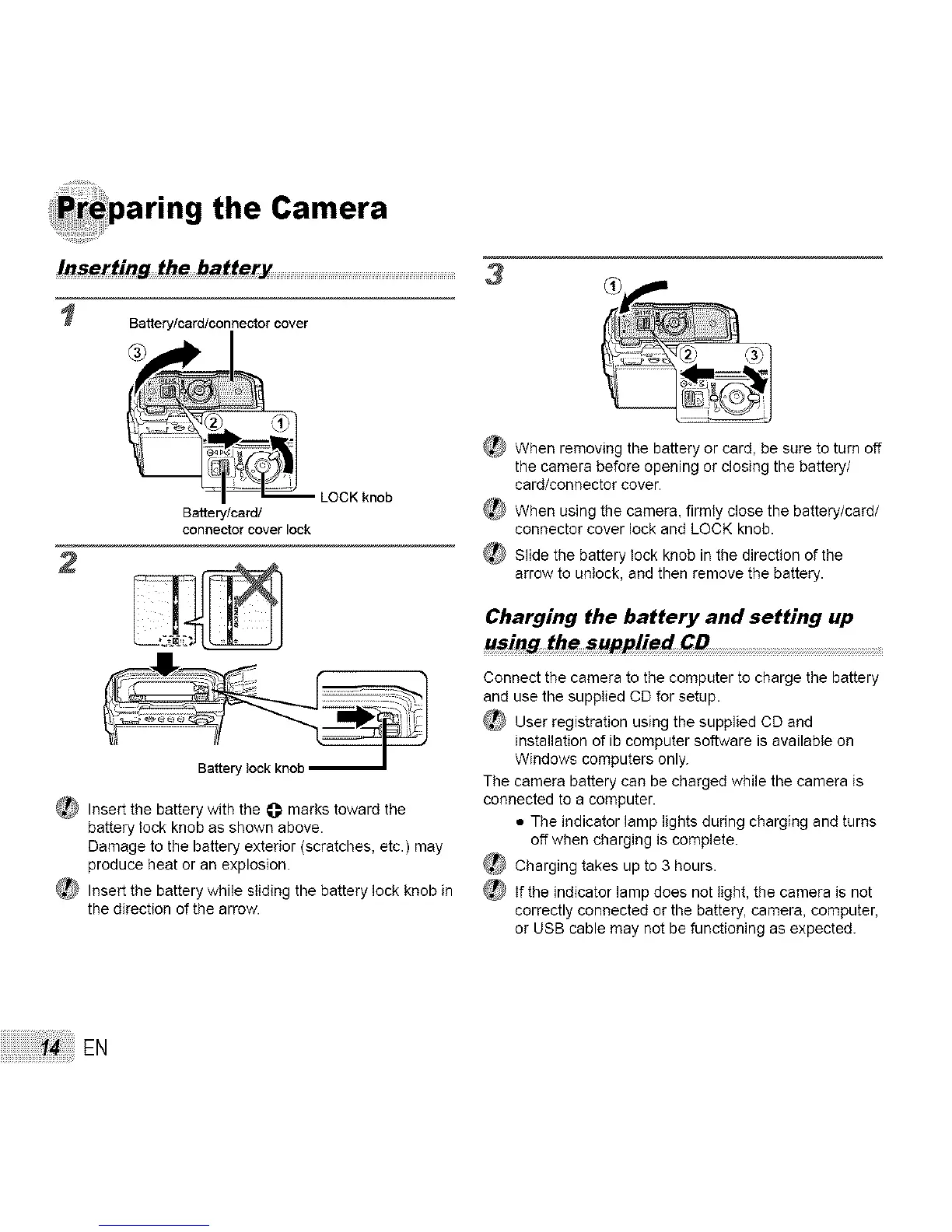
Battery/card/connectorcover
3
Battery/card/
connector cover lock
Battery lock knob
_ Insert the battery with the _]_marks toward the
battery lock knob as shown above.
Damage to the battery exterior (scratches, etc.) may
produce heat or an explosion.
Insert the battery while sliding the battery lock knob in
the direction of the arrow.
_) When removing the battery or card, be sure to turn off
the camera before opening or closing the battery/
card/connector cover.
_[_ When using the camera, firmly close the battery/card/
connector cover lock and LOCK knob.
_ Slide the battery lock knob in the direction of the
arrow to unlock, and then remove the battery.
Charging the battery and setting up
using the supplied CD .........................................................................................................................................................................
Connect the camera to the computer to charge the battery
and use the supplied CD for setup.
_ User registration using the supplied CD and
installation of ib computer software is available on
Windows computers only.
The camera battery can be charged while the camera is
connected to a computer.
• The indicator lamp lights during charging and turns
off when charging is complete.
Charging takes up to 3 hours.
_ If the indicator lamp does not light, the camera is not
correctly connected or the battery, camera, computer,
or USB cable may not be functioning as expected.
EN



 To Next Page