5 Setting Up EtherCAT Communications with the Sysmac Studio
5-8
NJ/NX-series CPU Unit Built-in EtherCAT Port User’s Manual (W505)
3
To specify a variable table for the scope, specify the Variable Type.
The device variable names will be created by combining the device name and the I/O port name. The
device names are set in the slave parameters. The default device names are “E” followed by a serial
number that starts from 001. For example, this method can be used to register device variables in the
following case.
• To eliminate the work that is involved in obtaining the device variable names.
Use the following procedure.
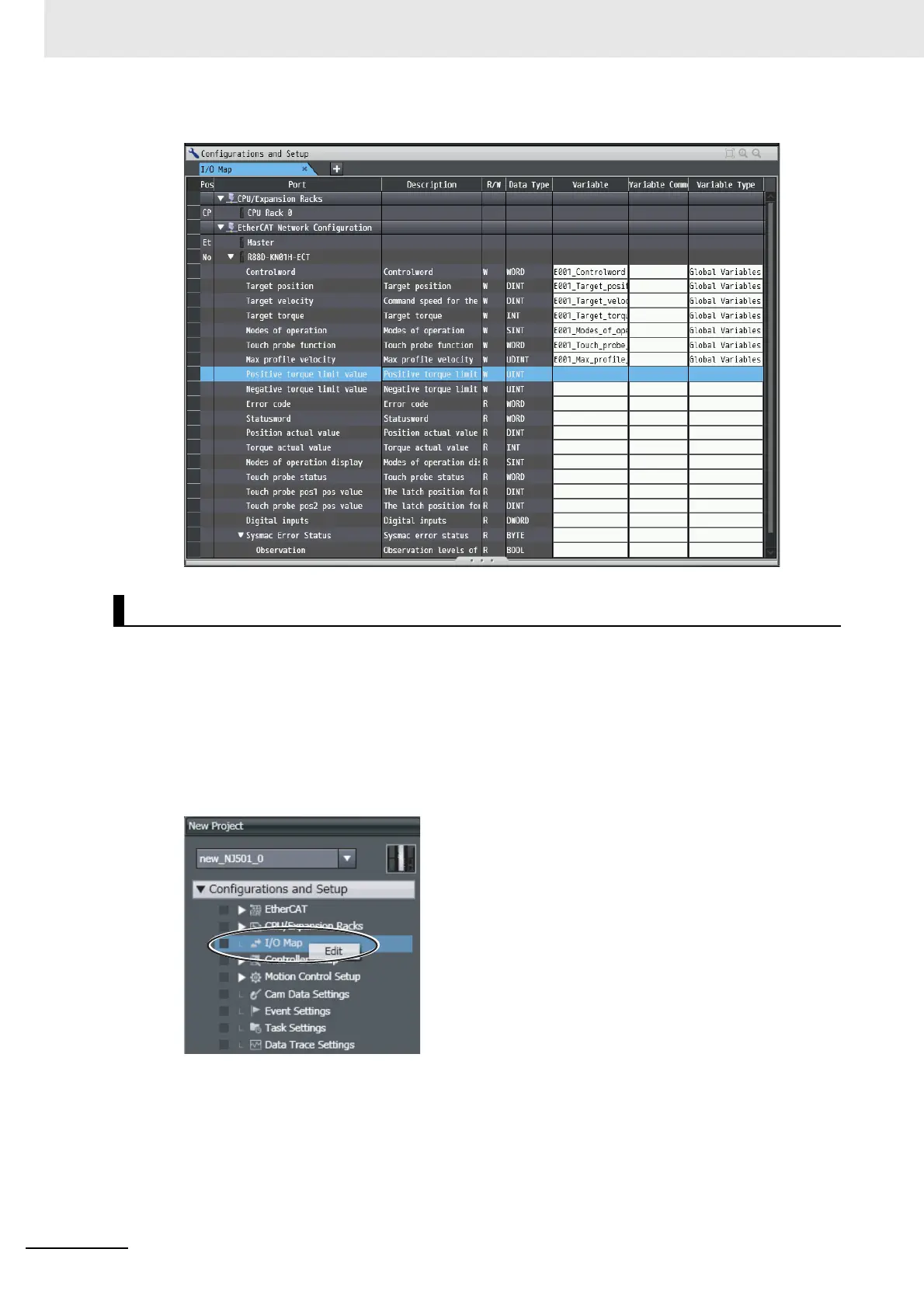
1
Double-click I/O Map under Configurations and Setup on the Multiview Explorer. Or, right-
click I/O Map under Configurations and Setup and select Edit.
The I/O Map Tab Page will be displayed.
Automatically Creating Device Variable Names


 To Next Page
 Loading...