Firmware download Crocus CNV
138 Reference manual
11.1 Downloading with TMA
To download firmware with TMA, proceed as follows:
Step Action
1 Establish a link between TMA and the Crocus CNV through the auxiliary connector.
Refer to Section 4.2 - Connecting to a Crocus CNV with TMA.
2 In the TMA window select Tools Æ Download…
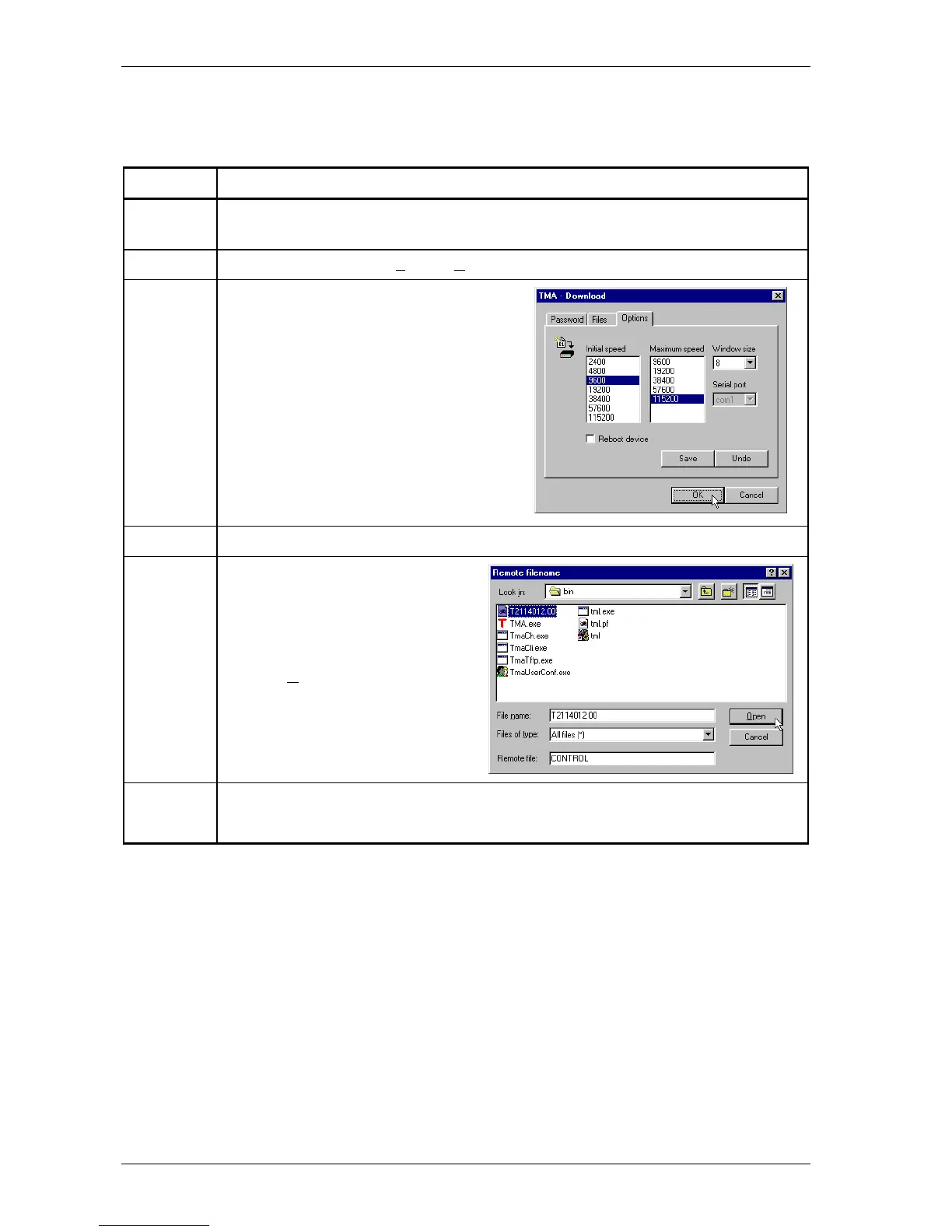
3 In the TMA – Download window, select the
Options tab.
Here it is a good practice to set the initial
transfer speed to 9600 bps.
If you set the maximum transfer speed to
115200 bps, the actual transfer speed will be
negotiated between the computer and the
Crocus CNV and will be between 9600 bps
and 115200 bps.
4 In the TMA – Download window, select the Configuration tab, and press Add…
5 In the Remote filename window:
1. Select the filename you want to
download (Txxxxxxx.00).
2. Type CONTROL in the Remote file
field.
3. Press O
pen.
6 When the TMA – Download window reappears, press OK.
⇒ A DOS window opens and shows the download progress.



 To Next Page