Crocus CNV Installing and connecting the Crocus CNV
User manual 19
2.6.1 Inserting the Card Version in the CN4 card nest
The Crocus CNV CV consists of a stuffed print, provided with a front panel. The CV has to be inserted in
the CN4 card nest. Most connections to this card are performed via 3 DIN-connectors on the back of the
card:
• the middle connector for power supply, line and management connections
• the two extreme connectors for interface connections.
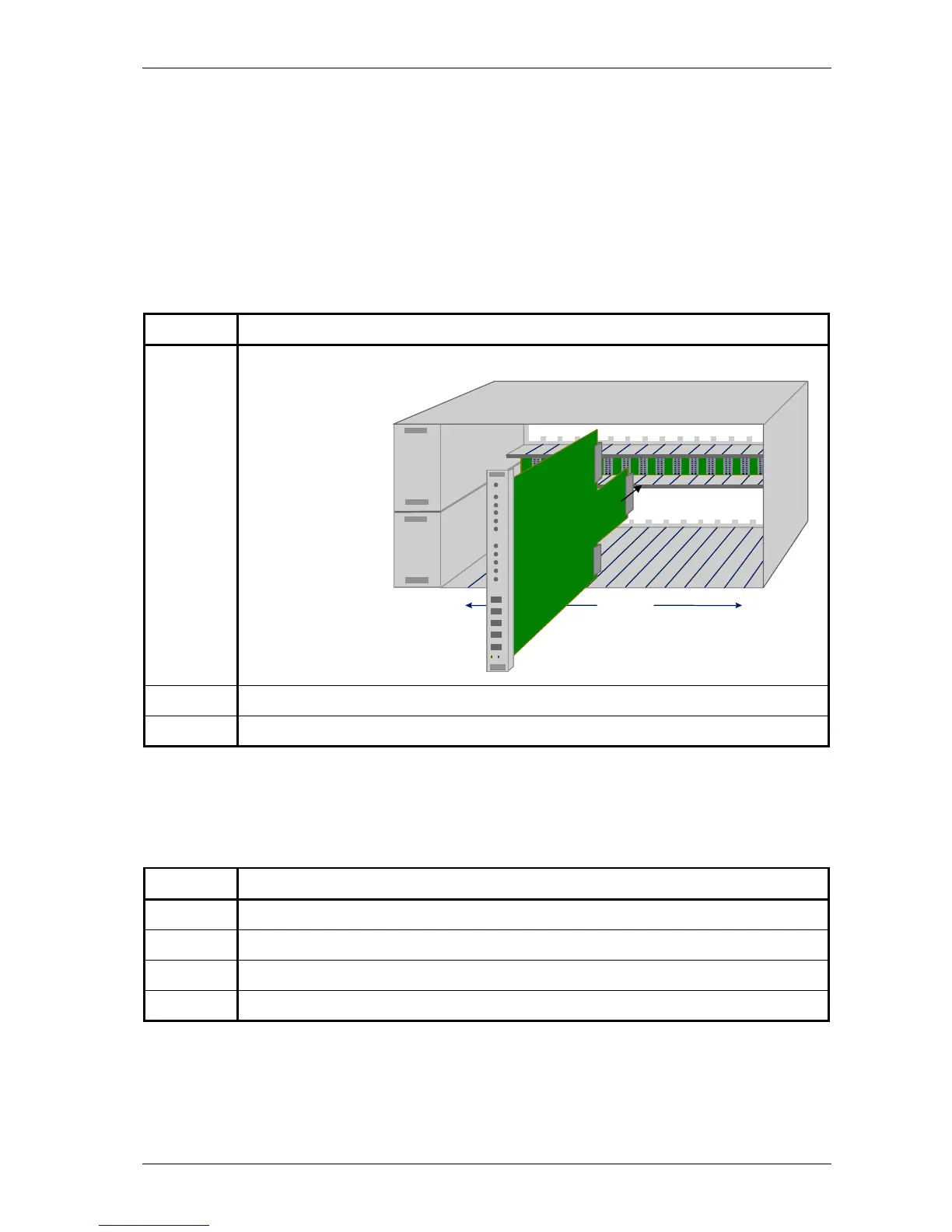
Inserting the CV in the CN4 card nest
To insert the CV in the CN4 card nest, proceed as follows:
Step Action
1 Gently slide the CV on the two inner slides into an available slot.
The following figure
shows this procedure:
2 When nearly inserted, press tight.
3 Lock both screws.
Filling an entire CN4 card nest
For EMC reasons the cards all fit closely to each other. Therefore, you will experience that inserting the
last card in a completely filled up rack happens to be more stiffly. To fill up an entire rack, it is best to
proceed as follows:
Step Action
1 Insert card 1 up to 14 in slot 0 up to 13 of the CN4 card nest.
2 Fasten the screws of card 1 up to 14.
3 Insert the last card in slot 14 of the CN4 card nest.
4 Fasten the screws of the last card.
15 slots



 To Next Page