Chapter 4: Firewall, Failover & OOB Access
90
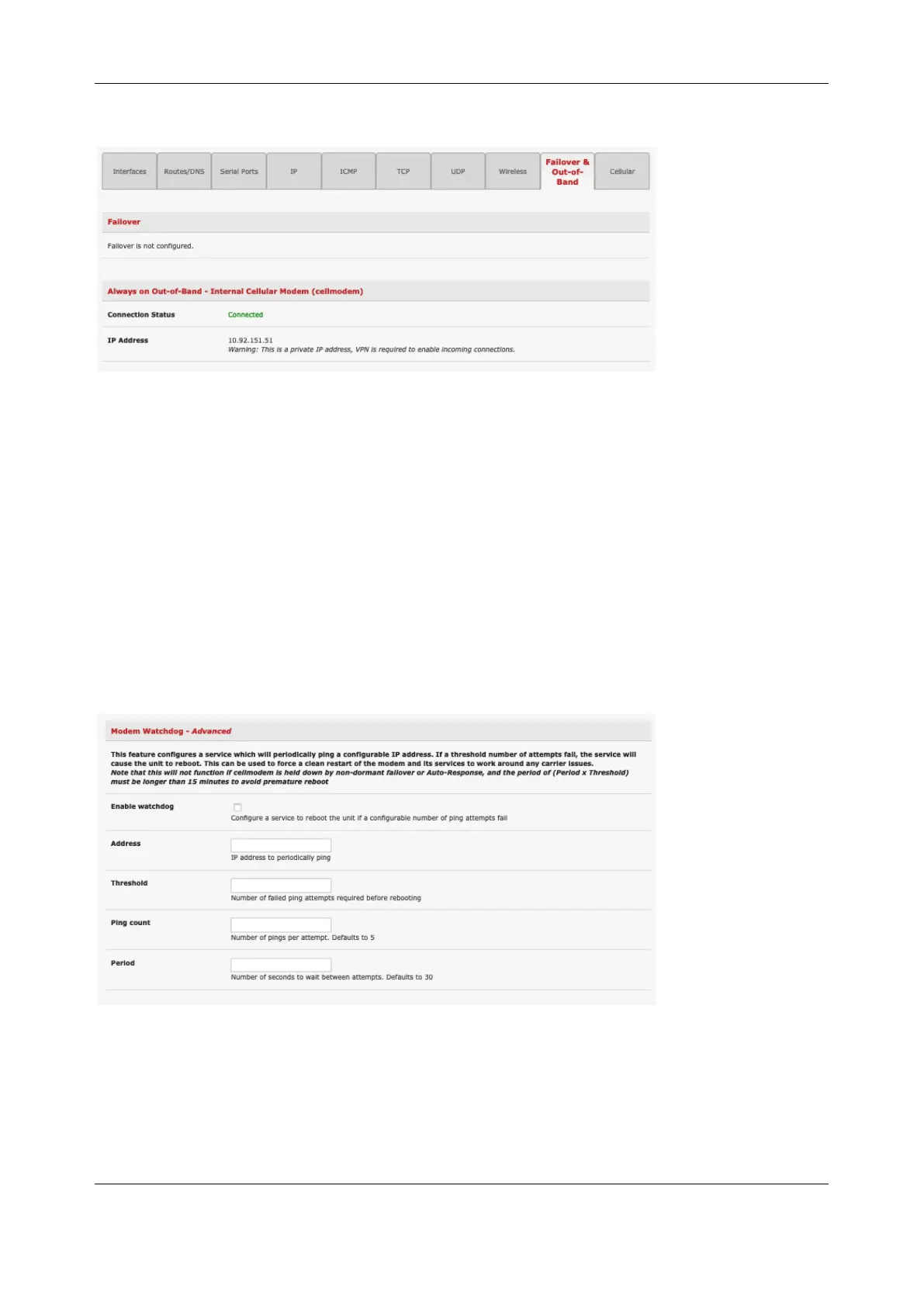
o You can check your allocated IP address
• Measure the received signal strength from the Cellular Statistics page on the Status >
Statistics screen. This displays the current state of the cellular modem including the Received Signal
Strength Indicator (RSSI). The best throughput comes from placing the device in an area with the
highest RSSI.
-100 dbm or less = Unacceptable coverage
-99 dbm to –90 dbm = Weak Coverage
-89 dbm to – 70 dbm = Medium to High Coverage
-69 dbm or greater = Strong Coverage
You can also see the connection status from the LEDs on top of unit
4.6.5 Cellular modem watchdog
Select Enable Dial-Out on the System > Dial menu under Internal Cellular Modem to configure a cellular
modem watchdog service. This service periodically pings a configurable IP address. If a threshold number
of consecutive attempts fail, the service reboots the unit to force a clean restart of the modem and its
services to work around any carrier issues.
4.6.6 Dual SIM failover
Some console server models allow you to insert two SIM cards so you can connect to two carrier
networks. The dual SIM failover feature allows the cell modem to selectively failover to the secondary SIM
when communications over the primary SIM fails.


 To Next Page