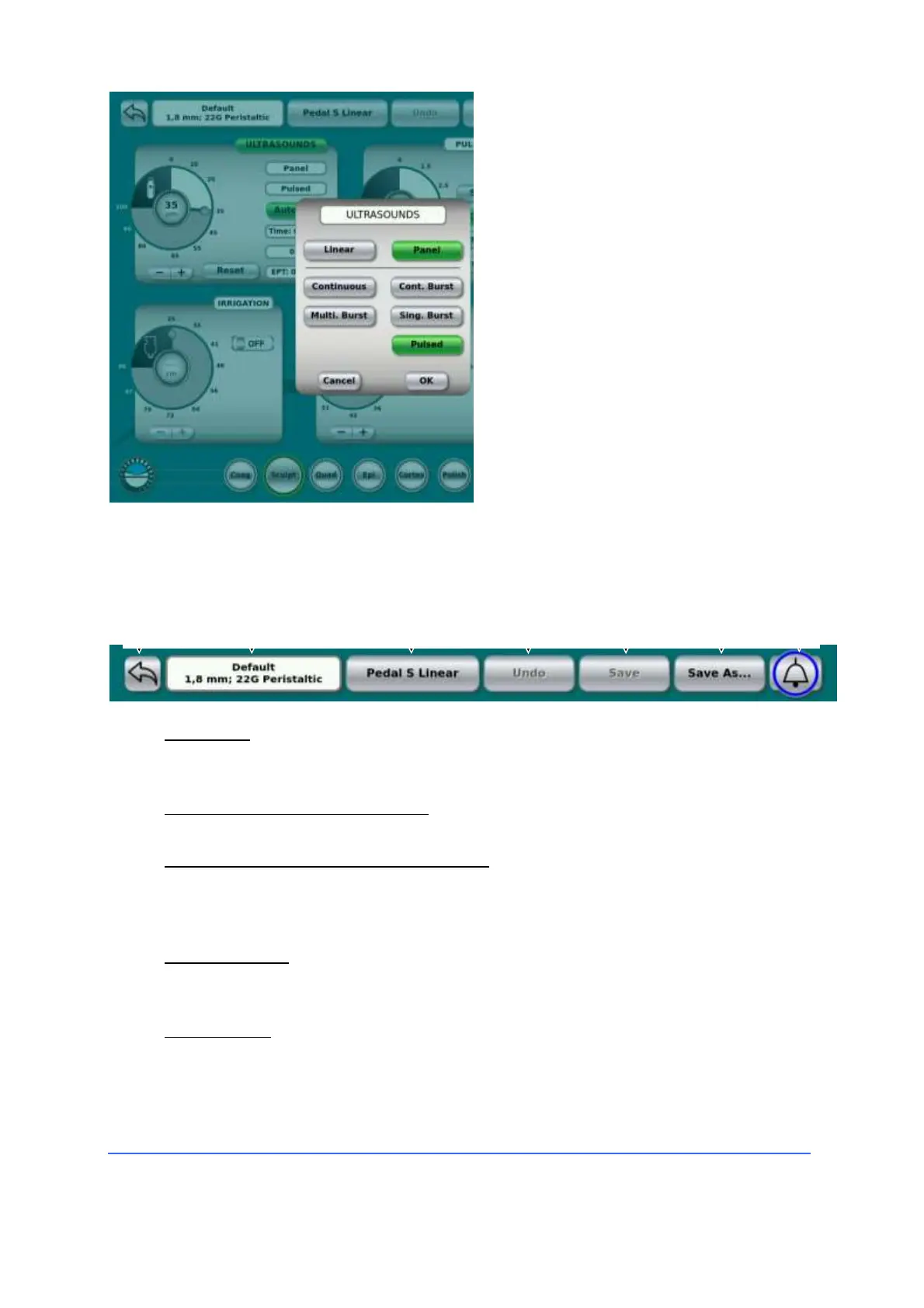
To set the status or value of parameters
that are changed less frequently, such
as linear or panel control (fixed) or
emission mode, the user touches the
"Ultrasound" button located at the top
of the window.
This opens a new window that allows
the control of all additional
parameters.
Tap a key to change the desired
parameter, then "OK" to close the
opened window.
Some settings, e.g. Pulsed, may require to present to the user a dial, buttons or other
additional controls.
A bar at the top of the touchscreen contains a variety of buttons and indicators:
1. "Back" key
Pressing this button returns to the previous screen, from which you can select a
new user program.
2. Indicator of the user's program.
Shows the name of the user program currently in use.
3. Foot switch program button/indicator.
The footswitch can be configured to work according to the surgeon's
preference. To access the list of programs available for the footswitch, press
this button.
4. Cancel button.
It allows to cancel any modification made by the user to the active program.
The button is not active (grey writing) when no changes have been made yet.
5. Save button.
It allows updating the current user program with all the changes made by the
user (current configuration). The predefined (Default) programs can not be
modified and saved with the same name.



 To Next Page