14
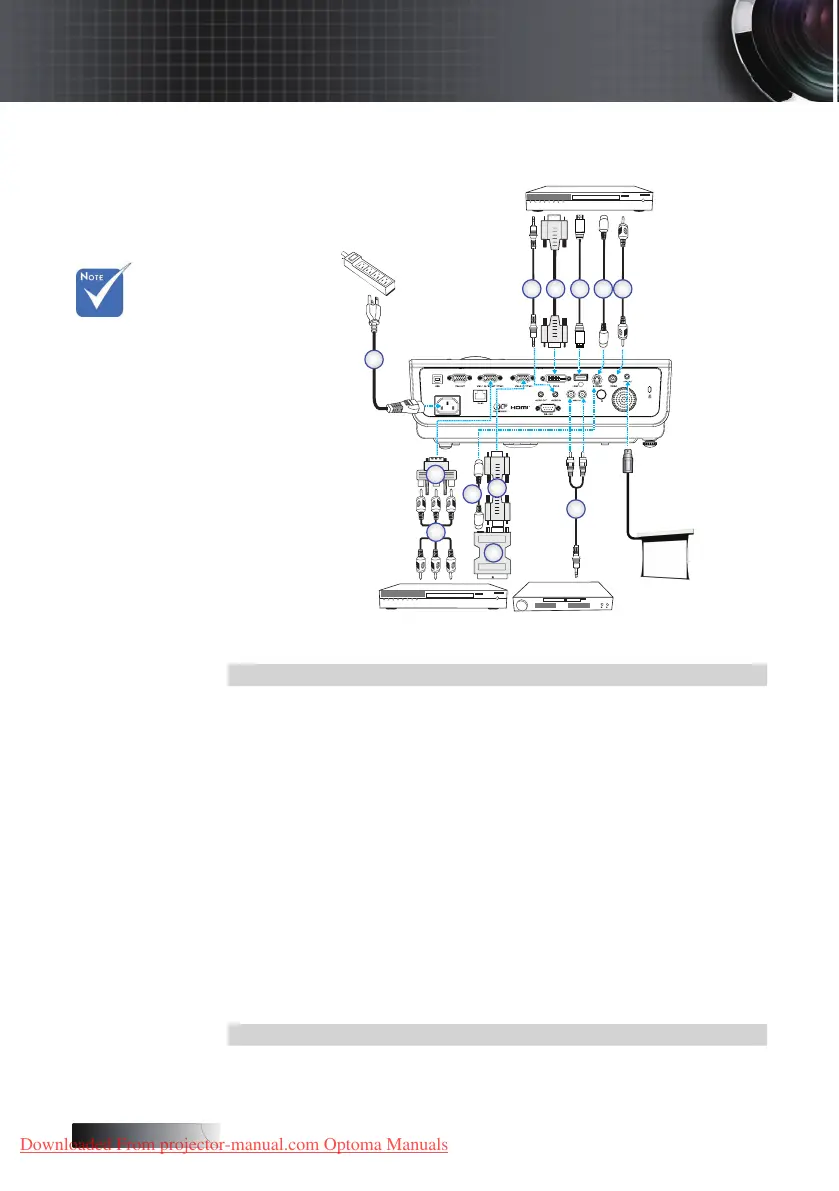
Connect to Video Sources
1. Power Cord
2. Audio-in Cable (Optional)
3. DVI-D Cable (Optional)
4. HDMI Cable (Optional)
5. S-Video Cable (Optional)
6. Video Cable (Optional)
7. Audio-in Cable (Optional)
8. VGA Cable
9.
SCART to RGB & S-Video Adapter (Optional)
10.
RGB to Component Adapter (Optional)
11.
Component Cable (Optional)
4
DVD Player, Set-top Box,
HDTV receiver
DVD Player, Set-top Box,
HDTV receiver
Video Output
10
11
1
32 4 5
5
8
9
6
7
Installation
Due to the
dierence in
applications
for each
country,
some re-
gions may
have dier-
ent
accessories.
v
Downloaded From projector-manual.com Optoma Manuals





 To Next Page