28
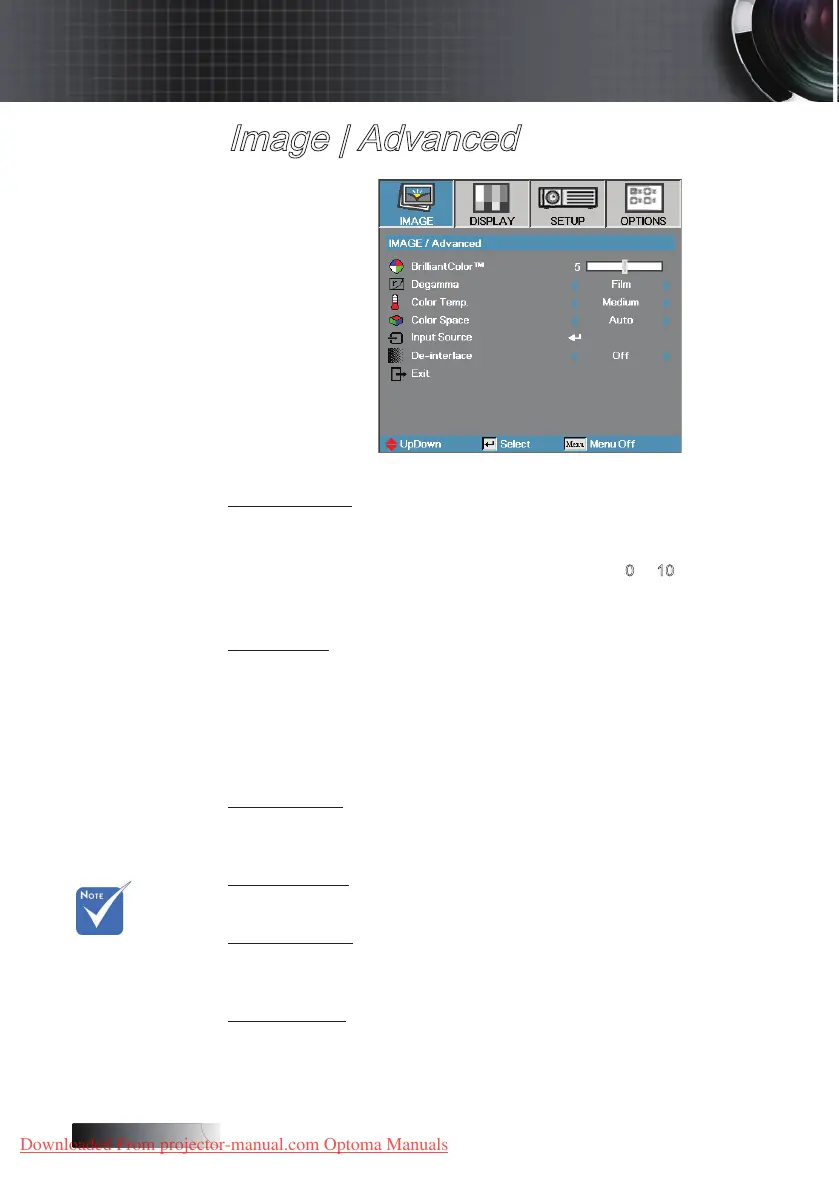
Image | Advanced
BrilliantColor
TM
This adjustable item utilizes a new color-processing algorithm and
system level enhancements to enable higher brightness while providing
true, more vibrant colors in picture. The range is from 0 to 10. If you
prefer a stronger enhanced image, adjust toward the maximum setting.
For a smoother, more natural image, adjust toward the minimum setting.
Degamma
This allows you to choose a degamma table that has been ne-tuned to
bring out the best image quality for the input.
4
Film—for home theater.
4
Video—for video or TV source.
4
Graphics—for image source.
4
PC—for PC or computer source.
Color Temp
Adjust the color temperature. Cold temperature, the screen looks colder;
with Warm temperature, the screen looks warmer.
Color Space
Select an appropriate color matrix type from AUTO, RGB, YUV.
Input Source
Enter the Input Source submenu. Select the sources to scan for at startup.
See page 29 for more information.
De-interlace
Press the cursor ◄ or ► button to select dierent De-interlace modes. This
function converts an interlaced video signal into progressive signal.
4
On: Use this mode for Films.
4
O: Use this mode for Video or TV sources.
De-interlace
only support
480i/576i
signal via
Component/
S-video/
Video.
v
User Controls
Downloaded From projector-manual.com Optoma Manuals





 To Next Page