20
Control Panel
User Controls
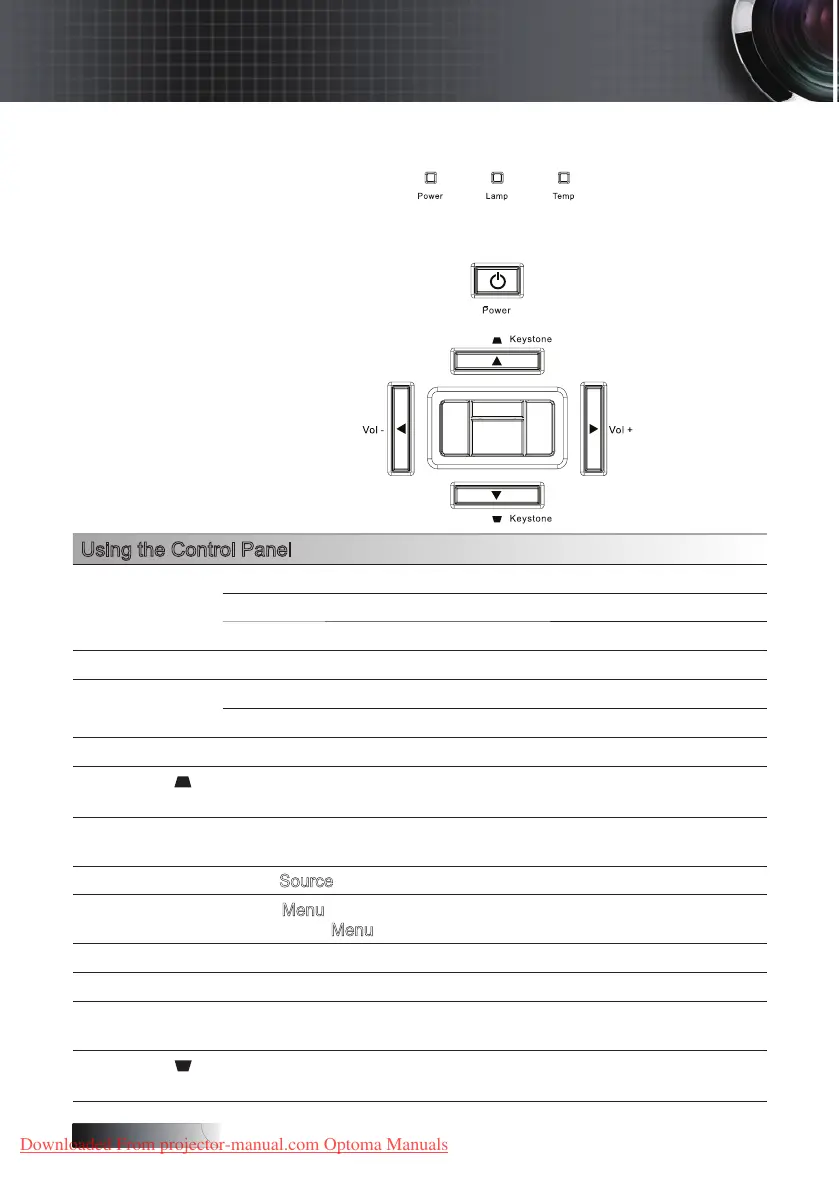
Using the Control Panel
Power LED
Green Power On
O Power O (AC O)
Flashing Standby
Lamp LED Red Error code
Temp LED
Red Error code
Flashing Error code
Power Turn the projector On or O.
▲/Keystone
(Up arrow)
•Adjust the image Keystone positively.
•
Navigates and changes settings in the OSD.
◄/Vol -
(Left arrow)
•Volume down
•
Navigates and changes settings in the OSD.
Source
Press Source to select an input signal.
Menu
Press
Menu
to launch the on-screen display (OSD) menu. To exit
OSD, Press
Menu
again.
Enter Conrm your item selection.
Re-Sync Automatically synchronizes the projector to the input source.
►/Vol +
(Right arrow)
•Volume up
•
Navigates and changes settings in the OSD.
▼/Keystone
(Up arrow)
•Adjust the image Keystone positively.
•
Navigates and changes settings in the OSD.
Downloaded From projector-manual.com Optoma Manuals





 To Next Page