can see the OS startup screen at this time
7) If you want to view the output information of the OS through the debug serial port,
please use the serial cable to connect the development board to the computer. For the
connection method of the serial port, please refer to the section on the use of the
debug serial port
2.7. How to use the debug serial port?
2.7.1. Debug serial port connection instructions
1) First, you need to prepare a USB to TTL module. This module can be bought in
Orange Pi stores. If there are other similar USB to TTL modules, you can also insert
the USB end of the USB to TTL module into the USB port of the computer
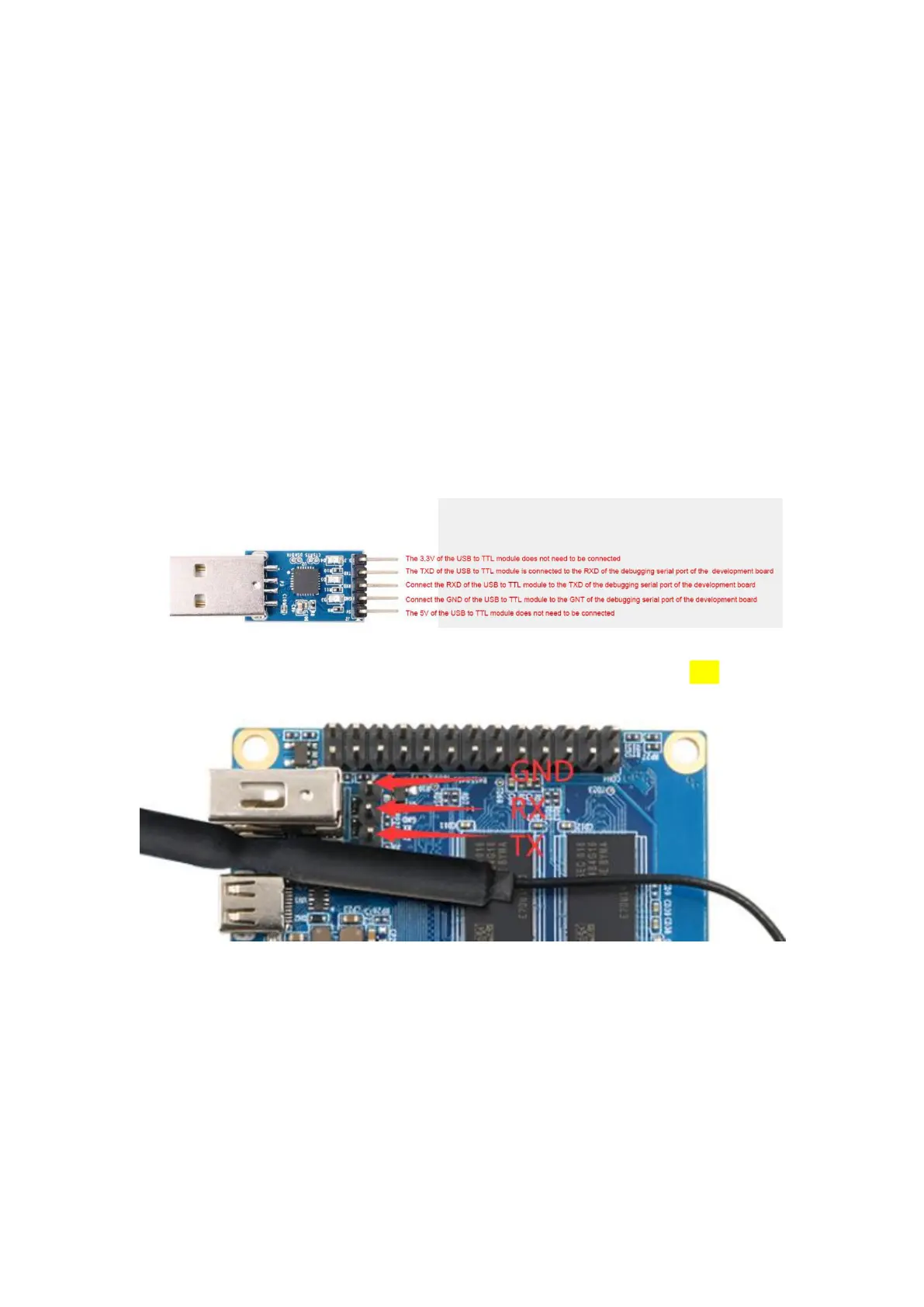
2) The corresponding relationship between the debug serial port GND, TX, and RX
pins of the development board is shown in the figure below
3) The GND, TX, and RX pins of the USB to TTL module need to be connected to the
debug serial port of the development board through a Dupont cable
a. Connect the GND of the USB to TTL module to the GND of the board
b. Connect the RX of the USB to TTL module to the TXD of the board
c. Connect the TX of the USB to TTL module to the RX of the board
4) The schematic diagram of connecting the USB to TTL module to the computer and
the Orange Pi development board is shown below



 To Next Page