bits per word: 8
max speed: 500000 Hz (500 KHz)
TX | FF FF FF FF FF FF 40 00 00 00 00 95 FF FF FF FF FF FF FF FF FF FF FF FF
FF FF FF FF FF FF F0 0D | ......@....▒..................▒.
RX | FF FF FF FF FF FF 40 00 00 00 00 95 FF FF FF FF FF FF FF FF FF FF FF FF
FF FF FF FF FF FF F0 0D | ......@....▒..................▒.
3.23.5. I2C test
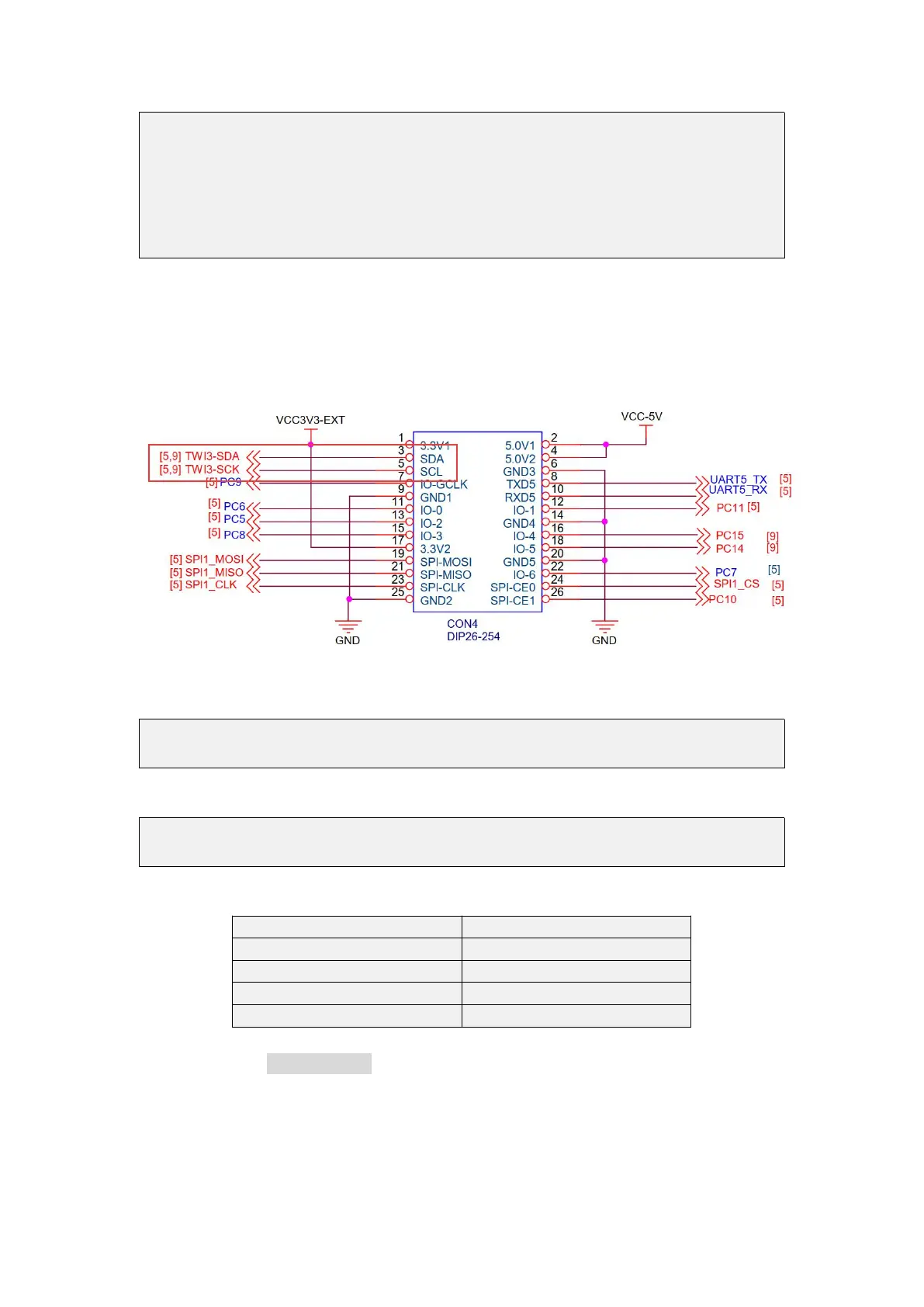
1) According to the schematic diagram of 26pins, the i2c available for Orange Pi Zero
2 is i2c3
2) After starting the linux OS, first confirm that there is an i2c3 device node under
/dev
root@orangepi:~# ls /dev/i2c-*
/dev/i2c-3 /dev/i2c-5
3) Then start to test i2c, first install i2c-tools
root@orangepi:~# apt update
root@orangepi:~# apt install i2c-tools
4) Then connect an i2c device to the i2c3 pin of the 26pins connector
5) Then use the i2cdetect -y 3 commands if the address of the connected i2c device
can be detected, it means that i2c can be used normally



 To Next Page