1) WiringOP has been adapted to the Orange Pi Zero 2 development board, using
wiringOP can test the functions of GPIO, I2C, UART, and SPI
2)Download the code of wiringOP
root@orangepi:~# apt update
root@orangepi:~# apt install git
root@orangepi:~# git clone https://github.com/orangepi-xunlong/wiringOP
3) Compile wiringOP
root@orangepi:~# cd wiringOP
root@orangepi:~/wiringOP# ./build clean
root@orangepi:~/wiringOP# ./build
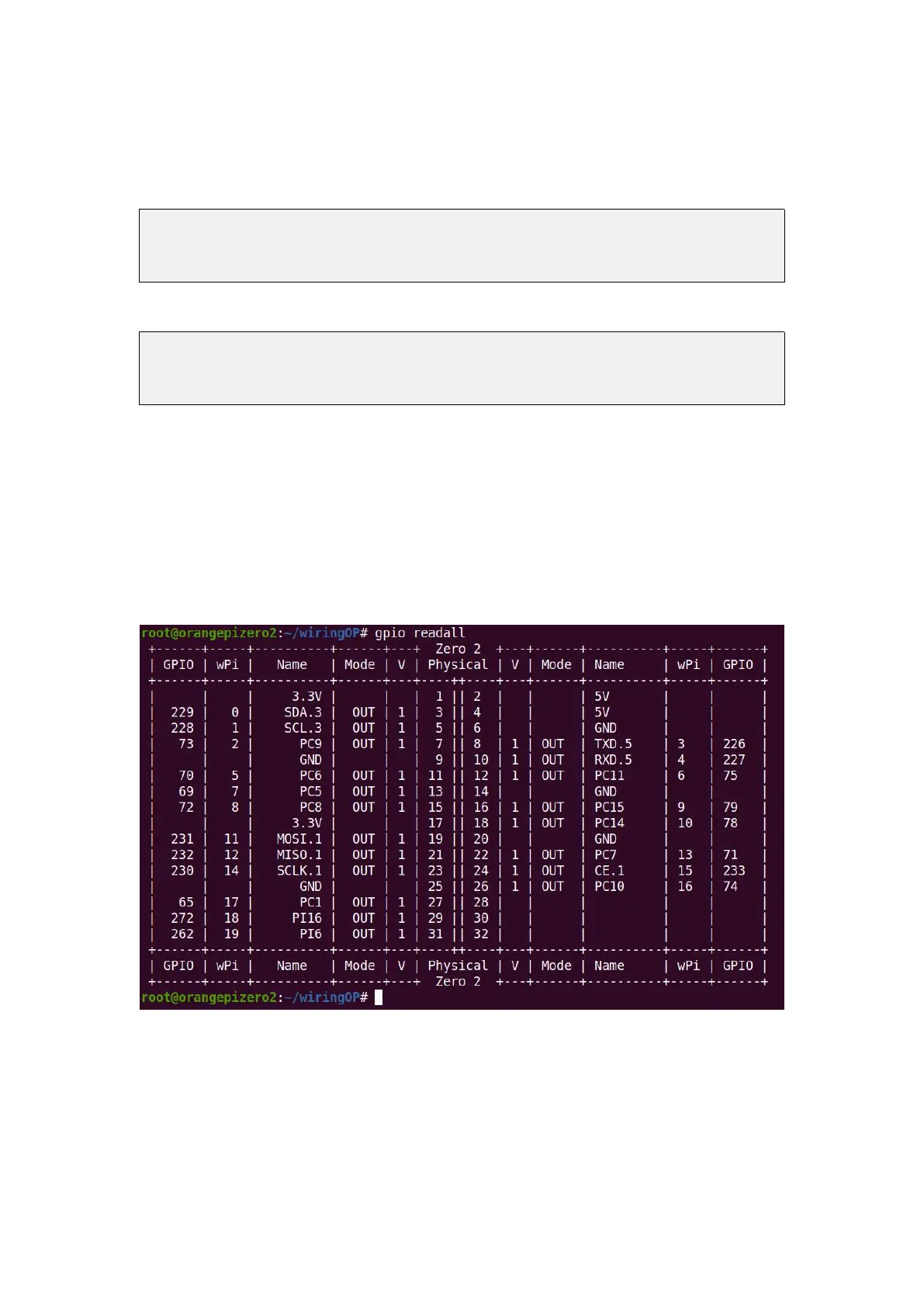
4) The output of the test gpio readall command is as follows
a. There is a one-to-one correspondence between pins 1 to 26 and 26 Pins on the
development board
b. Pin 27 corresponds to pin 10 of 13pins on the development board
c. Pin 29 corresponds to pin 11 of 13pins on the development board
d. Pin 31 corresponds to pin 12 of 13pins on the development board
e. 28, 30, 32 pins are empty, please ignore directly
3.23.3. Test common GPIO port
1) The following is an example of how to set the high and low level of the GPIO port
with pin No. 7-corresponding to GPIO as PC9-corresponding to wPi number as 2-



 To Next Page