15
ENGLISH
Installation
❖ Connecting to the power supply
Your box is designed for use only with the supplied 12 V power-supply unit.
The 12 V power-supply unit operates with a 200-240 V AC, 50 Hz mains supply. Do not
connect it to any other electricity supply than this.
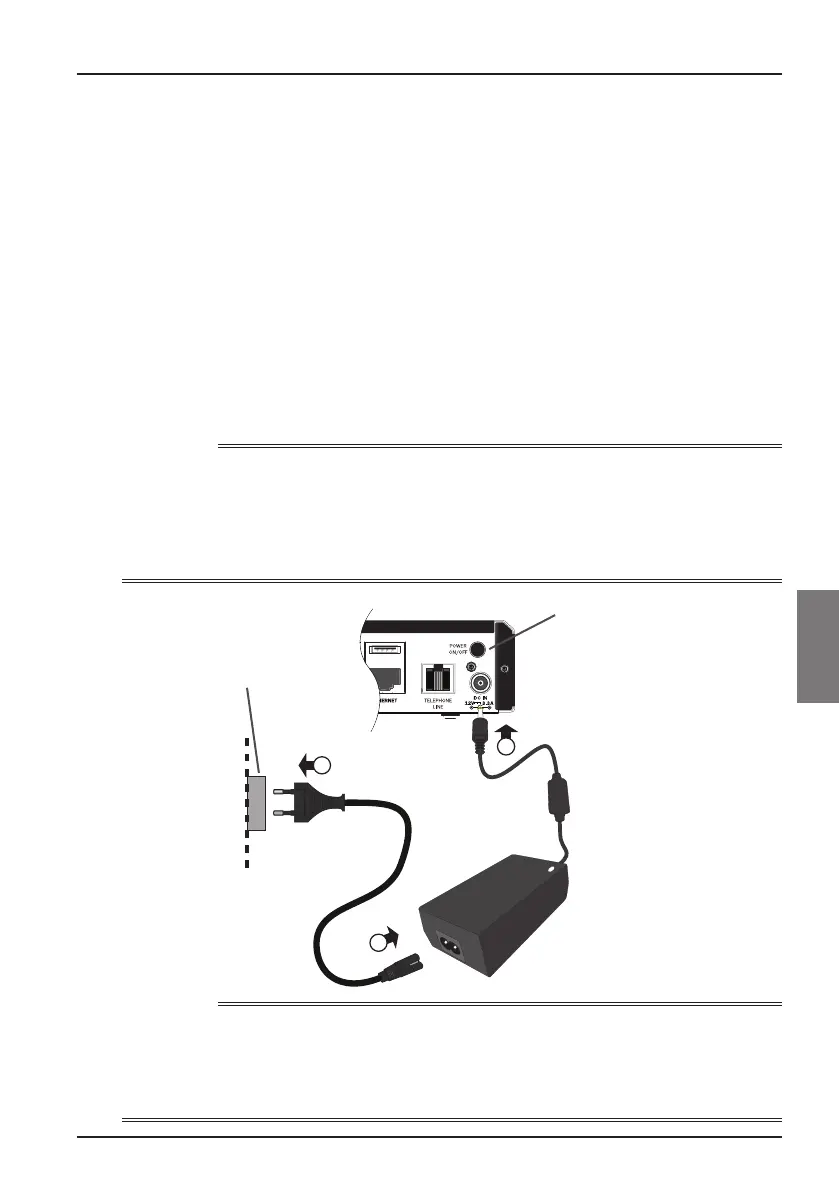
1. Connect the power-supply unit to the 12 V input (marked DC IN) on your box,
as shown in the diagram below.
2. Insert the 2-way connector on the supplied mains lead into the 12 V power-
supply unit.
3. Connect the mains plug to the mains wall-socket. If there is a switch by the mains
wall-socket, switch it on.
4. Ensure that the POWER ON/OFF button on the rear of your box is depressed (ON).
5. Connect your other equipment to the mains supply.
CAUTION
To disconnect power from your box, always remove the 12 V power-supply unit from the
mains supply (rather than disconnect the 12 V power-supply unit from your box).
Your box must therefore be installed near to the mains socket-outlet, which should be
easily accessible.
If you are in any doubt about the mains lead, its plug or its connection, consult a competent electrician.
1
3
2
12 V DC input
Mains
connector
Mains plug
Wall-socket
POWER ON/OFF button
NOTE
Ensure that the POWER ON/OFF button at the rear of the set-top box us set to On.
This button allows the set-top box to be in a very low power mode called Off. Even if the
mains plug is connected and if the POWER ON/OFF button is off, the set-top box will not
turn on.



 To Next Page