187
Chapter 7 Program Destinations/Program Keys
Continued on the next page...
Setting for Program Dialing
To program a communication feature on a Program key, follow the steps below.
z For instructions on how to edit pre-programmed station, refer to Editing Address Book (see page 183).
z For instructions on how to delete pre-programmed station, refer to Deleting a Destination from Address
Book (see page 184).
z For instructions on how to print the program list, refer to Printing the Program List (see page 194).
1
Press the Function key.
2
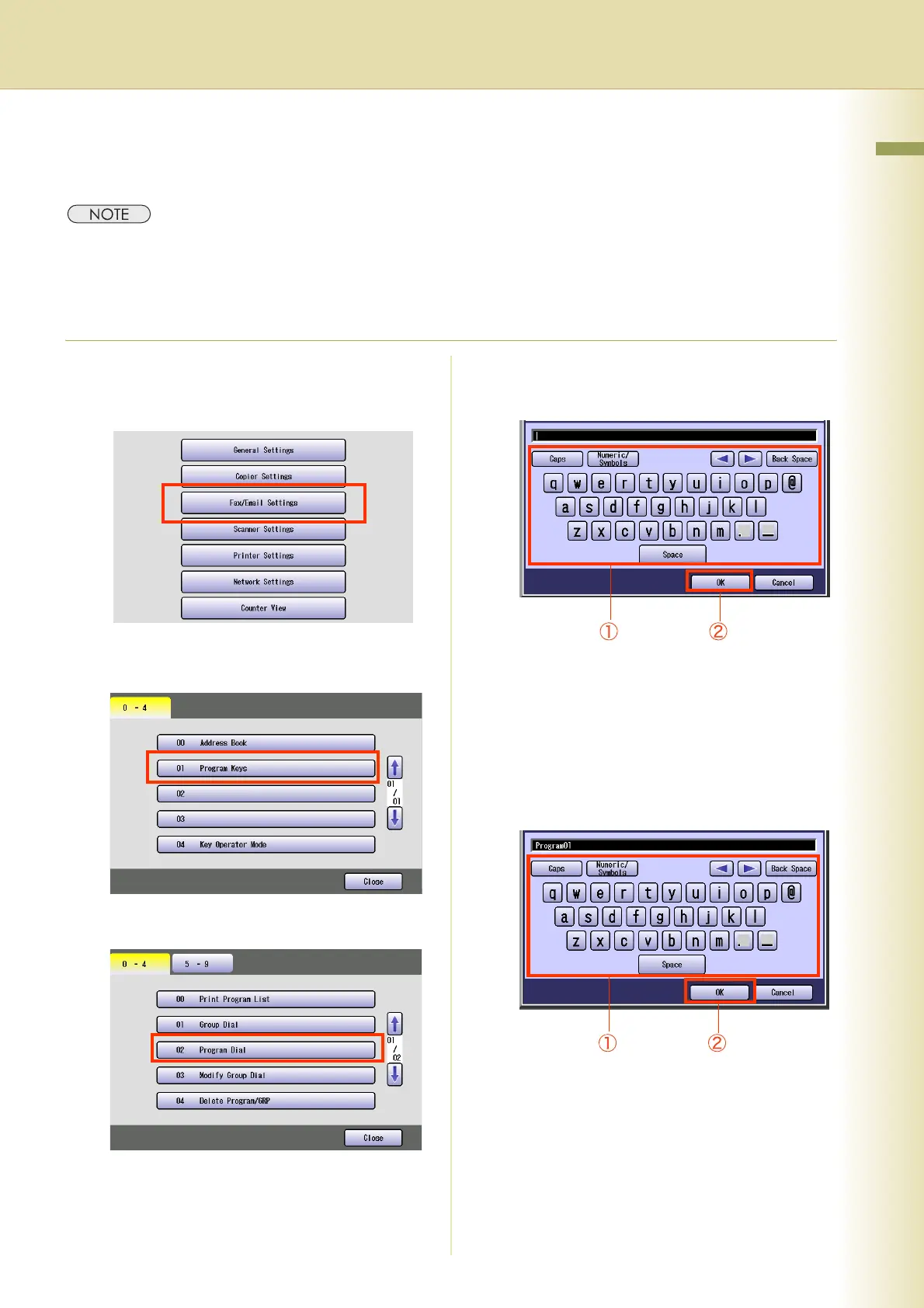
Select “Fax/Email Settings”.
3
Select “01 Program Keys”.
4
Select “02 Program Dial”.
5
Enter a program dial name, and then
select “OK”.
z Enter a name up to 15 characters.
z For instructions on using the onscreen
Keyboard, refer to Using the Keyboard in
the Operating Instructions (For Function
Parameters) of provided CD-ROM.
6
Enter a Key Name, and then select
“OK”.




 To Next Page