Getting Started
For assistance, please visit http://www.panasonic.com/phonehelp 55
*1 These icons align to the left in the order of priority.
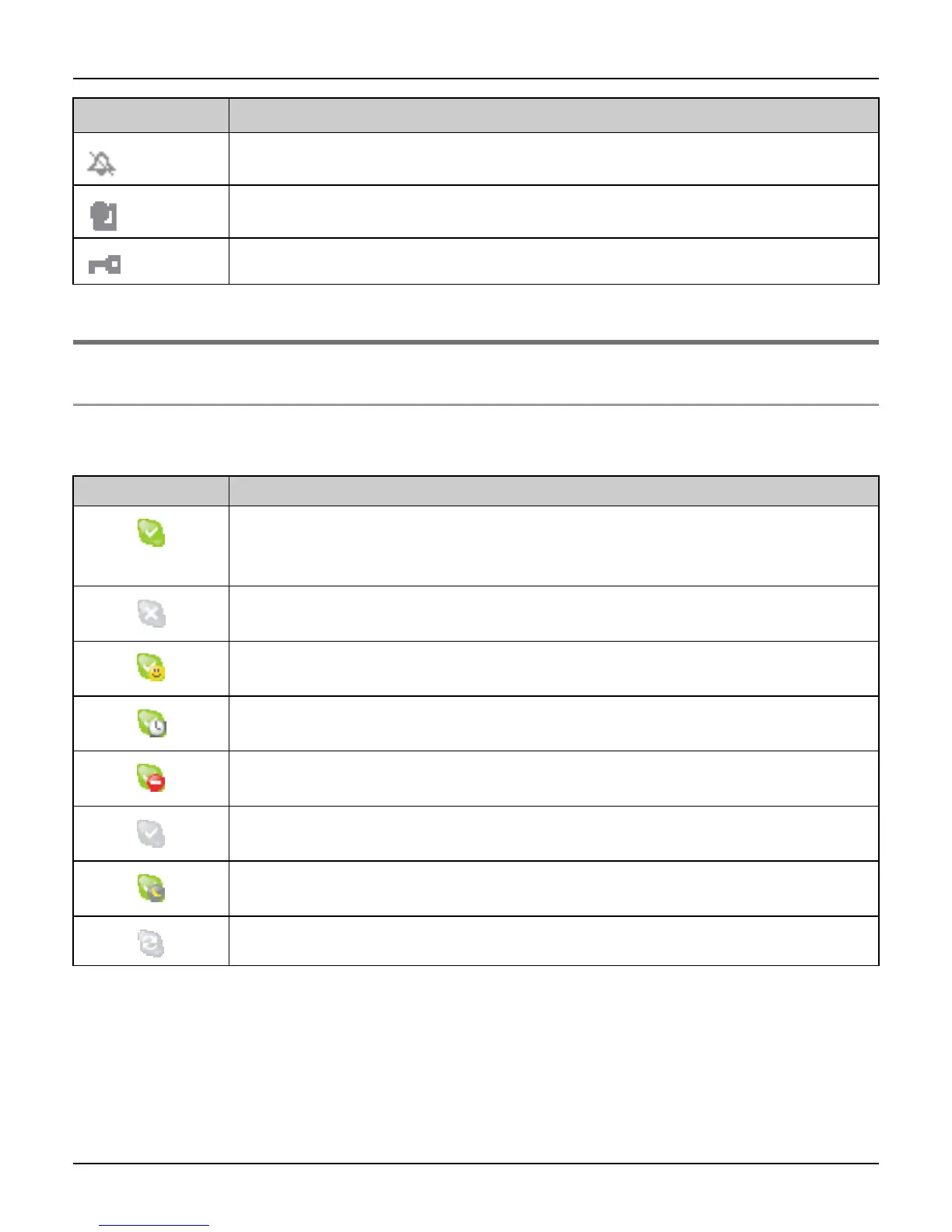
Skype status icons
While in Idle mode:
Skype status icons represent your current Skype status.
*1
Handset ringer is off.
*1
Keypad locked
*1
PIN locked
Icon Status
Online: Indicates that you are signed in to Skype and online. You can
make calls and accept calls that are allowed by your Privacy settings
(page 82).
Offline: Indicates that you are not connected to Skype, but you have
still been authenticated as a Skype user.
Skype Me: Indicates that you are available for anyone to call. This
mode temporarily disables your Privacy settings (page 82).
Away: Indicates that you are currently away from phone, but you are
still signed in to Skype and can make calls.
Do Not Disturb: Indicates that you are signed in to Skype, but do not
want to receive calls. In this mode, the ringer tone is set to be silent.
Invisible: Indicates that you are offline, but you are still signed in to
Skype and can make calls.
Not Available: Indicates that you are currently not available, but you
are still signed in to Skype and can make calls.
Connecting: Indicates that you are connecting to Skype.
Icon Meaning













 To Next Page