75
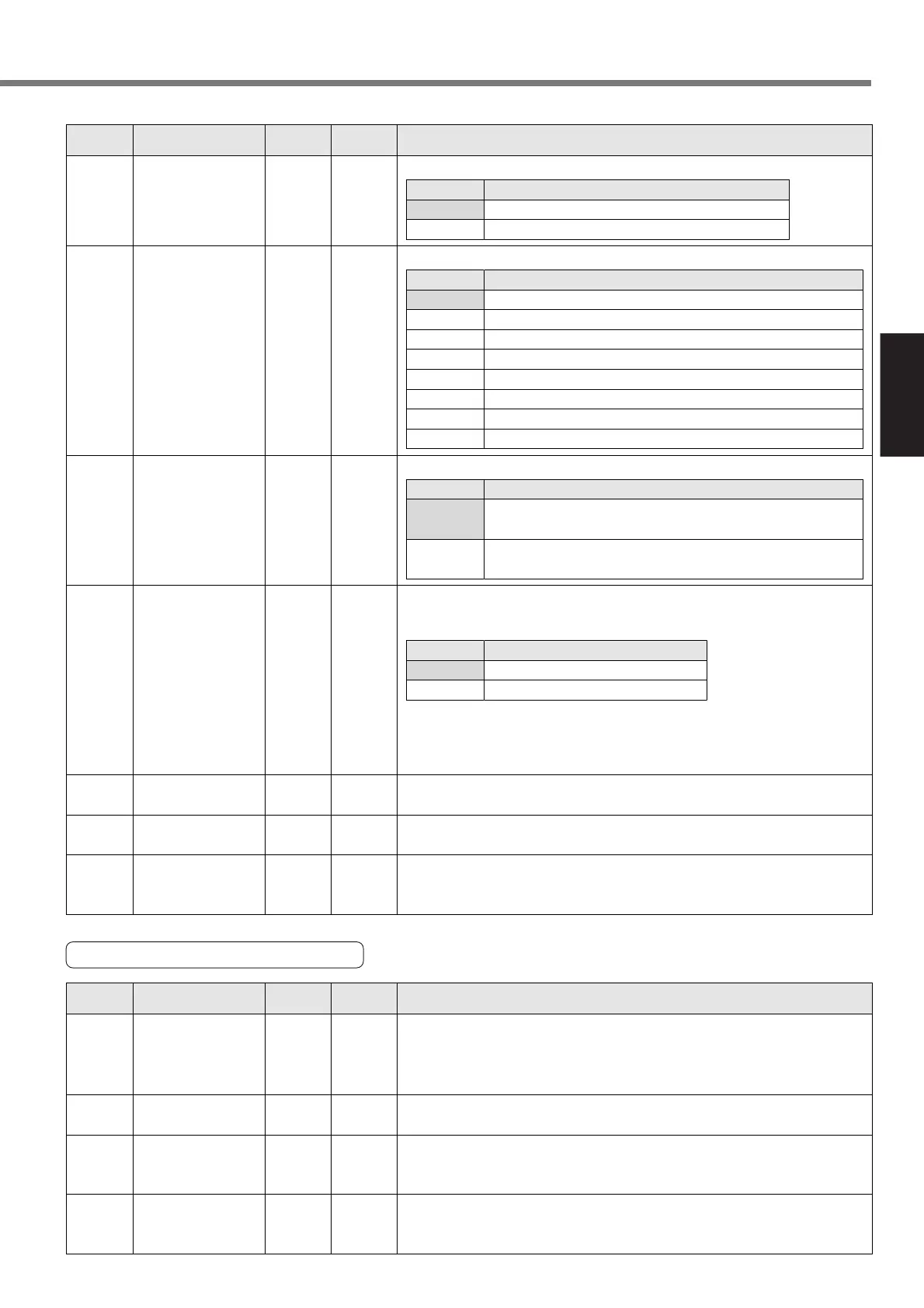
[Setting]
39
0 to 10000
<0>
msBumping detection
time
Specify home position recognition time for bumping homing.
3A 0 to 100
<0>
%Torque limit for
bumping homing
Specify a homing torque limit for bumping homing.
3B 0 to 100
<0>
–Homing Z-phase
count setting
Specify a Z phase at which the machine stops if the machine stops at the Z
phase when returning to its home position. If “0” is specified, the machine
stops at the first Z phase. (The same operation when “1” is specified.)
38
*
0 to 1
<0>
–Homing skip
If “1” is specified, a step operation can be performed without homing. In
this case, a position when the power supply has turned on is defined as a
home position.
<Note>
If the absolute mode (17-bit absolute encoder is used and SV.Pr08 (abso-
lute encoder setting) is 0.2) is enabled, “Homing not required” is specified
regardless of this parameter.
Setup value
<0>
1
Description
Homing required
Homing not required
37 0 to 1
<0>
–Home complete
type
Select an operation when homing has completed.
Setup value
<0>
1
Description
Set a current position to “- home offset” when the machine
has returned to its home position.
The machine moves according to the home offset when
homing has completed.
36 0 to 7
<0>
–Homing type Select how to perform the homing.
Setup value
<0>
1
2
3
4
5
6
7
Description
Home sensor + Z phase (based on the front end)
Home sensor (based on the front end)
Home sensor + Z phase (based on the rear end)
Limit sensor + Z phase
Limit sensor
Z phase homing
Bumping homing
Data set
35 0 to 1
<0>
–Homing direction Specify an operating direction of homing.
Setup value
<0>
1
Description
Detects a home position in a positive direction.
Detects a home position in a negative direction.
16-bit
positioning
PrNo.
Standard default : < >
Setup
range
UnitTitle Function/Content
Parameters for Jog operation
41 0 to 6000
<0>
r/minJog speed (high) Specify a speed for a high-speed jog operation.
42
0 to 10000
<0>
msAcceleration
setting in jog
operation
Specify acceleration for a jog operation.
Specify an acceleration time in a range between 0 to 3000 [r/min].
* There is a maximum of 10% difference between a calculation value in the
setup and the actual acceleration time.
43 0 to 1000
<0>
ms
Setting of S-shaped
acceleration in jog
operation
Specify S-shaped acceleration for a jog operation.
Specify the S-shaped control time during acceleration time. For details, refer
to page 131.
If “0” is specified, the linear acceleration control is enabled.
40 0 to 6000
<0>
r/minJog speed (low) Specify a speed for a low-speed jog operation.
<Note>
A low-speed jog can be started only from the console.
For a jog operation with a specified point, a set value for a high-speed jog
is used.
16-bit
positioning
PrNo.
Standard default : < >
Setup
range
UnitTitle Function/Content






 To Next Page