76
Parameter Setup
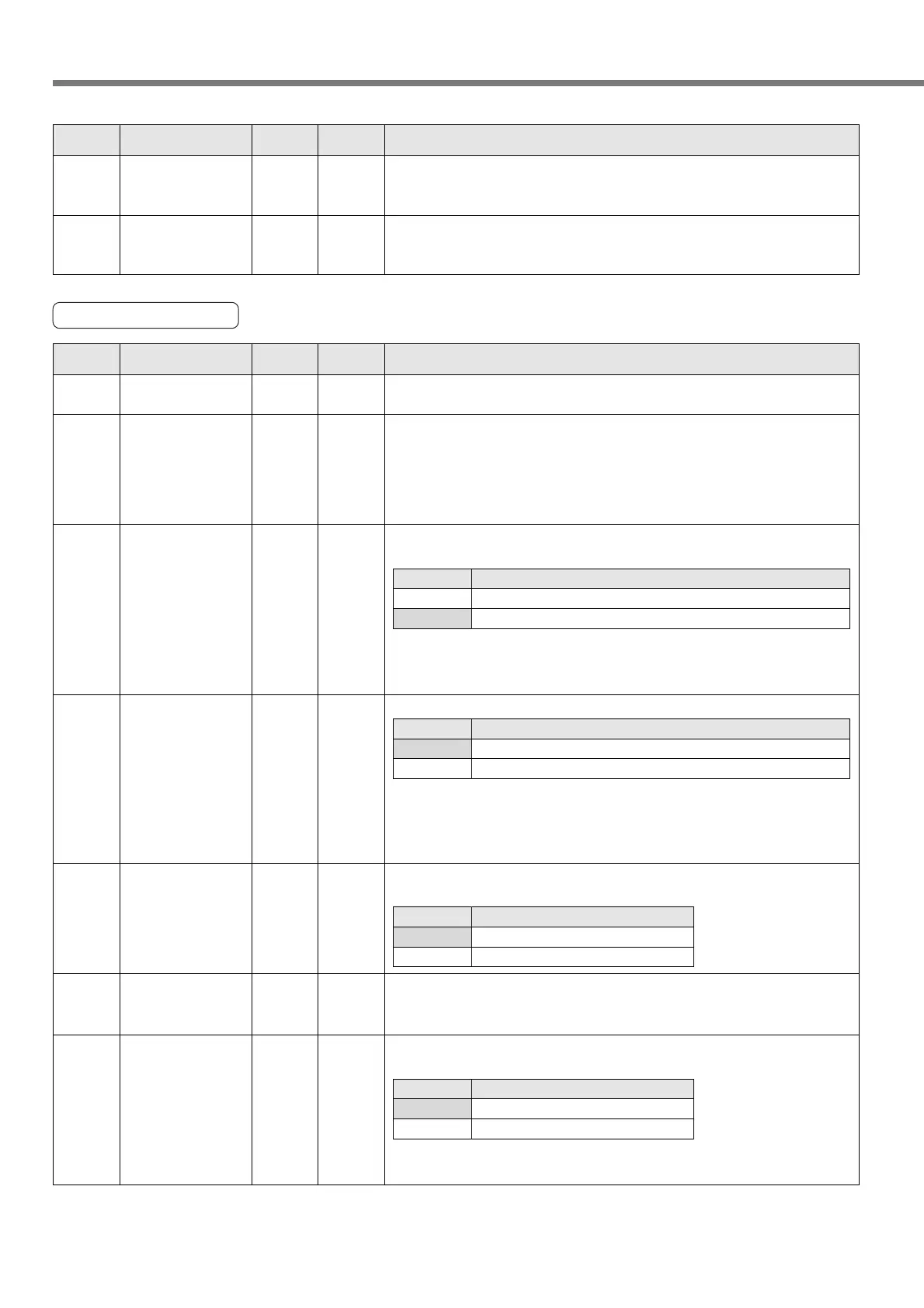
45 0 to 1000
<0>
ms
Setting of S-shaped
deceleration in jog
operation
Specify S-shaped deceleration for a jog operation.
Specify the S-shaped control time during deceleration time. For details, refer
to page 131.
If “0” is specified, the linear deceleration control is enabled.
44
0 to 10000
<0>
msSetting of
deceleration
in jog operation
Specify deceleration for a jog operation.
Specify a deceleration time in a range between 3000 to 0 [r/min].
* There is a maximum of 10% difference between a calculation value in the
setup and the actual deceleration time.
16-bit
positioning
PrNo.
Standard default : < >
Setup
range
UnitTitle Function/Content
Other Parameters
52
*
0 to 1
<0>
–Sequential
operation setting
Specify whether to enable or disable a sequential operation.
For the details of sequential operation, refer to page 130.
53 0 to 60
<0>
–Sequential opera-
tion maximum
point number
Specify a maximum point number for a sequential operation.
This is enabled only when a sequential operation is enabled (16.Pr52 = 1).
If “0” is specified, this is the same with “1”
Setup value
<0>
1
Description
Disable a sequential operation.
Enable a sequential operation.
54
*
0 to 1
<0>
–Block operation
type
Specify a type of block operation.
For the details of block operation, refer to page 125.
Setup value
<0>
1
Description
Continuous block operation.
Combined block operation.
50
*
0 to 1
<1>
–Operation direction
setting
Specify a relation between a positive/negative direction of point position
data and command position monitor and a CW/CCW rotation direction.
If “0” is specified, a sign of the command pulse sum shown on the monitor
screen of the console or “PANATERM
®
” is reversed. However, for a value
of the feedback pulse sum, CCW is a positive direction always.
<Note>
If “1” is specified to this parameter, although an error does not occur when
wrap around happens, an absolute position cannot be guaranteed. If wrap
around is disabled, use the system in a relative position only.
<Note>
If “1” is specified, the S-shaped acceleration/deceleration becomes unavailable.
Setup value
0
<1>
Description
CCW is a negative direction and CW is a positive direction.
CCW is a positive direction and CW is a negative direction.
51
*
0 to 1
<0>
–Wrap around
permission
Select an operation when a current position has overflowed.
Setup value
<0>
1
Description
An alarm is given and a trip is caused (Error code No. 70).
No alarm is given and an operation continues.
49
0 to 10000
<0>
msInstantaneous stop
deceleration time
Specify a deceleration time when an immediate stop command assigned
to the multi function input pin has been input. Specify a deceleration time
in a range between 3000 to 0 [r/min].
For “0”, the speed command changes into a step shape.
* There is a maximum of 10% difference between a calculation value in
the setup and the actual deceleration time.
48
0 to 32767
<0>
Pulse
Teaching movement
amount setting
Specify the number of pulses for movement at every pressing an opera-
tion key when teaching a position data using the console.
16-bit
positioning
PrNo.
Standard default : < >
Setup
range
UnitTitle Function/Content
<Notes>
• For 16-bit positioning parameters which No. have a suffix of "*", changed contents will be validated when
you turn on the control power.






 To Next Page