85
[Setting]
Alarm Display
.......
no alarm
.......
Alarm occurrence
• Over-load alarm :
Turns on when the load reaches 85% or more of alarm trigger level of over-load
protection.
• Over-regeneration alarm :
Turns on when regenerative load reaches more than 85% of alarm trigger level
of regenerative load protection. Alarm trigger level is defined as 10% of
regenerative resister working ratio, when Pr6C "Selection of external
regenerative resister " is 1.
• Battery alarm
• Fun-lock alarm
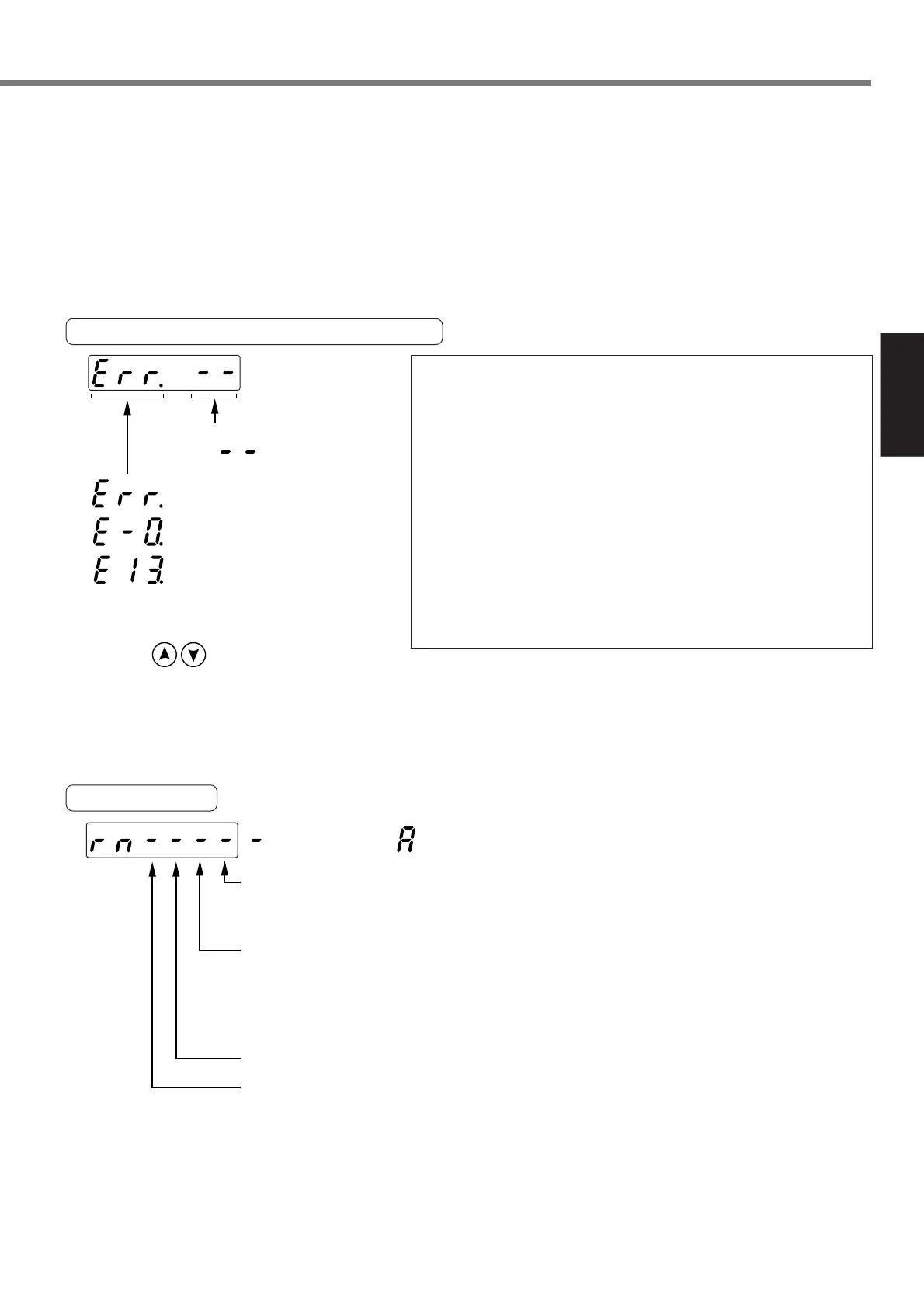
Reference of Error Factor and History
<Note>
• Following errors are not included in the history.
11: Control power supply under-voltage protection
13: Main power supply under-voltage protection
36: EEPROM parameter error protection
37: EEPROM check code error protection
39: Emergency stop input error protection
93: External scale auto recognition error protection
95: Motor auto recognition error protection
• When one of the errors which are listed in error history
occurs, this error and history o shows the same error No.
• When error occurs, the display flashes.
........Present error
........History 0 (latest error)
........History 13 (oldest error)
Error code No.
( appears if
no error occurs)
•You can refer the last 14 error factors
(including present one).
Press to select the factor to
be referred.
<Notice>
For the relation between an error code number and an error, refer to “Protective Function” in [When in
Trouble] on page 164.
<Notice>
• [-] shows the OPEN state and [A] shows the CLOSED state.
• The number of point inputs can be specified in SV.Pr57.
• The logic of point input can be changed in SV.Pr58.
The table above shows the case of “1: Point input is enabled by closing the connection to COM–”.
[A] and [-] are interchanged with each other in the case of “0: Point input is enabled by opening the
connection to COM–”.
• A point of “High-speed jog operation (negative direction)”, “High-speed jog operation (positive direction)”
and “Homing command” depends on the settings of SV.Pr57.






 To Next Page