30
PHONE EXPERIENCE
Learning to Use the Pantech Easy
Experience
Learn how to use the functions and menus in Pantech Easy
Experience.
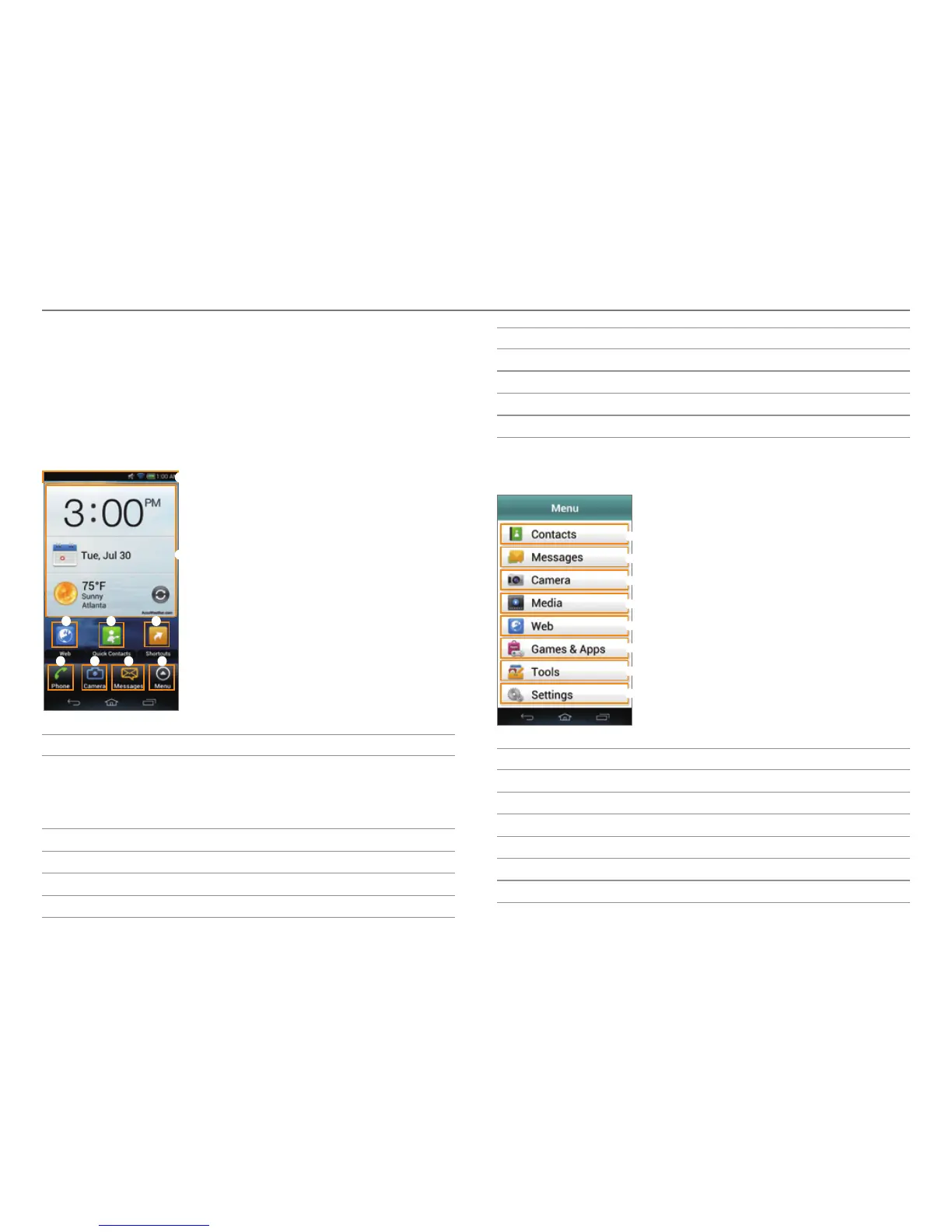
Layout of the Home Screen
3
2
1
4 5
6 7 8 9
No. Description
1
Drag the area at the top of the screen downward to
access Q
uick On/Off settings or view battery usage,
current time and date, your phone number, signal
strength, or ongoing events.
2
View the current time, date, and weather.
3
Access the web.
4
Open Quick Contacts.
5
Open shortcuts for applications.
No. Description
6
Make calls.
7
Take pictures and record videos.
8
Send and receive messages.
9
Open menus.
Menu Items in Pantech Easy Experience
1
2
3
4
5
6
7
8
No. Description
1
View contacts.
2
Send and receive messages.
3
Take pictures and record videos.
4
Launch Gallery, Music, ThinkFree Office, or Videos.
5
Access the web.
6
Play games or launch applications.



 To Next Page