43
BASIC OPERATIONS
Connecting to the Internet
Connecting to a Wi-Fi Network
When you activate Wi-Fi after turning on the phone for the first
time or resetting the phone, the Wi-Fi settings screen appears.
1. Drag the area at the top of the screen downward.
2. Tap Wi-Fi in Quick On/Off to turn on Wi-Fi.
x Tap Wi-Fi again to turn off Wi-Fi.
3. Tap
in Settings Shortcuts and then tap Wi-Fi Settings.
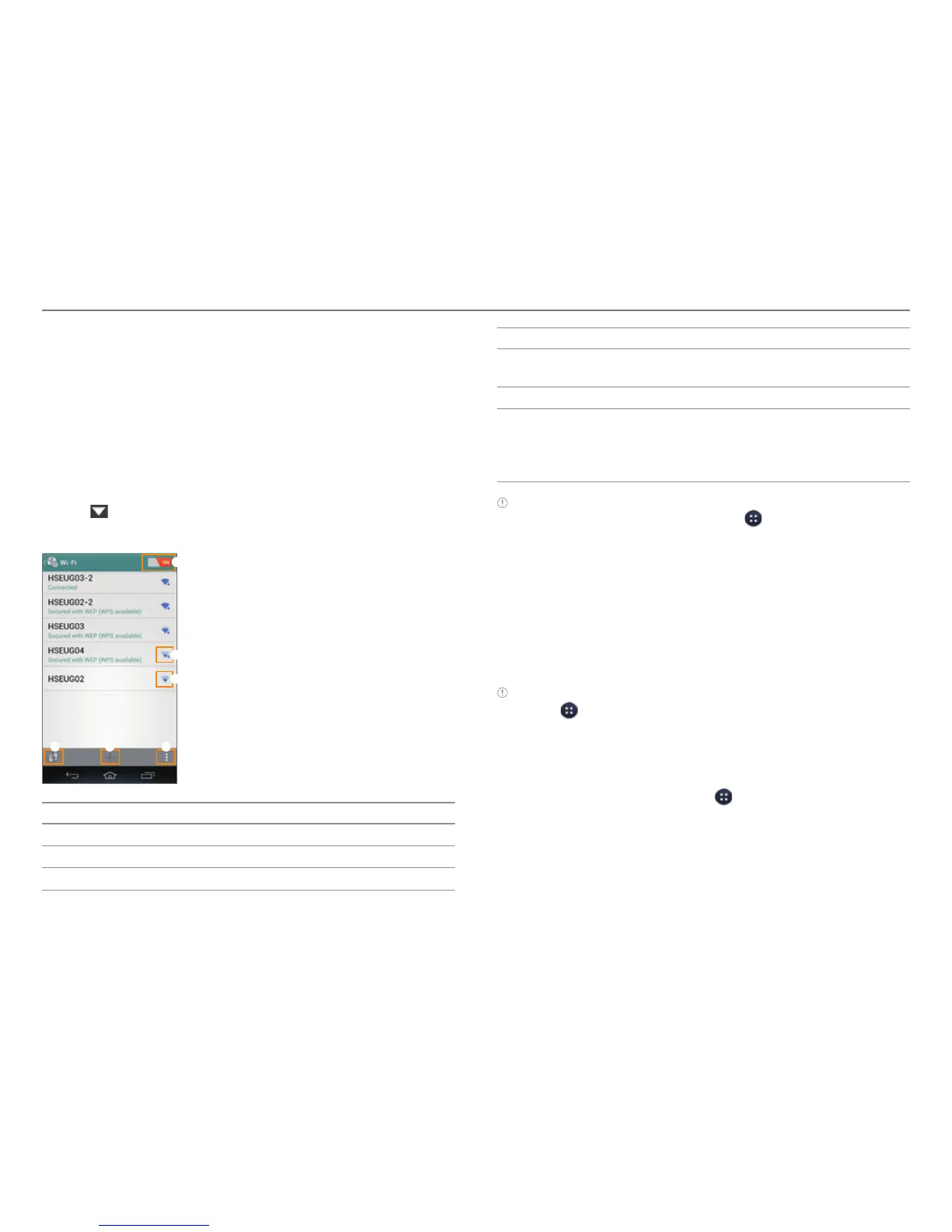
4. Select and tap a network in the Wi-Fi network list.
1
2
3
54 6
No. Description
1
Turn Wi-Fi on or off.
2
Secured network
3
Unsecured network
No. Description
4
Connect to a secured Wi-Fi network using a WPS
butt
on.
5
Add a Wi-Fi network.
6
Search for available Wi-Fi networks again. Connect
t
o a secured Wi-Fi network using a WPS PIN. Connect
to other device to send data via Wi-Fi Direct. Access
advanced settings.
Note
x You can also connect Wi-Fi by tapping > Settings > Wi-Fi.
x You must enter a password to connect to a secured Wi-Fi network.
Connecting to a Mobile Network
You will need a data plan to access a mobile network.
1. Drag the area at the top of the screen downward.
2. Tap Data in Quick On/Off to access the mobile network.
x Tap Data again to disconnect from the mobile network.
Note You can also enable data access over mobile networks by
tapping > Settings > More... > Mobile networks > Data Services.
Sharing the Internet Connection
The phone can provide other devices with an Internet
connection. To view the help, tap
> Settings > More... >
Tethering & portable hotspot > Help.



 To Next Page