49
Calling
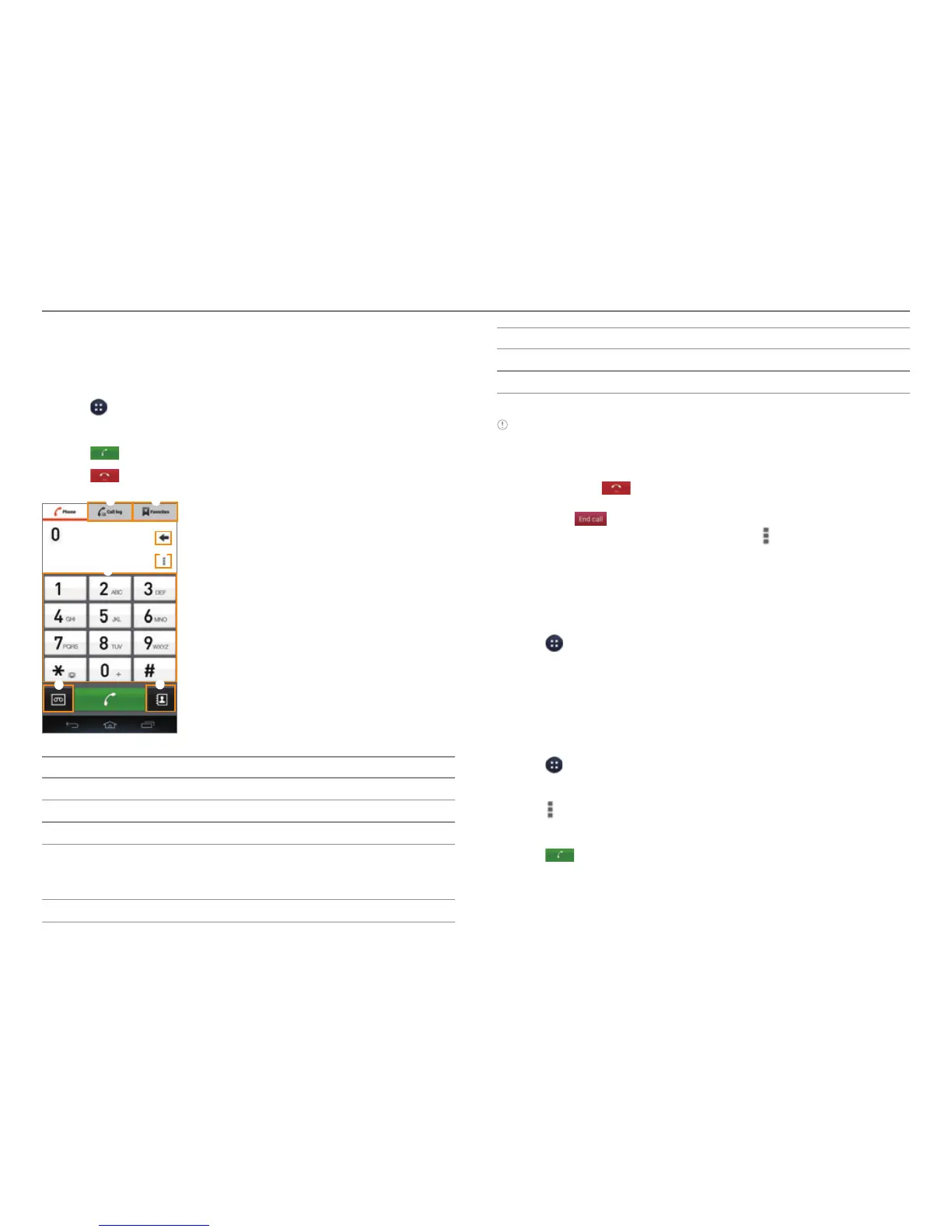
Making a Call
1. Tap > Phone.
2. Enter a phone number.
3. Tap
at the bottom of the screen.
4. Tap
to end the call.
2
3
6
7
4
5
1
No. Description
1
Call logs
2
Favorite contacts
3
Delete entry.
4
Save the number to Contacts. Search Contacts. Set
a speed dial number
. Add a pause or wait symbol.
Change the dialpad type. Access the settings.
5
Dialpad
No. Description
6
Access the voice mailbox.
7
Launch Contacts.
Note
x Tap and hold a speed dial number to make a call. If the speed dial
number is two digits, tap the first digit, and then tap and hold the
second digit.
x You must tap to end a call. If you are using other functions
during a call, drag the area at the top of the screen downward, and
then tap .
x Available items that appear when you tap
differ depending on
how you dial the number (manually or via speed dial).
Making a Call by Voice
You can make a call or open an application with your voice.
1. Tap > Voice Dialer.
2. Say a command.
Adding a Pause or a Wait to a Phone Number
To Add Pause
1. Tap > Phone.
2. Enter the phone number.
3. Tap
> Add 3-sec pause.
4. Enter the additional number.
5. Tap
.
x The additional numbers will be entered automatically
after 3seconds.
CALLING & MESSAGING



 To Next Page