72
MEDIA CENTER
Using the Music Player
Listening to Music
Enjoy music on the phone.
1. Tap
> Music.
2. Select and tap a tab.
x Tap
to delete files or access the settings.
x Tap and hold a file to set it as a ringtone, add it to a
playlist, add it to a current playlist, delete it, send it, or
view file information.
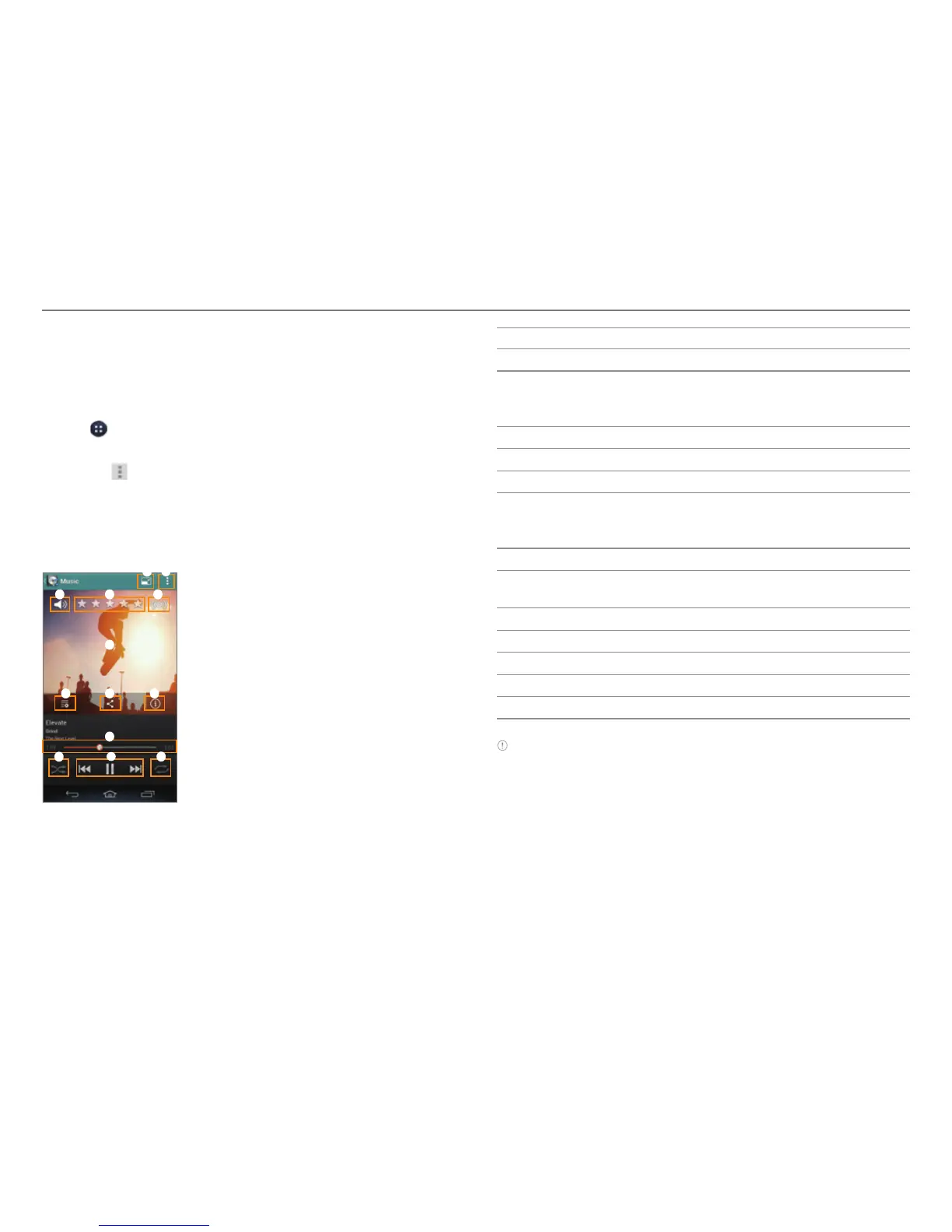
3. Select and tap a file to play.
4 5
6
7 8 9
0
!
1 2
3
#
@
No. Description
1
Switch to compact mode.
2
Search for songs. Add the song to a playlist. Set the
song as ringt
one. Set the sleep mode. Access the
settings.
3
Adjust the volume.
4
Rate the file.
5
Set the sound effects.
6
Album cover
x Dr
ag to the left or right to skip to the previous or
next track.
7
Switch to the current playlist.
8
View similar songs on YouTube and share the
inf
ormation via social network service (SNS).
9
View the song information.
0
Progress bar
!
Set random play.
@
Control the playing.
#
Set repeat play.
Note
x The playback screen differs when you rotate the phone
horizontally.
x The instructions in this manual are based on the default playback
screen. Available items may differ depending on the options you
select.



 To Next Page